Line Breaks in Electronic Reporting (ER)
Today we present you with a very useful small tip when inserting a multi-line field in a Word document.
We are going to deal with 2 similar cases with different origins, but with the same final solution:
- In a field of the ER model, we associate through labels a text that we want to be displayed on multiple lines.
- We create a field in ER and associate a multi-line field to it (for example, an address)
In both cases, if we do not configure the elements correctly, we will get the same result; all text on a single line.
Solution
For the first case we need to do an additional step before anything. Let’s say we want to display 2 labels, one on each line. We want a final result in the Word document like this:
Preparation Execution
For this, in the ER formula we will introduce through a function the character associated with the line break CHAR(10). Therefore, the formula will remain as follows:
"Preparation" & CHAR(10) & "Execution"
With this simple formula we are already telling our intermediate XML that there is a line break between the two words.
At this point we are at the intersection between case 1 and 2. We already have that multi-line element within our intermediate XML. Nevertheless, in our final Word document we will not see that line break unless we properly configure the control properties.
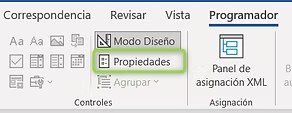
So we will check the “Allow carriage returns (multiple paragraphs)” option that comes disabled by default:
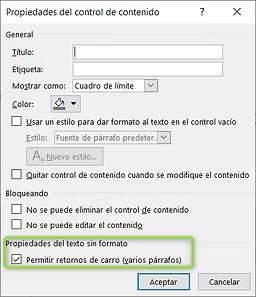
With these simple steps we will no longer waste time looking for a way to display our elements with line breaks.
