Power Virtual Agents: Creating Enhanced Chatbots with GPT
This post is intended to start a series of articles on Artificial Intelligence applied to the Dynamics 365 platform. We’ll start with some context and theory to understand what the rest will bring us!
Power Virtual Agents is a chatbot platform that uses Natural Language Processing (NLP) technology to improve chatbots’ ability to understand and respond to customer requests. One of the NLP technologies used in Power Virtual Agents is the Generative Pre-trained Transformer (GPT) model.
What is GPT?
GPT is a machine learning model that is based on processing large amounts of data to understand natural language. This model:

is based on the Transformer, a neural network architecture that uses attention to process inputs. The GPT model was developed by OpenAI and is capable of generating coherent and high-quality text in different natural language processing tasks, such as machine translation, question answering, and text generation.
When used in Power Virtual Agents, GPT allows chatbots to better understand the meaning behind user requests and generate appropriate and coherent responses. Additionally, the GPT model adapts and improves over time as the chatbot is used, allowing for greater accuracy and quality of responses.
Other AI Models
There are other AI models available in Azure OpenAI:
- GPT (Generative Pre-trained Transformer) is a natural language model that uses advanced deep learning techniques to generate coherent and natural text. This model has been trained with a large amount of text data and is capable of performing tasks such as text generation, machine translation, and question answering.
- Da Vinci is an improved version of the GPT-3 model. It uses more advanced deep learning techniques to produce more coherent and higher-quality texts than other natural language models. Additionally, it’s also capable of answering specific questions in a more precise and detailed manner.
- Curie is another natural language model available in Azure OpenAI, which focuses on text generation for specific tasks. This model uses advanced deep learning techniques to generate text adapted to different writing styles and tones of voice. It’s an ideal option for email writing, marketing text generation, and product description writing.
How to Create a Chatbot with Power Virtual Agents?
To create a chatbot with Power Virtual Agents, several steps must be followed. First, it’s necessary to define the objectives and topics of the chatbot to ensure it’s designed to meet users’ specific needs. Next, you should design the chatbot’s conversation flow and configure responses using the visual editor or natural language.
The Power Virtual Agents visual editor allows you to design the conversation flow by dragging and dropping content blocks and configuring the corresponding values. On the other hand, natural language allows you to configure responses using simple phrases in natural language that the chatbot can understand.
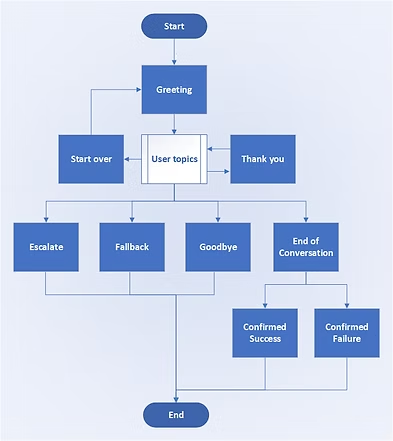
It’s important to test and debug the chatbot before publishing and distributing it through different channels. Power Virtual Agents offers testing and debugging tools to ensure the chatbot functions correctly.
How to Embed a Chatbot in a Website?
One of the advantages of Power Virtual Agents is that it allows embedding chatbots in websites and applications. To embed a chatbot in a website, follow these steps:
- In the Power Virtual Agents portal, click the “Add to a website” button on the chatbot you want to embed.
- Select the “Website” channel and click “Next”.
- Configure the chatbot’s appearance to match your website’s design.
- Select the type of authentication you want to use and click “Next”.
- Copy the generated embedding code and paste it into your website’s source code.
Power Virtual Agents offers the ability to customize the chatbot’s appearance to match your brand or website design or application. This means that chatbots can be an effective tool for interacting with customers and improving user experience without disrupting your website or application’s design or functionality.
What are the Conditions of the Power Virtual Agents Preview with GPT?
The Power Virtual Agents preview that incorporates GPT is currently in a testing and experimentation phase. This preview version has certain conditions and limitations, such as:
- The preview is only available in certain selected regions and languages.
- The preview is only available to enterprise customers with a Dynamics 365 or Microsoft Power Platform license.
- The preview may have limitations in terms of scalability and customization.
- The preview may have errors or performance issues.
It’s important to keep these limitations in mind when using the Power Virtual Agents preview with GPT and be prepared to work with Microsoft to resolve any issues that may arise.
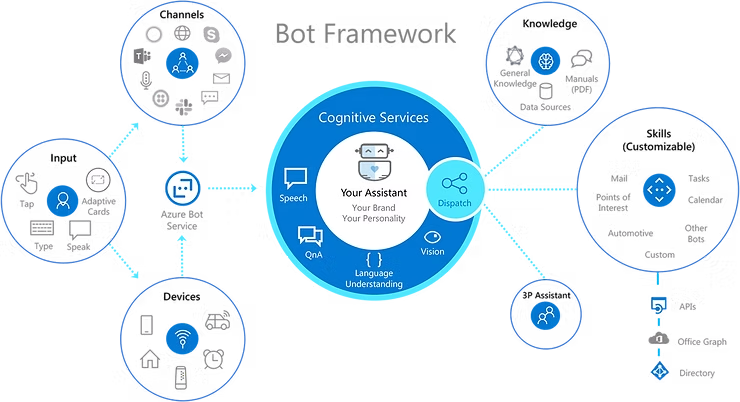
Differences Between Bot Framework Composer and Power Virtual Agents Web Editor
Both Bot Framework Composer and the Power Virtual Agents web editor are chatbot creation tools that allow users to create and design chatbots visually, without needing to write code.
Although both tools are similar in some respects, there are significant differences between them. Here are some key differences:
- Platform: Bot Framework Composer is a desktop tool that runs on Windows, while the Power Virtual Agents web editor runs in the cloud on Microsoft Power Platform service.
- Integration with third-party services: Bot Framework Composer integrates with a wide variety of third-party services, such as Azure cognitive services, Azure business logic, and REST web services, which allows users to create more sophisticated and customized bots. On the other hand, the Power Virtual Agents web editor focuses on integration with Microsoft services such as Dynamics 365, Power Automate, and Power Apps.
- Customization and control: Bot Framework Composer offers users greater control and customization over the chatbots they create, allowing the creation of more complex bots with specific functionalities. The Power Virtual Agents web editor, on the other hand, is designed to simplify chatbot creation with a more intuitive and easy-to-use interface, making it easier for users to create basic and quick chatbots.
- Multi-language support: Bot Framework Composer is compatible with multiple languages, which allows creating multilingual bots. In contrast, the Power Virtual Agents web editor focuses on a more limited selection of languages.
- Licenses and pricing: Bot Framework Composer is an open-source tool that is free to use, while the Power Virtual Agents web editor is a paid tool that requires a subscription to Microsoft Power Platform or Dynamics 365.
In summary, Bot Framework Composer is a more complex and versatile tool that offers users greater control and customization of their chatbots, while the Power Virtual Agents web editor is an easier-to-use tool focused on integration with Microsoft services. Both tools are valuable for chatbot creation, but users should choose the appropriate tool based on their specific needs and requirements.
Conclusion
Power Virtual Agents is an effective tool for creating chatbots that can improve user experience and automate common tasks. The addition of the GPT model in Power Virtual Agents allows chatbots to better understand natural language and generate coherent and accurate responses.
Additionally, the ability to embed chatbots in websites and applications means that chatbots can be a valuable tool for interacting with customers and improving user experience. While the Power Virtual Agents preview with GPT has certain limitations and conditions, this tool has great potential for improving efficiency and user experience in a variety of business applications.
In upcoming posts, we’ll see bots in full action and we’ll dare to create some! Don’t miss it!