Let's Add Excitement to SELECT Statements: SysDaQuery
And here we have the first real blog entry!!
Today’s entry will be about some peculiar objects that exist in D365FO, that the standard uses sometimes and that can get us out of some trouble.
All of us (programmers are sure to have used it, and consultants are sure to have seen some of them at some point) have used “selects” or “while selects” to query records from a table and perform actions on them. Furthermore, even many times we have used the famous “queryruns” to do basically the same thing but in a cleaner way.
But there are times when according to what “select” cannot be transformed to “queryrun” or that the developer simply does not have the mindset oriented to easily detect how to make a specific query. After all, we are all people and each of us has facility to see or perform tasks in a certain way.
That is why there is another way to make queries, a different way but that in turn is very visual and understandable: using SysDaQuery.
This collection of objects does not perform any kind of black magic or perform complex actions in itself, it simply makes it easier for us to write statements through code.
Query Statement
Let’s see an example from the standard where this type of object is used:
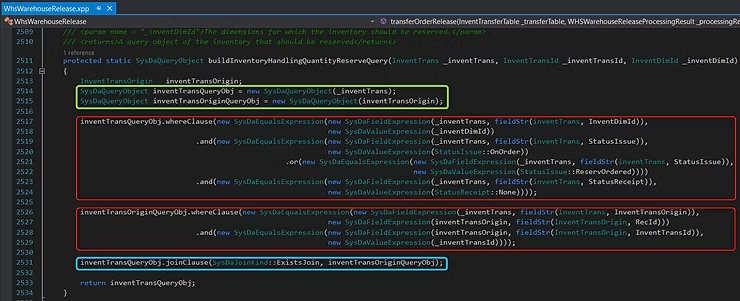
This code fragment is used by the warehouse management module when releasing a load (or part of it). Later I will make an entry dedicated exclusively to warehouse processes and what elements are involved in them.
When a load is released to the warehouse, the order quantity that is part of the work created in the release changes state from “On order” or “Reserved order” to state “Physically reserved”. This step is what is performed in the previous fragment. As you can see, first it declares the two main tables that will carry out the query (in yellow), one of them over the entire table and the other over a selection of it that enters as a parameter in the method. Secondly, the most interesting parts of this type of statements follow; all those conditions applicable as “where”, “and” or “or” are used sequentially in the same way we would write them in a SQL editor. (in red) Finally, since the two tables must be joined through a join, it performs that join with another separate statement (in blue).
With this we already have the statement set up and in quite a curious way that we can have in a separate method. After that we can iterate over it and perform the actions we want.
Action Statements
But that’s not all. We can not only make query statements but we can insert, update and delete records.
Let’s see examples of these types:
As you can see in these examples, other objects are used that have the characteristics and conditions that insert, update, and delete statements must meet.
Object Library
To be able to set up these statements there are multitudes of objects to use. Whether for grouping, to define selection, to deal with date issues (Valid Time State), etc…
I share with you the list of all the objects in this utility (I mark in bold the ones mentioned above). You will see that the possibilities are immense:
SysDaAggregateProjectionField
SysDaAndExpression
SysDaAvgOfField
SysDaBinaryExpression
SysDaCountOfField
SysDaCrossCompany
SysDaCrossCompanyAll
SysDaCrossCompanyContainer
SysDaDataAccessStatement
SysDaDeleteObject
SysDaDeleteStatement
SysDaDivideExpression
SysDaEqualsExpression
SysDaFieldExpression
SysDaFindObject
SysDaFindStatement
SysDaGreaterThanExpression
SysDaGreaterThanOrEqualsExpression
SysDaGroupBys
SysDaInsertObject
SysDaInsertStatement
SysDaIntDivExpression
SysDaLessThanExpression
SysDaLessThanOrEqualsExpression
SysDaLikeExpression
SysDaMaxOfField
SysDaMinOfField
SysDaMinusExpression
SysDaModExpression
SysDaMultiplyExpression
SysDaNotEqualsExpression
SysDaOrderBys
SysDaOrExpression
SysDaPlusExpression
SysDaProjectionField
SysDaQueryExpression
SysDaQueryObject
SysDaQueryObjectBuilder
SysDaSearchObject
SysDaSearchStatement
SysDaSelection
SysDaSettingsList
SysDaSumOfField
SysDaUpdateObject
SysDaUpdateStatement
SysDaValidTimeState
SysDaValidTimeStateAsOfDate
SysDaValidTimeStateAsOfDateTime
SysDaValidTimeStateDateRange
SysDaValidTimeStateDateTimeRange
SysDaValueExpression
SysDaValueField
Seen all these options, it’s tempting to try a bit and familiarize yourself with these new friends. And also discover what happens when queries are really complex.
Are you up for it?