Error in Set Model Versions - Azure DevOps Pipeline
Here’s a quick tip for resolving a particular error when we configure a pipeline to do automatic Build on an Azure machine.
We won’t go into the details of pipeline setup. If you need help you can refer to a very useful link that has been very helpful to me:
https://ariste.info/2021/02/azure-devtest-labs-builds-dynamics-365-fno/
It is possible that we encounter the following error when running the pipeline:
##[error]Unable to find type Microsoft.Dynamics.ApplicationPlatform.Instrumentation.AXDeveloperALMEventSource].
The error image would be this:
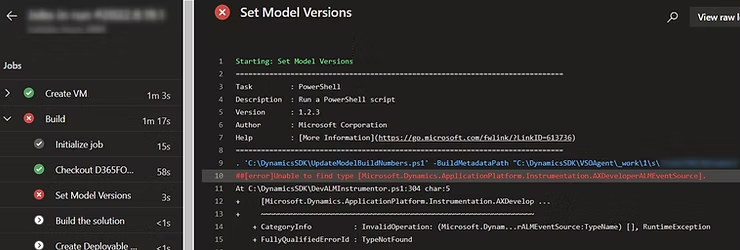
This error is because we have disabled the Prepare for build step. This step, in addition to backing up the AOSServices and the database (the reason we may have disabled the step) also pre-loads all the libraries that will be used during Build. If we disable it, the agent will not have these libraries and it will fail.
Therefore, the solution is to enable the Prepare for build step. And if you want it not to do the backup, open the PrepareForBuild.ps1 file from the C:/DynamicsSDK/ folder and comment the lines corresponding to the backup (line 696):
# Create packages backup (if it does not exist).
$NewBackupCreated = Backup-AX7Packages -BackupPath $PackagesBackupPath -DeploymentPackagesPath $DeploymentPackagesPath -LogLocation $LogLocation

# Restore packages backup (unless a new backup was just created).
if (!$NewBackupCreated)
{
    Restore-AX7Packages -BackupPath $PackagesBackupPath -DeploymentPackagesPath $DeploymentPackagesPath -LogLocation $LogLocation -RestoreAllFiles:$RestorePackagesAllFiles
}

if (!$DatabaseBackupToRestore)
{
    $DatabaseBackupPath = Get-BackupPath -Purpose "Databases"
    Backup-AX7Database -BackupPath $DatabaseBackupPath
}
else
{
    # Restore a database backup (if specified).
    Restore-AX7Database -DatabaseBackupToRestore $DatabaseBackupToRestore
}
I hope this TIP helps you!