🧪 D365FO 10.0.49: bulk ER validation with batch and history
🧪 D365FO 10.0.49: bulk ER validation with batch and history
Validating an Electronic Reporting configuration before completing it was already possible. The problem arose when we needed to answer a much more operational question: which versions across our configuration catalogue have been validated, when, and with what result?
Dynamics 365 Finance 10.0.49, Platform update 73, introduces Enhanced validation management for Electronic Reporting configurations. The new experience lets us select multiple completed versions, validate them interactively or in batch, and retain shared history by configuration and version. Microsoft updated the release plan for these ER capabilities on August 27, 2026.
This is not a cosmetic check. It turns an isolated designer validation into a repeatable process for governing a catalogue of formats, mappings, and models.
What exactly changes
Previously, validations ran against an individual version and were also triggered automatically when certain configurations were imported, completed, or rebased. That behaviour remains.
With the feature enabled, three capabilities are added:
| Capability | Technical change |
|---|---|
| Multiple selection | One operation can inspect several Completed versions. |
| Decoupled execution | The same validation can run interactively or be submitted to batch. |
| Persistent state | Results are recorded by run, configuration, and version. |
The engine retains its existing inspection categories: Executability, Performance, and Data integrity. Issues include the path to the affected element, and some support automatic correction. The new feature does not replace the validation engine; it changes how we orchestrate, scale, and audit it. See the ER validation documentation.
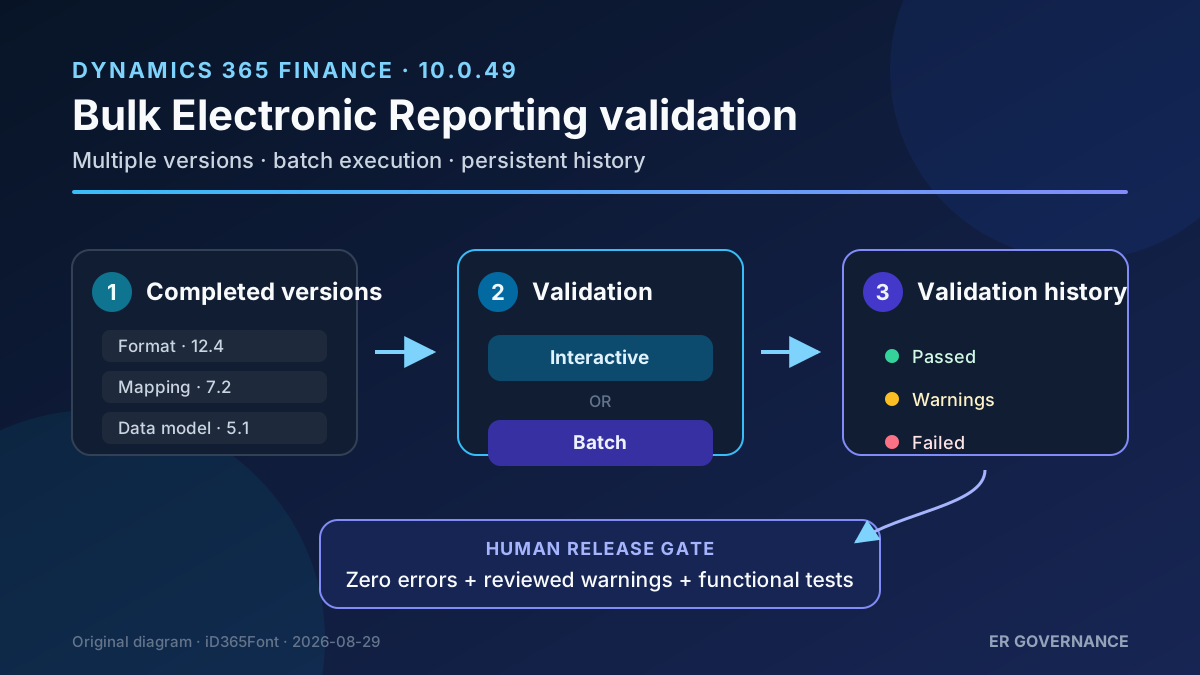
Original diagram. History provides evidence of validation, but it does not replace functional testing of the generated document.
Availability and requirements
At the publication date of this article, 10.0.49 is still a preview release and must not be installed in production. The official schedule lists:
| Milestone | Planned date |
|---|---|
| Preview availability | July 27, 2026 |
| Latest possible preview update | August 17, 2026 |
| GA for self-update | September 11, 2026 |
| First production auto-update | October 2, 2026 |
| Second production auto-update | November 1, 2026 |
Dates are subject to change. Microsoft requires the preview package to be deployed in a development or test environment, never in production. See the service update schedule.
Confirmed requirements:
- Finance and Operations 10.0.49 / Platform update 73.
- The Enhanced validation management for Electronic Reporting configurations feature enabled in Feature management.
- At least one completed ER version; multiple selection does not accept drafts.
- Authorised access to the ER configurations page and, for background execution, the ability to create the batch task.
ER task documentation uses the Electronic reporting developer, Electronic reporting functional consultant, or System administrator roles in its labs. Do not assume that these define the exact minimum for your organisation: review privileges and segregation of duties before assigning a broad role. See the official ER role example.
Operational architecture
Validation is separated from the interactive session when batch is selected:
- A user selects completed versions from the configuration repository.
- Finance creates either an interactive run or a batch task.
- The engine inspects the ER components and classifies its messages.
- On completion, it persists the run summary and per-version detail.
- Other authorised users in the same environment can review that history.
A batch task runs with the security credentials of the user who created it. This matters when the catalogue contains configurations or companies that should not be accessible to everyone. See batch execution security.
History is not global across environments. If we validate in DEV and then import into UAT, the documentation only confirms state stored in the current environment. Therefore, a DEV history row should not be treated as automatic evidence for UAT or PROD.
Step-by-step configuration
1. Prepare a test set
In a 10.0.49 environment, identify two or three custom or derived configurations with a Completed version. Do not modify a Microsoft-owned configuration merely to manufacture an error.
Before enabling the feature, record:
- name and version;
- component type;
- current individual validation result;
- approximate duration;
- known warnings and their justification.
This snapshot becomes our baseline.
2. Enable the feature
- Open Workspaces → Feature management.
- Search for Enhanced validation management for Electronic Reporting configurations.
- Review dependencies and select Enable now.
- Close and reopen the configurations page if it was already loaded.
I have not found a documented option specifically for reverting history data when the feature is disabled. Evaluate the change in a sandbox first.
3. Verify individual validation
- Go to Organization administration → Electronic reporting → Configurations.
- Select a configuration and version.
- On the Versions FastTab, choose Validate.
- Confirm that errors and warnings still appear with their paths.
With the feature disabled, Validate is on the Action Pane; when enabled, it moves to the Versions FastTab. Document this for support teams because the location change can look as though the function has disappeared.
4. Run an interactive bulk validation
- From Configurations, open Validation → Validate configurations.
- Select multiple completed versions.
- Run without enabling batch.
- Verify the summary and ensure every selected version has a result.
Use interactive mode for a small set. Microsoft warns that validation can take time and recommends batch for large or numerous configurations.
5. Schedule the same operation in batch
- Repeat Validation → Validate configurations.
- Select the agreed catalogue.
- Select Batch, then configure name, group, and recurrence according to your governance model.
- Confirm the queued notification.
- Check the batch identifier and log if an infrastructure failure occurs.
The documentation confirms batch submission but does not define a standard frequency. I recommend starting with a run after relevant imports or promotions; a daily recurrence with no changes only adds noise.
Review validation history
Open Validation → Validation history. Each run header records:
- completion date and creating user;
InteractiveorBatchmode;- batch job identifier;
- number of configurations checked;
Passed,Warnings, andFailedcounters.
Selecting a run displays configuration, version, type, result, and message count in the lower grid. Show message details drills down to an individual error or warning. History is persistent and shared within the environment; runs can also be deleted. See Review ER validation history.
Deletion should be part of the governance model. Microsoft does not document automatic retention or an export mechanism for this history on these pages. If you need evidence for several years, do not promise that capability without validating it in your solution design.
Recommended promotion pattern
I suggest using the result as a human quality gate:
Import / rebase configuration
        ↓
Validate completed versions in batch
        ↓
Errors = 0
        ↓
Review and justify warnings
        ↓
Run functional tests and compare outputs
        ↓
Authorise promotion to the next environment
I am not claiming that this screen exposes a public API or an automatic pipeline gate: Microsoft documents the application experience. Automating a blocking gate would require a supported interface and further investigation.
Test plan
| Test case | Expected result |
|---|---|
Select two Completed versions | Both appear in one run. |
| Try to select a draft | It is unavailable for the bulk operation. |
| Run interactively | History shows Interactive mode. |
| Run in the background | History shows Batch and retains the job ID. |
| Open a run | Counters match the per-configuration detail. |
| Sign in as another authorised user | The same environment history is visible. |
| Delete a test run | It disappears from history after confirmation. |
| Revalidate the same version | A new run is retained without being confused with the previous one. |
Add a generated-document regression test for every critical format. A consistency validation does not prove that the XML is accepted by a tax authority, that a PDF retains its layout, or that a payment file passes the bank’s rules.
Limitations, security, and licensing
- Only completed versions are available for multiple selection.
- History is per environment, not evidence transported across DEV, UAT, and PROD.
- Warnings do not automatically equal approval: classify them and justify exceptions.
- It does not replace runtime testing: use ER execution traces for real performance and functional tests for output correctness.
- Batch credentials: execution uses the identity of the user who created the task.
- Shared data: names, versions, and messages are visible to users with access to environment history.
The capability is part of Finance 10.0.49, and Microsoft does not publish a separate add-on for enabling it. Applicable Dynamics 365 Finance licences and access rights are still required. Copilot Credits are not involved. For contractual decisions, the current Product Terms and licensing guide prevail.
Conclusion
The improvement does not make the ER engine smarter; it makes validation governable. Batch prevents long-running checks from blocking sessions, history answers who validated each version, and multiple selection lets us review a whole catalogue before promotion.
The value appears when we make it part of the process: clear owners, zero errors, explained warnings, and functional testing after technical validation.