🔐 D365FO removes SHA-1 from ISV licenses
🔐 D365FO removes SHA-1 from ISV licenses
Microsoft has clarified a syntactically small but operationally important change for every ISV protecting a Finance and Operations extension: support for SHA-1-based ISV license signatures was removed in Platform update 73, build 7.0.8129.0. SHA-1 is no longer supported for license generation and SignatureVersion must use value 2, which selects SHA-256.
The official documentation added a deprecation notice on September 15, 2026 and corrected it on September 16 to state that support was removed. Generation now has a real cutoff rather than a future recommendation. Microsoft still doesn’t clarify whether an already-imported SHA-1 license automatically fails validation after an update. Retire SignatureVersion:1, PU34-or-earlier scripts, and renewal processes that still produce SHA-1 signatures, and test installed licenses before moving production to PU73.
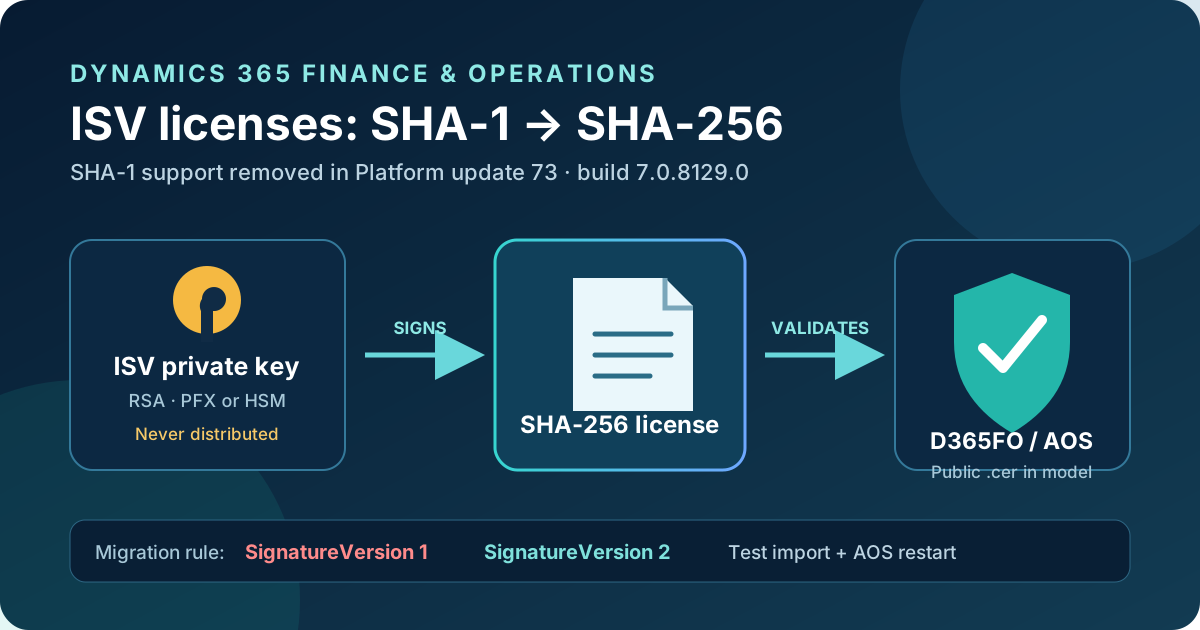
Original diagram. The private key signs outside D365FO; the model distributes only the public certificate used to validate the license.
What changed
axutil genlicense supports two signature versions in the legacy flow:
SignatureVersion | Hash | Status from PU73 |
|---|---|---|
1 | SHA-1 | Support removed in PU73 |
2 | SHA-256 | Required for license generation |
The published threshold is Platform update 73, build 7.0.8129.0. Microsoft specifies a platform build, so check the environment’s actual version instead of inferring it only from the application version.
One version boundary matters:
- on 10.0.43 and later, licenses are tenant-scoped and the current parameter table doesn’t expose
SignatureVersion; current examples use the SHA-256-compatible flow; - before 10.0.43,
SignatureVersionis explicitly documented and its correct value is2; - licenses generated on 10.0.43 or later aren’t compatible with older application versions.
Don’t blindly append /SignatureVersion:2 to a current generator. On modern versions, remove every SHA-1 dependency and validate the command supported by the target build’s axutil. The explicit switch belongs to the documented pre-10.0.43 contract.
Why the change matters when many installations already used SHA-256
Many installations already generate SHA-256, but the revised document no longer describes SignatureVersion as optional and removes the statement that value 2 is the default. Don’t depend on an implicit omission in the legacy flow. The risk lives in old automation: templates retaining /SignatureVersion:1, utilities built around the PU34 flow, copied internal documentation, or renewal jobs that run only when a certificate expires.
An ISV license isn’t just a configuration file. It controls configuration keys that can hide forms, disable processes, and block the solution. Microsoft states that a license that becomes invalid after import continues to work until the server restarts. The solution is then disabled and AOS writes an error to the event log. A restart is therefore a required migration test.
Validation architecture
The flow separates private from public material:
- The ISV owns an Authenticode X.509 certificate with an RSA private key.
- The private key, held in PFX/PKCS #12 or an HSM, signs the license file.
- The public
.cercertificate is embedded as an AOT resource and associated with the license code. - Configuration keys depend on that license code and gate solution elements.
- At import, the environment validates the signature with the public key distributed in the model.
- At AOS startup, the valid or invalid state is enforced and errors are written to the event log.
SHA-256 changes the signature hash, not this trust model. It also doesn’t replace certificate controls: anyone with the private key can issue a license accepted by the model.
Migration plan
1. Inventory generators and artifacts
Search repositories, pipelines, runbooks, and signing hosts for:
SignatureVersion:1
/SignatureVersion 1
makecert
pvk2pfx
UseLegacyCryptoServiceProvider
UseLegacyCryptoServiceProvider doesn’t select SHA-1, but it identifies a compatibility path. Microsoft says its default is 0 and that it should be used only as a fallback when the modern provider fails.
Record the target application/platform build, license code and configuration keys, tenant ID, expiry and count, certificate/provider/expiry, signature version, generator location, and private-key owner. You don’t need to extract or distribute the key to complete this inventory.
2. Prepare the certificate
Microsoft supports 1024- and 2048-bit RSA Authenticode certificates; 3072 and 4096 bits are supported from 10.0.20 and larger keys are recommended. HSM certificates must use an RSA private key.
The PFX contains the private key and must never leave the ISV organization. Only the public .cer belongs in the model. Where possible, install the certificate in Current User/My on a controlled signing host and select both subjectName and thumbprint; the thumbprint prevents axutil from choosing another certificate with the same subject.
For development, PU35 and later document this SHA-256 pattern:
$cert = New-SelfSignedCertificate `
    -CertStoreLocation Cert:\LocalMachine\My `
    -DnsName "IsvCert" `
    -Type CodeSigningCert `
    -KeyExportPolicy Exportable `
    -HashAlgorithm sha256 `
    -KeyLength 2048 `
    -KeySpec Signature `
    -Provider "Microsoft Enhanced RSA and AES Cryptographic Provider"
Self-signed certificates are for development only and aren’t supported in production.
3. Update the generator
On 10.0.43 or later, issue the license with the tenant ID in serialnumber. The official certificate-store pattern is:
& "C:\AOSService\PackagesLocalDirectory\Bin\axutil.exe" genlicense `
    /file:C:\Licenses\Contoso.txt `
    /licensecode:ISVLicenseCode `
    /serialnumber:<tenant-id> `
    /subjectName:"ISVCert" `
    /thumbprint:<certificate-thumbprint> `
    /expirationdate:11/30/2027
Don’t expose secrets in command lines or logs. The subjectName plus thumbprint pattern supports a certificate store or compatible HSM without moving a PFX.
On a version earlier than 10.0.43, retain the customer and serialnumber parameters required by that contract and explicitly set:
/SignatureVersion:2
Don’t mix the two contracts. From 10.0.43, a license is tenant-scoped and can potentially be reused across environments sharing the same tenant ID; a license generated by that model doesn’t work on older versions.
4. Test import and restart in a sandbox
For nonproduction under the classic flow, Microsoft documents Microsoft.Dynamics.AX.Deployment.Setup.exe --setupmode importlicensefile, followed by database synchronization. In production, deploy the license through Lifecycle Services using:
<PackagesFolder>\bin\CustomDeployablePackage\ImportISVLicense.zip
A minimum test checks successful import; enabled license code and configuration keys; protected UI, batch, and integrations; behavior after an AOS restart; event-log validation errors; tenant/expiry/count values; and startup without relying on the old license.
The restart test catches the most important operational failure. Testing import alone can leave an invalid license apparently functional until the next maintenance window.
5. Deploy and plan rollback
Reissue active licenses with SHA-256 before customers reach PU73. In production, copy ImportISVLicense.zip, place files under AosService\Scripts\License, and deploy through LCS. Multiple licenses are processed alphabetically, so name them to preserve dependencies.
Keep a matrix of version, tenant, certificate, hash, expiry, and test result. Rollback shouldn’t mean returning to SHA-1; it should restore the previous package and certificate only on a version where they remain supported while the SHA-256 generator is corrected.
Signing-process security
- Sign on a dedicated, restricted agent.
- Prefer an HSM with an RSA key; if using PFX, keep it in a secret manager and restrict export.
- Never put a PFX, password, or file contents in source control or pipeline artifacts.
- Distribute only the public
.cerin the model. - Use a thumbprint when subjects aren’t unique.
- Ship license codes and configuration keys in binary packages, as Microsoft recommends.
- Treat certificate rotation as a coordinated model-and-license change and test before retiring the old key.
SHA-256 strengthens the hash but doesn’t compensate for weak key custody. The primary control remains preventing anyone else from signing a license accepted by the public certificate in the solution.
Limits and open questions
- Removal is already effective for license generation in PU73, build 7.0.8129.0; there is no pending deprecation period.
- Microsoft says support for SHA-1 signatures was removed, but describes the concrete behavior as no longer supported for generation. It doesn’t explicitly say what happens to a SHA-1 license imported before the update; test each case in a sandbox.
SignatureVersionappears in the pre-10.0.43 parameter table, not the current contract. Don’t assume the explicit switch works on every build.AllowCrossDomainInstallationand tenant-scoped licensing solve different problems; don’t change that flag as part of a cryptographic migration without reviewing commercial scope.- This removal concerns the technical ISV license mechanism, not Dynamics 365 subscription licensing.
Practical recommendation
Treat PU73 as an already effective cutoff: don’t attempt to issue more SHA-1 licenses. Audit generators now, issue a SHA-256 license for every supported variant, and run a restart test before updating production. The change is cheap during a planned renewal and expensive when an extension becomes disabled after maintenance.