🛡️ D365FO 10.0.49: the ERP MCP server now declares each tool's risk
🛡️ D365FO 10.0.49: the ERP MCP server now declares each tool’s risk
Microsoft has added a behavioral contract to every tool exposed by the dynamic Dynamics 365 ERP MCP server. Starting with 10.0.49 PQU-1, an MCP client can know whether a tool is read-only, destructive, idempotent, or able to interact with external systems before invoking it.
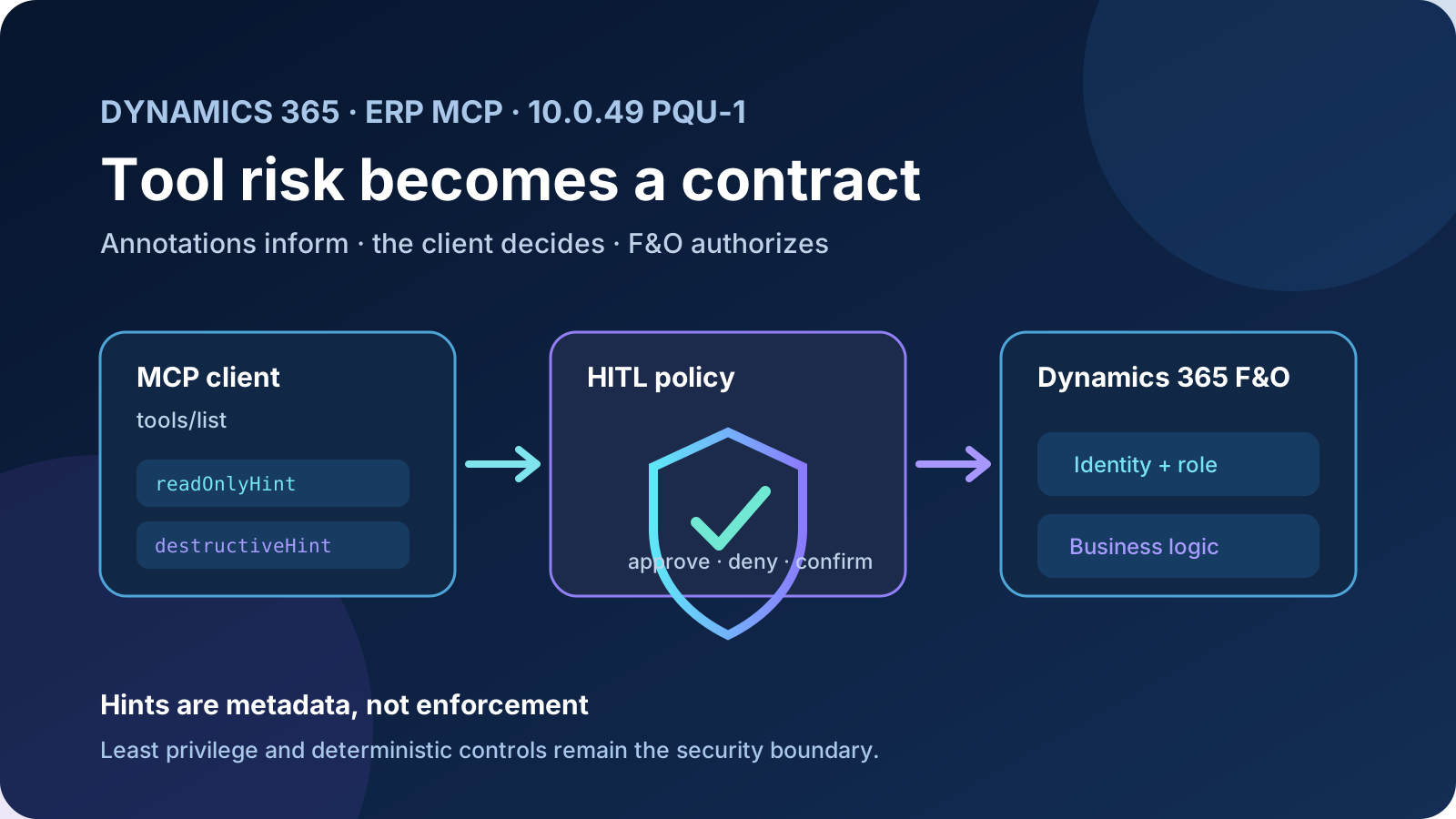
This is not a new security boundary or a confirmation button built into Dynamics 365. These are standard MCP metadata that let a compatible client decide when human approval is appropriate. Previously, the orchestrator discovered a tool’s name, description, and input schema; it can now also receive an explicit risk vocabulary.
The same update expands SQL queries, hardens field and control resolution, returns inherited action parameters, and adds support for option buttons and document controls. The surface change is compact, but it matters to ERP agents that must reason about what they are about to do, not only how to call a tool.
Status on September 1, 2026: the enhancements are enabled by default from 10.0.49 PQU-1, platform version
7.0.8199.29. Microsoft also backported them to 10.0.48 PQU-5 (7.0.7996.107) and 10.0.47 PQU-11 (7.0.7858.166). The release note was updated on August 28, 2026.
What changed
| Area | Change | Technical consequence |
|---|---|---|
| Protocol safety | readOnlyHint, destructiveHint, idempotentHint, and openWorldHint annotations | The client can classify a call and apply a human-in-the-loop policy |
| Data tools | SQL aggregate arithmetic, explicit field validation, and SysDA queryTimeout | Fewer calls, diagnosable failures, and better handling of long queries |
| Action tools | Full parameter set, including inherited parameters | The orchestrator sees the actual contract of an exposed X++ action |
| Form tools | Option buttons, control/group resolution, menu-item labels and search, document controls | More processes can be automated through the server-side view model |
Exact minimum versions are:
| Application | Minimum PQU | Minimum platform version |
|---|---|---|
| 10.0.49 | PQU-1 | 7.0.8199.29 |
| 10.0.48 | PQU-5 | 7.0.7996.107 |
| 10.0.47 | PQU-11 | 7.0.7858.166 |
No separate feature switch is documented for these enhancements. The dynamic ERP MCP prerequisites still apply: Tier 2 or higher, or a Unified Developer Environment; the server enabled in Feature management; and the client registered under Allowed MCP Clients. Cloud Hosted Environments are unsupported.
Architecture: the contract travels with tools/list
MCP clients discover tools through tools/list. A definition includes a name, description, input schema, and—when published by the server—annotations.
{
  "name": "data_find_entities_sql",
  "description": "Find or read records by using SQL",
  "inputSchema": { "type": "object" },
  "annotations": {
    "readOnlyHint": true,
    "destructiveHint": false,
    "idempotentHint": true,
    "openWorldHint": false
  }
}
This JSON is illustrative. Inspect the real response for each environment and version before encoding a policy.
User or autonomous process
          │
          ▼
MCP client/orchestrator
  1. discovers the tool
  2. reads annotations
  3. applies its HITL policy
          │
       allow / deny
          │
          ▼
Dynamics 365 ERP MCP
  4. validates identity and role
  5. executes a data, form, or action tool
          │
          ▼
Dynamics 365 F&O + extensions + personalization
Two separate controls are involved:
- Annotations inform the client about expected behavior. A host may use them for confirmation, visual labels, or policy.
- F&O security authorizes the real operation. The server builds dynamic context from the authenticated identity and roles and rejects inaccessible objects or actions.
Reading the four annotations
The official MCP schema defines:
readOnlyHint: the tool does not modify its environment.destructiveHint: a writing tool may perform destructive updates;falsemeans additive updates only.idempotentHint: repeating the call with the same arguments has no additional effect.openWorldHint: the tool may interact with entities outside a closed domain.
They are hints, not guarantees. The specification explicitly warns clients not to base security decisions on annotations from untrusted servers. Even with Microsoft’s ERP server, annotations do not replace permissions, segregation of duties, business validation, audit logs, or deterministic confirmations.
destructiveHint and idempotentHint are meaningful only when readOnlyHint is false. Missing annotations also have conservative protocol defaults: a client must not assume a tool is read-only or idempotent and should treat it as potentially destructive and open-world.
Why this improves human-in-the-loop controls
Without annotations, clients infer risk from names and descriptions—a fragile heuristic for custom actions, internal names, and localization. A generic policy can now look like this:
| Condition | Recommended policy |
|---|---|
readOnlyHint = true | Allow without confirmation when role and data sensitivity permit |
| Additive and idempotent write | Summarized confirmation; controlled technical retry |
destructiveHint = true | Explicit confirmation including entity, key, company, and expected effect |
idempotentHint = false | Do not auto-retry after an ambiguous timeout |
openWorldHint = true | Show the external destination and review exfiltration, DLP, and consent |
This does not prove that Copilot Studio automatically enforces the matrix. Microsoft says the server publishes annotations so the calling client can decide. Behavior depends on the host and its version and must be tested in the actual channel.
Data improvements: fewer calls and clearer failures
Arithmetic between aggregates
data_find_entities_sql can now handle expressions such as:
SELECT SUM(AmountCurDebit) - SUM(AmountCurCredit)
FROM GeneralJournalAccountEntry
The entity and field names illustrate the shape only; use objects exposed by your environment. Computing a balance in one call instead of retrieving two aggregates reduces latency, tool-call consumption, and orchestration errors.
Field validation
An invalid field now returns an explicit error instead of failing opaquely or returning an unexpected shape. Agents should still call data_find_entity_type and then data_get_entity_metadata before CRUD operations. Better validation is a safety net, not a reason to skip discovery.
SysDA timeout
Microsoft added queryTimeout support to the underlying SysDA framework for the protocol data path. The release note does not publish a default value or recommend changing it. Include long-running queries in performance tests and establish how the client surfaces a timeout before allowing retries.
Form and document improvements
Form tools do not automate pixels. They use server APIs and the application’s view model. This PQU adds:
FrameOptionButton = RadioandCheckcontrols;- name-based and grid-group control resolution;
- preference for non-lookup controls when setting values;
- menu-item label resolution, including search;
- document upload and document viewer control support.
There is a documentation mismatch worth treating carefully. The general ERP MCP page, updated August 19, still lists radio buttons, document viewer, DocuUpload, and FileUpload as unsupported. The 10.0.49 release note, updated nine days later, announces support for some of these controls on exact PQU builds. It is reasonable to infer that the release note describes newer behavior and the general page has not caught up, but that remains an inference. Validate each form and control type in a sandbox.
Do not confuse form-control support with file transport. The dedicated file documentation still describes separate paths and limits: output resources are preview; inline responses are roughly capped at 160 KB; resource responses reach 5 MB; and uploads in Copilot Studio currently use a flow and Dataverse custom APIs, with a documented 15 MB maximum.
Step-by-step implementation and validation
1. Verify the effective build
Do not check only the functional version. Record the platform build and confirm one of the minimum PQU combinations above. A 10.0.49 environment without PQU-1 does not meet the requirement.
2. Review the dynamic server
- Verify Dynamics 365 ERP Model Context Protocol server in Feature management.
- Allow only required clients under Allowed MCP Clients.
- Use Tier 2+ or UDE; do not plan for CHE.
- Remove dependencies on the static 13-tool server before its documented retirement on October 1, 2026.
3. Add it to Copilot Studio
- Open the agent and go to Tools.
- Select Add a tool and filter by Model Context Protocol.
- Add Dynamics 365 ERP MCP server and create the connection.
- Restrict the F&O role to the process’s required duties and privileges.
- In agent instructions, prefer data tools for CRUD and reserve form or action tools for logic unavailable through entities.
4. Inspect metadata
Use a client that exposes tools/list—for example, Microsoft’s documented Visual Studio Code connection—and retain a versioned snapshot of tool names, schemas, and annotations. Do not assume every client shows these properties in its UI.
5. Test HITL behavior
Build a matrix that covers:
- read-only query;
- additive create;
- update;
- deletion or irreversible posting;
- retry after timeout;
- custom X++ action;
- form with an option button;
- document view and upload.
For each case capture the selected tool, received annotations, confirmation shown, effective identity, company, result, and retry behavior.
Security and licensing
The server filters menu items, entities, and actions according to the effective security role. This also reduces the orchestration context. Assign the empty System agent role to the agent identity for the licensing exemption where applicable and, separately, only the minimum functional roles required. Microsoft explicitly says not to add privileges to System agent.
In Copilot Studio, calls are billed as Agent Actions at a fixed rate that includes orchestration and MCP execution. In other clients, Microsoft documents 0.1 Copilot Credits per tool call plus the client’s model cost. Finance Premium and Supply Chain Management Premium licenses exempt that execution for clients other than Copilot Studio; they do not remove Copilot Studio’s Agent Action rate.
Annotations can reduce unnecessary retries and calls, but they do not change the rate. Observe tool calls per task, especially where aggregate SQL or improved control resolution replaces several steps.
Adoption checklist
| Control | Expected evidence |
|---|---|
| Version | Platform at or above the documented PQU build |
| Discovery | tools/list snapshot containing annotations |
| HITL | Confirmation test by risk class and channel |
| Least privilege | Effective role and objects visible to the test identity |
| Retries | Separate policy for idempotent and non-idempotent operations |
| SQL | Aggregate arithmetic and invalid-field failures validated |
| Forms | Option buttons, ambiguous lookup, search, and documents tested |
| Attachments | Size, timeout, preview status, and upload flow documented |
| Cost | Tool calls per scenario and client measured |
| Migration | No static-server dependency before October 1 |
Conclusion
HITL annotations turn the ERP MCP tool catalog into more than a function list. They add a risk vocabulary a client can use before touching the ERP. This separates three responsibilities cleanly: the server declares behavior, the client decides human interaction, and F&O enforces authorization.
The critical nuance is that annotations are information, not enforcement. Safe adoption still requires a compatible client, verified confirmations, least-privilege roles, retry protection, and tests on the exact build. With that discipline, the 10.0.49 enhancements reduce calls, remove ambiguity, and expand automatable processes without making the model the security boundary.
Official references
- Platform updates for version 10.0.49 of finance and operations apps
- Use Model Context Protocol for finance and operations apps
- Build an agent with Dynamics 365 ERP MCP
- Files with Dynamics 365 ERP MCP
- Connect to Dynamics 365 ERP MCP with Visual Studio Code
- MCP specification: Tools
- MCP schema reference: ToolAnnotations