🧭 D365FO lets X++ teach business semantics to ERP MCP
🧭 D365FO lets X++ teach business semantics to ERP MCP
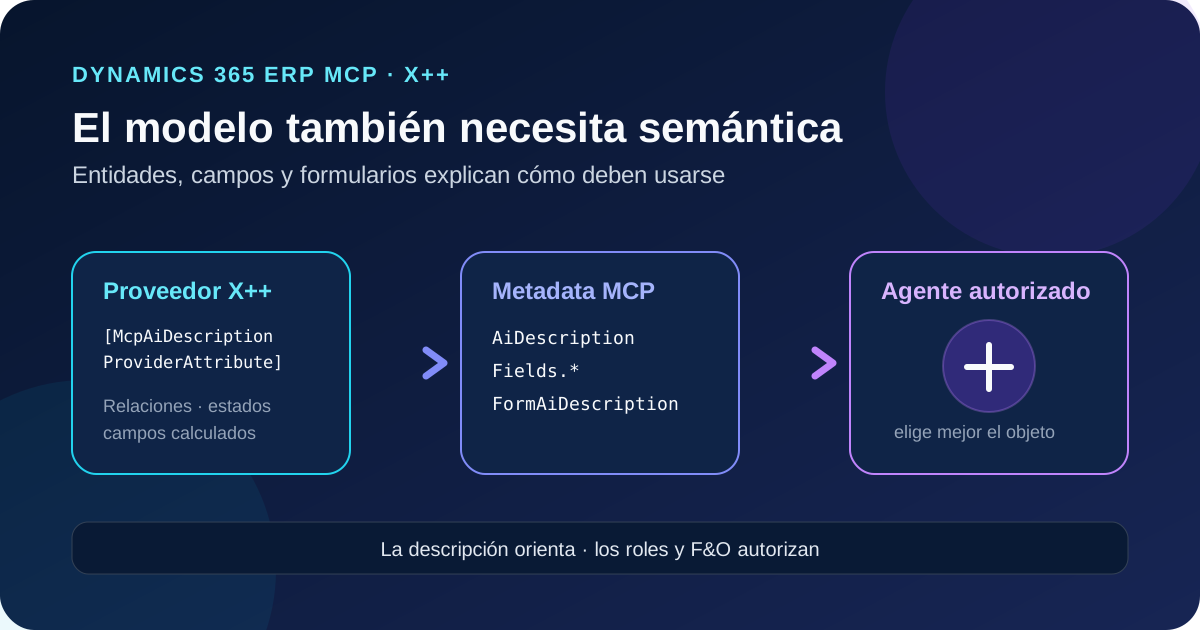
Microsoft has opened a new extensibility surface for the dynamic Dynamics 365 ERP MCP server. Developers can add AI-oriented descriptions in X++ to a data entity, its fields, and a form. The server includes this text in its responses, giving every authorized agent business context alongside structural metadata.
Names, types, and labels explain what exists, but not always how to use it. An agent can find a header entity without knowing that lines live in another collection, try to write a calculated field, or misread a lifecycle status. AI descriptions declare those relationships and constraints next to the X++ artifact itself.
These descriptions are neither private agent instructions nor a new security boundary. They are shared metadata for all clients that query ERP MCP and can access the object. This changes the extensibility contract: technical knowledge no longer has to be duplicated in every prompt and can be versioned with the F&O model.
Status on October 28, 2026: Microsoft published the technical guide on October 27, with a document date of October 26. It is not labeled preview, but Microsoft has not published a dedicated minimum version or rollout schedule for this API. The general dynamic ERP MCP prerequisites apply. Before relying on it in production, verify that your environment returns
AiDescriptionandFormAiDescription.
What changed
A class or entity can declare a provider method with McpAiDescriptionProviderAttribute. At runtime, the server discovers providers on the target object and its extensions, executes them, and combines their text into the MCP response.
| Described object | Tool that returns it | Response property |
|---|---|---|
| Data entity | data_get_entity_metadata | AiDescription |
| Entity field | data_get_entity_metadata | Fields.<FieldName>.AiDescription |
| Form | form_open_menu_item | Context.FormAiDescription |
The text can explain when to use an entity or form, how related entities are joined, what status values mean, and which fields are system-assigned or calculated.
It does not change which entities, fields, forms, or actions are available, and it does not elevate permissions. The authenticated identity and F&O roles still determine the visible surface.
Architecture: context lives with the artifact
The description is deployed in the same model as the entity or its extension. There is no central registry to maintain.
- A developer implements an X++ provider.
- ERP MCP discovers valid methods on the object and its extensions.
- It executes each provider independently and concatenates the fragments.
- The MCP tool filters metadata according to read permissions.
- The orchestrator uses the context to select entities, fields, or forms.
This separates two kinds of knowledge:
| AI descriptions | Agent instructions |
|---|---|
| Stable facts about entities, fields, forms, and relationships | Process, policy, approvals, and work sequence |
| Apply to every authorized agent in the environment | Apply only to the configured agent |
| Maintained by the F&O development team | Maintained by the maker or scenario owner |
A useful rule is: describe the model in X++; describe the process in the agent.
Requirements and availability
The documentation requires an environment that already meets the dynamic ERP MCP prerequisites:
- F&O 10.0.47 or later, 10.0.46 PQU-2 or later, or 10.0.45 PQU-7 or later;
- Dynamics 365 ERP Model Context Protocol server enabled when it is not already on by default;
- the client registered under Allowed MCP Clients;
- Tier 2 or higher, or a Unified Developer Environment;
- an X++ development environment in which to build and deploy the model.
Cloud Hosted Environments are unsupported. Microsoft has not tied McpAiDescriptionProviderAttribute to a specific PQU. Those versions enable ERP MCP in general; they do not prove that this extension has reached every region. Treat a real metadata call as the acceptance test.
Step-by-step implementation
1. Choose knowledge that belongs in metadata
Prioritize ambiguity that can produce incomplete selection or unsafe writes: header/line relationships, number sequences, application-controlled status, calculated fields, and similar forms with different responsibilities.
Do not include customer data, secrets, real examples, or approval instructions. Descriptions are returned to every agent with access to the object.
2. Describe an entity you own
The method must be public static void, take exactly one McpIAiDescriptionBuilder, and carry the attribute. Use the interface, not the concrete builder class.
[McpAiDescriptionProviderAttribute]
public static void describeForAgents(McpIAiDescriptionBuilder _builder)
{
    _builder.appendDescription(
        'Rental agreement headers. Lines are stored in ContosoRentalAgreementLines. ' +
        'Join both entities by AgreementId.');

    _builder.appendFieldDescription(
        fieldStr(ContosoRentalAgreementEntity, AgreementId),
        'System-assigned agreement number. Leave empty when creating a record.');

    _builder.appendFieldDescription(
        fieldStr(ContosoRentalAgreementEntity, Status),
        'Lifecycle state controlled by the application. Do not update directly.');
}
appendDescription() adds object-level context. appendFieldDescription() applies only to entity fields. Use fieldStr() so the compiler catches renames and missing fields.
3. Extend a standard entity
You do not have to modify the Microsoft object. Add a provider in an entity class extension:
[ExtensionOf(dataEntityViewStr(CustCustomerV3Entity))]
public final class CustCustomerV3Entity_ContosoRental_Extension
{
    [McpAiDescriptionProviderAttribute]
    public static void describeRentalRelation(McpIAiDescriptionBuilder _builder)
    {
        _builder.appendDescription(
            'Customers with rental activity have agreements in ContosoRentalAgreements.');

        _builder.appendFieldDescription(
            fieldStr(CustCustomerV3Entity, CustomerAccount),
            'Use this value to filter ContosoRentalAgreements by CustomerAccount.');
    }
}
The server does not replace the base description; it combines every valid provider. This lets multiple ISVs add context, but the total length becomes a shared resource.
4. Describe a form
Forms support only a top-level description:
[ExtensionOf(formStr(ContosoRentalAgreement))]
public final class ContosoRentalAgreementForm_Extension
{
    [McpAiDescriptionProviderAttribute]
    public static void describeForAgents(McpIAiDescriptionBuilder _builder)
    {
        _builder.appendDescription(
            'Use this form to review rental agreements and record equipment returns.');
    }
}
Resolution uses the form name, not the menu-item name. Every menu item that opens the form receives the same description.
5. Build, deploy, and verify
After deployment:
- call
data_get_entity_metadatawith the public collection name; - inspect root and field-level
AiDescriptionvalues; - open a menu item with
form_open_menu_item; - inspect
Context.FormAiDescription; - run a conversational test that forces a choice between ambiguous objects;
- keep the metadata response as version and deployment evidence.
An abbreviated response should look like this:
{
  "AiDescription": "Rental agreement headers. Lines are stored in ContosoRentalAgreementLines.",
  "Fields": {
    "Status": {
      "AiDescription": "Lifecycle state controlled by the application. Do not update directly."
    }
  }
}
Design constraints
Invalid signatures and silent omission
If the method does not exactly match the required signature or lacks the attribute, the server skips it without an error. Investigate compilation, attribute, parameter, and provider location first when text is missing.
If a provider throws, the server logs the error and still returns text from the others. The tool call does not fail. This improves resilience but requires observability because an agent can operate with partial context.
Composition without guaranteed order
Fragments are added on separate lines, but execution order is not guaranteed. Every description must make sense independently. The builder cannot replace or remove another provider’s content.
Providers on parent classes and their extensions are not inherited. Only providers on the target object and its own extensions are used.
Length limits
The server truncates without warning or ellipsis:
| Combined description | Default maximum |
|---|---|
| Entity or form | 1,500 characters |
| Each field | 500 characters |
Because the limit applies after providers are combined, one extension can consume another’s space. Lead with decisive information and test the final response, not only your fragment.
Security, governance, and cost
A field description appears only when the authenticated user can read the field. Filtering reduces exposure, but the text itself must not contain confidential, personal, or customer-specific information.
Metadata does not make a field read-only. Wording such as “do not update directly” guides the model, but actual protection must remain in permissions, X++ validation, segregation of duties, and client confirmations. Treat the text as orchestration help, not a security control.
Descriptions become part of the model context. Microsoft documents no separate fee for this capability; normal ERP MCP billing remains: Copilot Studio includes the call in Agent Action, while other clients use the published Copilot Credit execution rate. Better context can reduce searches and retries, but measure the result.
Govern these descriptions as code with technical and functional PR review, style and length rules, metadata tests, data-domain ownership, review on schema changes, and conversational regression before promotion.
Recommended test matrix
| Case | Expected evidence |
|---|---|
| Owned entity | AiDescription visible after deployment |
| Standard entity extension | Base and extension text combined |
| Unauthorized field | Field and description absent |
| Throwing provider | Remaining context available and error logged |
| Multiple ISV models | Self-contained fragments independent of order |
| Excessive text | Truncation detected before production |
| Form with several menu items | Same FormAiDescription |
| Ambiguous task | Agent selects every related entity |
| Controlled write | Agent avoids calculated fields and F&O still validates |
Practical recommendations
Start with a small number of high-risk entities and compare traces before and after. A useful description answers “when to use,” “how it relates,” and “what not to touch” without repeating labels and types already present in metadata.
Do not turn descriptions into process manuals. An approval based on amount, company, or role belongs in agent instructions and deterministic controls. Keep only stable application-model facts in X++.
Finally, do not infer availability from the functional version alone. Until Microsoft publishes a dedicated minimum, add a response-property check to deployment validation. That evidence protects against rollout, PQU, and regional differences.
Conclusion
AI descriptions turn the X++ model into a semantic source for agents. The change matters because relationships, calculated fields, and lifecycle meaning can travel with the solution and be reused from Copilot Studio or any other authorized ERP MCP client.
The design still needs clear boundaries: concise text, no secrets, no ordering assumptions, and real security underneath. Used this way, the extension reduces duplicated prompt knowledge and makes tool selection more deterministic without confusing model guidance with authorization.