⚡ D365FO replaces tiers with PPR-based elastic AOS capacity
⚡ D365FO replaces tiers with PPR-based elastic AOS capacity
In the new unified Finance and Operations environments, you no longer select a Tier 2, 3, 4, or 5. Microsoft has documented an elastic compute model in which production and sandbox start from a mid-sized topology and scale horizontally with demand, up to a limit calculated from the tenant’s Power Platform Requests (PPR) entitlement.
This isn’t merely an administrative change. It changes how we size an implementation, interpret a performance test, and purchase additional capacity. On September 10, 2026, Microsoft also added an official PowerShell query that reads the tenant entitlement through Power Platform API and translates it into AOS capacity.
Availability needs precise wording. This model applies to unified environments managed with zero LCS footprint. As of September 13, 2026, Microsoft still labels the Finance and Supply Chain Management ERP templates as preview. Don’t apply these rules to a legacy LCS environment or describe the unified experience as universally GA.
What changes from LCS
| Aspect | LCS environments | Unified environments |
|---|---|---|
| Capacity unit | Tier contracted per environment | Tenant PPR pool |
| Production and sandbox | Different topologies | Same model and scaling ceiling |
| Increase capacity | Contract change or support | Increase PPR entitlement |
| Scale-out | Bound to the tier | Automatic, based on demand |
| Published limit | 3–12 AOS depending on tier | Up to 80 AOS: 40 interactive and 40 batch |
| Create environments | Contracted slots | Primarily constrained by storage |
This gives the Power Platform and F&O administration unification a concrete technical model. It doesn’t mean every environment receives 80 AOS or that purchasing PPR reserves servers permanently. PPR defines the capacity ceiling available to the service when it scales.
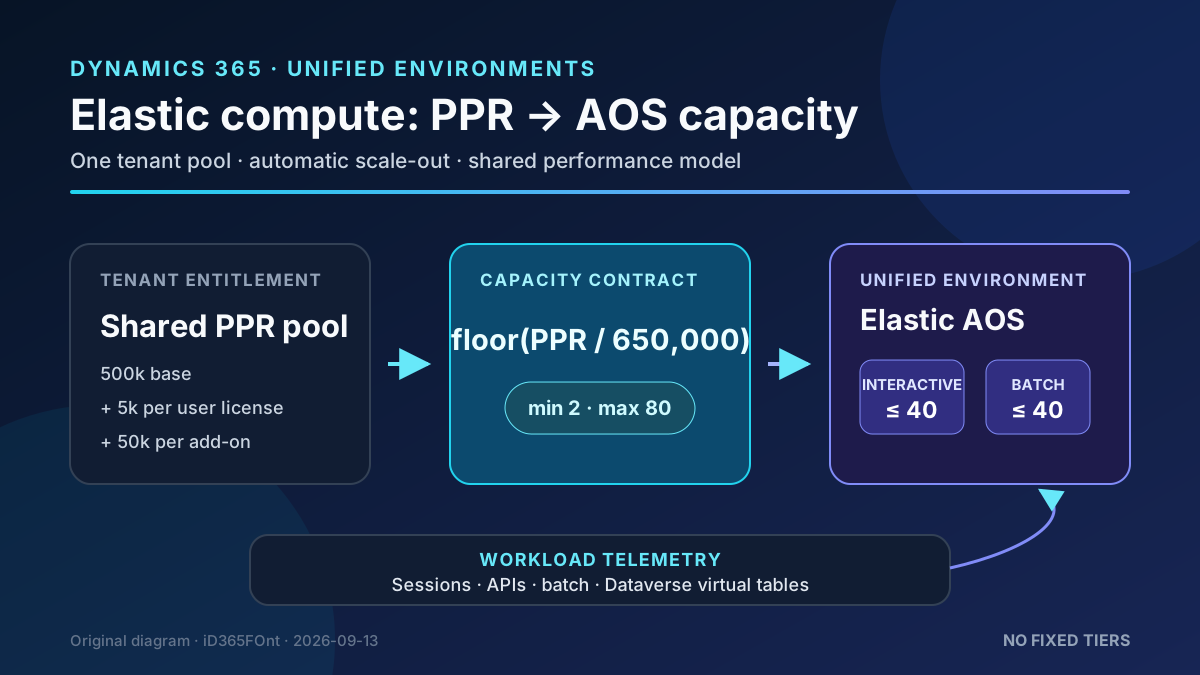
Original diagram. PPR sets the ceiling; workload telemetry determines when an environment scales.
Architecture: stateful AOS and two scaling speeds
Application Object Server still runs X++ business logic, user sessions, OData and custom services, integrations, and batch processing. Microsoft confirms that AOS instances retain session state in memory and that an internal load balancer maintains session affinity.
That explains the model’s asymmetry:
- Scale-up without downtime. Increased concurrent sessions, API traffic, batch processing, or virtual-table calls can cause the platform to add AOS instances and redistribute load without disconnecting users.
- Scale-down during maintenance. Removing an AOS requires session draining. The service therefore reduces topology during maintenance or customization deployment, when downtime already exists.
- Return to baseline. The environment returns to its mid-sized baseline rather than a dynamic minimum. Microsoft doesn’t publish the exact baseline AOS count or autoscaler thresholds.
Persistent data remains outside AOS in Azure SQL, caching layers, and blob storage. Scaling is horizontal; don’t assume that more AOS makes one slow, serial X++ process faster.
The capacity formula
Microsoft publishes a direct conversion:
Calculated AOS = floor(granted PPR / 650,000)
Allowed AOS = max(2, min(80, calculated AOS))
A tenant accrues PPR from:
- a 500,000 PPR tenant-wide base included with a Dynamics 365 purchase;
- 5,000 PPR per assigned user license;
- 50,000 PPR add-on packs.
Power Apps Premium, Dynamics 365 customer engagement applications, and Finance and Operations licenses can all grant PPR. They accrue into one tenant pool used by Power Platform, Dataverse, and F&O.
Examples using the base and licenses, without add-ons:
| Licenses | PPR | Calculation | Ceiling |
|---|---|---|---|
| 20 | 600,000 | floor(600,000 / 650,000) | 2 AOS minimum |
| 100 | 1,000,000 | floor(1,000,000 / 650,000) | 2 AOS minimum |
| 500 | 3,000,000 | floor(3,000,000 / 650,000) | 4 AOS |
| 1,000 | 5,500,000 | floor(5,500,000 / 650,000) | 8 AOS |
The published platform maximum, 80 AOS, corresponds to 52 million PPR. It is split into up to 40 interactive AOS and 40 batch processors. Microsoft doesn’t document manual control of that split or a way to reserve a specific number for an environment.
Query the tenant entitlement
The official guide calls Power Platform API GET /licensing/tenantCapacity, version 2024-10-01. The capacity type representing PPR is ApiCallCount.
1. Prepare the identity
- Register a single-tenant application in Microsoft Entra.
- Add Power Platform API using its official ID:
8578e004-a5c6-46e7-913e-12f58912df43. - Configure the minimum read permission and consent required by your policy.
- For the interactive example, configure the mobile/desktop application redirect URI.
- Apply Conditional Access and restrict who can run the query.
The authentication guide distinguishes delegated permissions for calls made as a user from RBAC for service principals. Microsoft’s example uses interactive sign-in; don’t copy that pattern into unattended automation with embedded secrets.
2. Read PPR and calculate AOS
This reduced example keeps the calculation separate from the API call so it can be tested without tenant access:
#Requires -Modules MSAL.PS

$TenantId = '<tenant-id>'
$ClientId = '<application-client-id>'
$ApiBase  = 'https://api.powerplatform.com'

$token = Get-MsalToken `
    -TenantId $TenantId `
    -ClientId $ClientId `
    -Scope "$ApiBase/.default" `
    -Interactive

$headers = @{ Authorization = "Bearer $($token.AccessToken)" }
$uri = "$ApiBase/licensing/tenantCapacity?api-version=2024-10-01"
$capacity = Invoke-RestMethod -Method Get -Uri $uri -Headers $headers

$pprCapacity = $capacity.tenantCapacities |
    Where-Object capacityType -eq 'ApiCallCount' |
    Select-Object -First 1

if (-not $pprCapacity) {
    throw 'The tenant returned no ApiCallCount capacity.'
}

$ppr = [double]$pprCapacity.totalCapacity
$aos = [math]::Floor($ppr / 650000)
$aos = [math]::Max(2, [math]::Min(80, $aos))
$next = if ($aos -lt 80) { (($aos + 1) * 650000) - $ppr } else { 0 }

[pscustomobject]@{
    GrantedPPR = $ppr
    AOSCeiling = $aos
    PPRToNextAOS = [math]::Max(0, $next)
}
Inspect capacityEntitlements as well to identify the licenses contributing to the total. Don’t treat the response’s maxCapacity as the AOS ceiling: Microsoft explicitly corrected that assumption and sets the platform maximum to 80.
PPR has two separate effects
PPR serves two related but independent roles:
- compute entitlement: determines how many AOS instances F&O can scale to;
- request limit: governs throttling for Power Platform operations such as Dataverse calls, plug-ins, and flows.
Buying PPR raises both limits, but a larger entitlement doesn’t fix a poorly designed integration. Virtual-table traffic can trigger scale-up while consuming requests subject to throttling. Measure both planes.
Requirements and exceptions
The documented model distinguishes three environment types:
| Type | Purpose | Elastic compute |
|---|---|---|
| UPE | Production | Up to 80 AOS |
| USE | UAT, staging, training | Up to 80 AOS |
| UDE | Individual X++ development | One fixed AOS |
UDE doesn’t scale because the Visual Studio debugger must attach to a specific AOS process. It isn’t suitable for performance testing or multi-user development. A USE can’t be converted to a UDE, or the reverse.
Availability depends on the Azure region. North Europe and West Europe support UPE, USE, and UDE, while some secondary locations support only UDE and trial. Check Microsoft’s table before provisioning; Microsoft warns that preventive validation for every unsupported region is still being added.
How performance testing changes
Giving sandbox and production the same model and ceiling removes a historical mismatch, but it doesn’t make every test representative. A minimum plan should:
- use USE, never UDE;
- record the version, PQU, customizations, and dataset;
- generate interactive, API, and batch load separately;
- observe latency, throttling, SQL, batch, and session count;
- repeat after maintenance to assess baseline behavior;
- test gradual growth and bursts;
- record granted PPR at test time.
We can’t control scaling timing or retrieve all internal thresholds from public documentation. The valid result is the observed end-to-end behavior, not an inference based only on the mathematical ceiling.
Security and governance
- Protect the capacity-querying application with least privilege and Conditional Access.
- Use certificates or another secure identity for automation; don’t store secrets in scripts or repositories.
- Treat license and capacity details as tenant administration data.
- Monitor capacity, request consumption, and F&O performance separately.
- Alert before reaching the ceiling and define an approved purchase process; autoscaling can’t exceed entitlement.
- Recheck the pool after license additions, removals, or changes because it doesn’t depend only on F&O users.
Limits Microsoft doesn’t publish
- the exact initial baseline AOS count;
- metrics and thresholds that trigger scale-up;
- a guaranteed time to add capacity;
- allocation behavior when several environments demand capacity simultaneously;
- manual AOS reservation by environment;
- add-on pricing, which depends on the commercial agreement and must be checked in the tenant;
- an elasticity SLA separate from the service SLA.
Don’t fill these gaps with assumptions inherited from LCS tiers. If a project needs a concrete guarantee, validate it contractually with Microsoft.
Practical recommendation
Add the PPR query to the technical assessment for every unified environment. Store the result with the performance plan, calculate the distance to the next AOS, and correlate it with real telemetry. When a bottleneck appears, determine whether it is parallelizable first: more AOS distributes users, API, and batch work, but it doesn’t repair an inefficient SQL query, contention, or a monolithic process.
The important change isn’t the possibility of reaching 80 AOS. It is that capacity stops being a fixed environment property and becomes a shared tenant entitlement, with automatic scaling and an API that can be included in technical governance.
References
- Elastic compute for finance and operations apps
- Unified environment types and templates for finance and operations apps
- Overview of unified admin experience for finance and operations apps
- Microsoft Power Platform API reference
- Authentication for Power Platform API
- Official documentation update that added the AOS capacity query