📸 D365 SCM 10.0.50 brings photos and video into warehouse flows
📸 D365 SCM 10.0.50 brings photos and video into warehouse flows
Dynamics 365 Supply Chain Management 10.0.50 introduces preview photo and video capture inside the Warehouse Management mobile app. Workers can document damaged goods, unreadable license plates, or receiving condition without leaving the task they are performing.
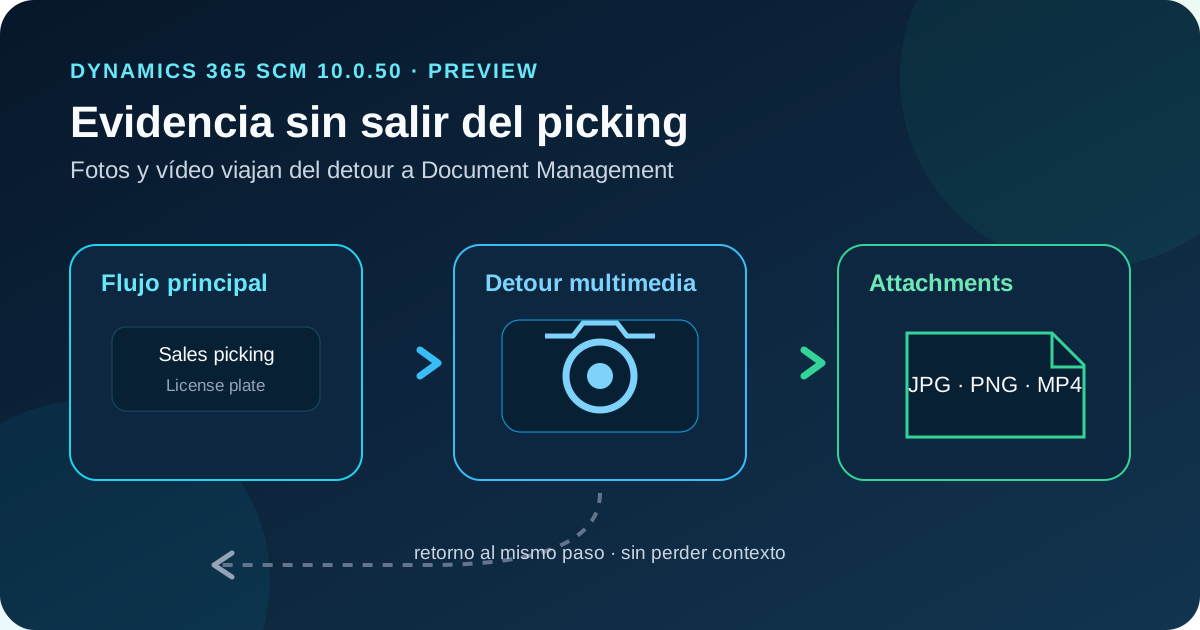
This is more than a camera button. Microsoft implements it as a new Process Guide menu-item type that can run as a detour from a compatible step. The main flow sends context, the worker captures or selects files, SCM attaches them to one or more records through Document Management, and the app returns to the previous step.
The result is a reusable operational-evidence pattern based on configuration rather than a separate mobile customization.
Status on October 29, 2026: the capability is in public preview, requires SCM 10.0.50 or later, and uses the (Preview) Media capture in the warehouse mobile app feature. Release 10.0.50 entered preview in October 2026; Microsoft schedules self-update GA for December 2026 and auto-update GA for January 2027. The documentation does not name a minimum mobile-app version, so use a current supported build and validate camera, gallery, and permissions on every platform.
What changed
The new (Preview) Media capture activity code creates indirect menu items that query records and attach files to the selected results.
| Capability | Confirmed behavior |
|---|---|
| Capture | Device camera or existing gallery files |
| Formats | JPEG, PNG, and MP4 |
| Destination | Standard SCM record attachments |
| Selection | Up to 100 records in the working list |
| Search | Configurable query, exact match, and * wildcard |
| Company | Current worker legal entity only |
| Integration | Direct menu item or detour in a mobile flow |
| Return | The app resumes at the step that opened the detour |
Every file is attached to every record in the list. Two photos and three selected license plates produce both attachments on each license plate. That multiplication matters for storage and privacy.
Architecture: a detour ending in Document Management
The flow has four layers:
- A picking, receiving, movement, or other warehouse flow reaches a configured step.
- The capture detour receives values, runs a query, and builds a record list.
- The device captures a photo or video, or selects an existing file, and the worker confirms upload.
- SCM validates content and creates standard Document Management attachments before returning control.
Capture neither changes the business record nor completes the main step. It stores evidence and returns. This lets existing mobile flows gain documentation without being rebuilt.
Attachments use the default file document type. F&O stores files in Azure Blob Storage by default; a document type can also use SharePoint when its requirements are met. DocuRef and DocuValue hold attachment metadata while the binary remains outside the database.
Requirements
Verify the following before configuration:
- Supply Chain Management 10.0.50 or later;
- (Preview) Media capture in the warehouse mobile app enabled in Feature management;
- Warehouse Management mobile app installed and connected;
- camera or media-file access on the device;
- a device menu assigned to the work user;
- sufficient Document Management configuration and file capacity;
mp4allowed when workers record video.
The app supports Windows, Android, and iOS, but media behavior also depends on OS permissions, hardware, MDM, and camera policy. Test the actual device fleet before rollout.
Step-by-step configuration
1. Enable the preview feature
In System administration > Workspaces > Feature management, enable (Preview) Media capture in the warehouse mobile app. Start in a sandbox and record both SCM and mobile-app versions.
2. Allow MP4 files
Document Management accepts only extensions listed in its file-type configuration:
- Open Organization administration > Document management > Document management parameters.
- Add a row under File types.
- Enter
mp4without the period. - Save.
A separate video document type is unnecessary. In SCM 10.0.50 users can download an MP4 attachment, but cannot preview or play it in the browser.
3. Create the capture menu item
Under Warehouse management > Setup > Mobile device > Mobile device menu items, create an item with:
| Field | Value or decision |
|---|---|
| Mode | Indirect |
| Activity code | (Preview) Media capture |
| Use process guide | Enabled automatically |
| Table name | Table whose records receive attachments |
| Show filter page | Always, or only when filters are editable |
| Barcode data policy | Blank; this flow does not parse GS1 |
The selected table must be the root query data source.
4. Design the query and cards
In Edit query, add a range with a blank Criteria for each worker input and fixed criteria for boundaries. Do not group the query, and sort only on root-table fields.
Every blank-criteria range becomes a required search field. Matching is exact unless the worker supplies a wildcard such as WMA*.
Use Field list to choose identifying values shown on result cards. Provide enough information to prevent attachments being added to the wrong record.
5. Add it to the worker menu
A work user can open only items included in the assigned menu or its submenus. Add the capture item to the relevant Mobile device menu. Hide it when it should be available only as a detour.
6. Configure the detour
In Mobile device steps, create a menu-specific override for the relevant step and add the capture item under Available detours (menu items).
Use Select fields to send to copy main-flow values into search fields. During sales picking, for example, send License plate to the license-plate filter. Auto submit can run the search, but never uploads files: the worker always confirms upload.
7. Validate the complete path
Test with the real work-user profile:
- open the configured warehouse flow;
- launch the detour from its step;
- verify incoming filters target the correct record;
- capture JPEG, PNG, and MP4;
- select multiple records and verify attachment multiplication;
- confirm the app resumes at the same step;
- inspect Attachments on every SCM record;
- capture uploader, company, file size, and storage evidence.
Limits and design consequences
Search and selection
A search page returns up to 100 results and the selection list holds up to 100 records. Workers can run several searches and accumulate results. Queries return only the current legal entity.
Use fixed criteria to narrow the surface. Do not rely solely on the worker reading every result card.
Atomic batch validation
SCM checks that file content matches the extension. If one file in an upload is invalid, none of the files are attached. Support procedures should account for renamed formats and full-batch retry.
MP4 download only
Version 10.0.50 permits MP4 download but no inline playback. Define who can download video and which managed application opens it. Photos may be a better default for high-frequency operations.
Preview and unspecified app minimum
Preview functionality can be restricted and is not a production guarantee. Microsoft has not published a minimum Warehouse Management mobile-app version for this capability. Record the exact Windows, Android, or iOS and app versions in test evidence.
Security and compliance
Two security surfaces apply:
- the mobile work user sees only menu items in the assigned menu and works in the current legal entity;
- back-office users with access to the target record and attachments can view or download evidence.
Hiding the menu item does not protect an attachment after upload. Review roles, tables, document types, storage, and subsequent access.
Images can contain labels, people, transport identifiers, documents, or locations. Establish minimization, retention, deletion, export, and privacy-request policies. Where device management supports it, disable gallery selection if the scenario requires live capture only.
With SharePoint storage, validate permissions, Conditional Access, and authentication. With default Azure Blob Storage, deleting an attachment permanently removes both file and reference; restoring the database alone does not restore the binary.
Licensing, storage, and performance
Microsoft documents no separate media-capture license. Standard SCM and mobile-app usage rights apply, while the resulting attachments consume file storage. Volume can grow quickly because each file is associated with every selected record.
Estimate operational growth as:
monthly growth ≈ operations × files per operation
                 × average size × selected records
This is a capacity estimate, not a billing rule. Measure actual photo and video size and use device policy to constrain duration or resolution where possible.
Uploads depend on warehouse connectivity. Test loss of network, timeout, and retry behavior to avoid duplicates or missing evidence.
Recommended test matrix
| Case | Expected result |
|---|---|
| Value sent from main flow | Correct record without re-entering the key |
* wildcard | Controlled matches and paging |
| Multiple records | Every file appears on every selected record |
| Renamed invalid file | Entire upload batch rejected |
| MP4 not allowed | Failure until mp4 is added to File types |
| Valid MP4 | Download succeeds; no browser preview in 10.0.50 |
| Company switch | No records from another legal entity |
| Hidden menu item | Available as detour, absent from main menu |
| Network loss | Clear failure and duplicate-safe retry |
| Back-office user | Only authorized records and files accessible |
Practical recommendations
Start with one scenario where evidence has clear value, such as damage during picking or receiving. Target a table and key already known by the main flow so the detour can receive it automatically.
Prefer photos unless motion or sound is necessary. Video consumes more storage, uploads more slowly, and cannot currently play in the SCM browser.
Govern capture as a data process rather than a device convenience: define who can capture, which records can receive evidence, retention, and who can view it later.
Conclusion
Media capture turns Warehouse Management detours into an integrated evidence channel. It reuses Process Guide, queries, menus, and Document Management instead of requiring a parallel mobile app or losing work context.
Preview status and easy attachment multiplication demand a controlled rollout. Narrow queries, least privilege, retention, upload observability, and storage control are as important as enabling the camera.
Official references
- Capture photos and videos by using Warehouse Management mobile app detours
- Official change published October 28, 2026
- What’s new in Supply Chain Management 10.0.50
- Configure detours for Warehouse Management mobile app steps
- Configure document management
- Install and configure the Warehouse Management mobile app