⌚ D365 SCM opens its warehouse app to third-party hardware
⌚ D365 SCM opens its warehouse app to third-party hardware
Microsoft has published a bidirectional integration contract for the Warehouse Management mobile app. The new form bridge lets a provider’s Android app receive the warehouse form currently open for the worker and return input or actions to Microsoft’s app. Glasses, an arm-mounted display, a voice system, or another industrial wearable can therefore present and operate the process without duplicating Dynamics 365 Supply Chain Management logic.
The important change isn’t support for one device. ProGlove is the first integrated provider, but the protocol is vendor neutral: another provider can implement it without provider-specific code in Warehouse Management mobile app.
As of September 30, 2026, the integration requires Warehouse Management mobile app 4.2.0.0 or later and works only on Android. Version 4.2.0.0 became available in Microsoft App Center on September 29; progressive app-store rollout is scheduled to begin October 6. It isn’t a preview, but package publication doesn’t mean it is already visible on every managed device.
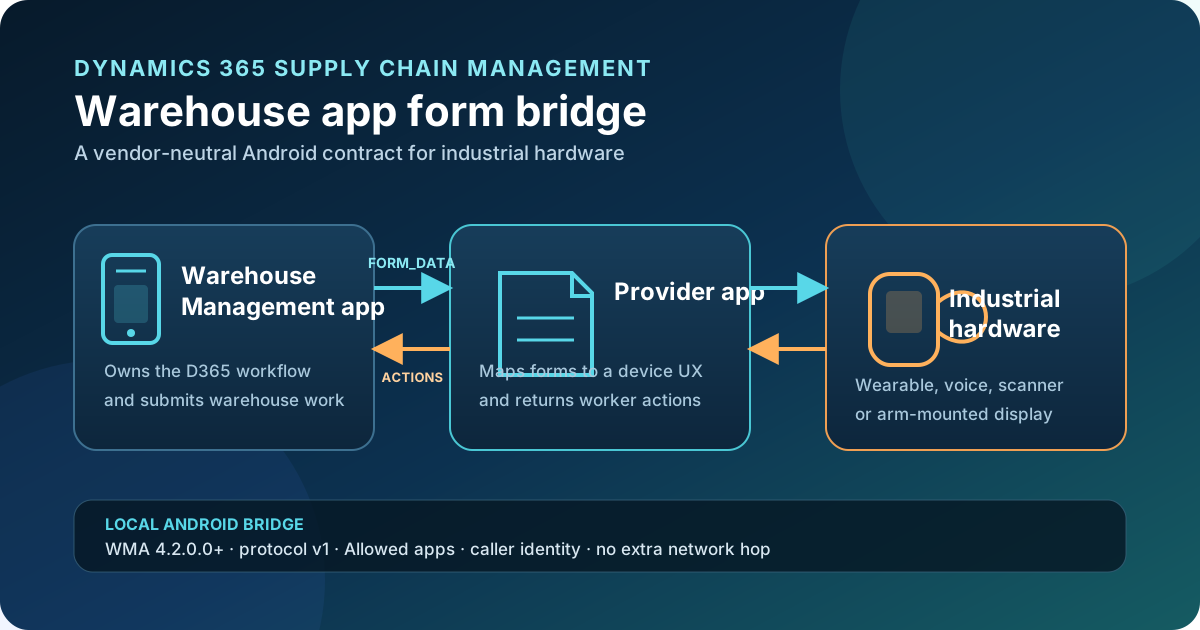
Original diagram. The bridge is local to the Android device; Microsoft’s app retains the warehouse flow and communication with D365 SCM.
What actually changes
Common integrations previously focused on sending barcode reads or receiving haptic signals. The form bridge exposes the current form structure and accepts a response that can modify controls, press buttons, submit the page, or close an instruction.
| Integration | Direction | Scope |
|---|---|---|
| Scanner output | Hardware → app | Usually enters a value in the active control. |
| Haptic feedback | App → wearable | Communicates success, warning, or error. |
| Form bridge v1 | App ↔ provider | Delivers forms, controls, instructions, and images; returns input and actions. |
The provider app becomes a second interaction experience, but it doesn’t execute the warehouse process. Warehouse Management mobile app still interprets the response, submits the form to Supply Chain Management, and receives the next step.
Architecture and message contract
The bridge exchanges Android broadcast intents between two apps installed on the same device. This local exchange doesn’t require an additional network request. Each message carries a JSON string in this extra:
com.microsoft.aierpmobile.extra.PAYLOAD
The four contract actions are case-sensitive:
| Action | Direction | Effect |
|---|---|---|
com.microsoft.aierpmobile.FORM_DATA | WMA → provider | Sends the current form. |
com.microsoft.aierpmobile.CONTROL_CHANGES | Provider → WMA | Applies changes and immediately submits the form. |
com.microsoft.aierpmobile.SUBMIT_FORM | Provider → WMA | Submits the form without changing controls. |
com.microsoft.aierpmobile.CLOSE_NOTIFICATION | Provider → WMA | Closes the current notification or instruction without submitting. |
Every payload declares "version": "v1". This identifies the contract, not mobile app version 4.2.0.0. Build a parser that tolerates unknown fields: Microsoft recommends logging a warning when the version changes and attempting to process supported fields.
There is also a compatibility warning. Earlier integrations used FORM_RENDER or the com.microsoft.wma.* namespace. They must move to the current names; keeping the old actions stops form delivery.
What FORM_DATA contains
The message includes screenId, a localized title, controls, and—when present—an image or instruction. A reduced payload might look like this:
{
  "version": "v1",
  "screenId": "Default",
  "pageTitle": "Enter license plate",
  "controls": [
    {
      "controlType": "text",
      "name": "WHSWorkLicensePlateId",
      "label": "License plate",
      "data": "",
      "enabled": "1",
      "Status": "1",
      "DisplayArea": "PrimaryInputArea",
      "PreferredInputMode": "Scanning"
    }
  ]
}
Don’t treat this as a stable domain model:
screenIdis a presentation hint, not a business key;- the identifier returned to WMA is
name, never the label or position; - many flags and priorities that look numeric or Boolean are strings;
- field names are case-sensitive:
Statusandenableduse different casing; - an image is Base64 JPEG without a
data:prefix, capped at 150 KB encoded; imageandinstructionare omitted when absent rather than necessarily set tonull;- the device needs a generic presentation for unknown types or screen patterns.
Documented controls include text, password, buttons, detours, combo boxes, and fast-validation variants. Display areas and priorities let a provider adapt the form to a small screen without changing its supplied logical order.
Step-by-step implementation
1. Prepare the device and provider app
You need:
- Android with Warehouse Management mobile app 4.2.0.0 or later.
- The provider app installed on the same device.
- A test connection to a Supply Chain Management environment.
- Representative warehouse flows.
- Administrative access to allow the provider’s Android package.
Don’t confuse the form bridge with QR sign-in, also published for 4.2.0.0. They are independent: one links hardware to forms; the other authenticates workers through Entra ID and a PIN.
2. Allow the package on every device
From the WMA sign-in page, open Connection setup → Client settings → Allowed apps and add the exact package name. Separate multiple entries with semicolons:
com.contoso.warehousebridge; de.proglove.integrationkit.intenthub
The list is stored locally on each device. Configuring one terminal doesn’t configure a fleet, so provisioning and audit procedures are required. An empty list disables the bridge in both directions.
3. Declare the form receiver
The provider must register an exported BroadcastReceiver in AndroidManifest.xml:
<receiver
    android:name=".WarehouseFormReceiver"
    android:exported="true">
    <intent-filter>
        <action android:name="com.microsoft.aierpmobile.FORM_DATA" />
    </intent-filter>
</receiver>
A runtime-only receiver isn’t enough. On Android 11 and later, the manifest declaration also lets WMA discover the package through its action-based package visibility query.
When the intent arrives:
- check the action;
- read
com.microsoft.aierpmobile.extra.PAYLOAD; - validate JSON and contract version;
- present only supported controls and honor
enabled, length, and type hints; - avoid logging full payloads or credentials.
4. Identify the action sender
WMA accepts inbound actions only when it can attribute them to an allowed app:
- Android 14 and later provides the sender identity;
- Android 13 and earlier requires an immutable provider-created
PendingIntentin thecaller_id_intentextra.
Attach that identifier to all three inbound actions on every supported Android version. This Kotlin skeleton changes one control:
private val callerId = PendingIntent.getActivity(
    context,
    0,
    Intent(),
    PendingIntent.FLAG_IMMUTABLE
)

fun submitChange(controlName: String, value: String) {
    val payload = JSONObject()
        .put("version", "v1")
        .put("changes", JSONArray().put(
            JSONObject().put("name", controlName).put("value", value)
        ))

    context.sendBroadcast(
        Intent("com.microsoft.aierpmobile.CONTROL_CHANGES")
            .putExtra("com.microsoft.aierpmobile.extra.PAYLOAD", payload.toString())
            .putExtra("caller_id_intent", callerId)
    )
}
If you explicitly target the broadcast, the actual application ID is com.Microsoft.WarehouseManagement, not the action namespace. On Android 11 and later, declare it in <queries> as well.
5. Return the correct action
CONTROL_CHANGES carries only changed controls and immediately submits the form. It isn’t a draft update: don’t emit it on every keystroke or follow it with SUBMIT_FORM, because that creates two submissions.
{
  "version": "v1",
  "changes": [
    { "name": "WHSWorkLicensePlateId", "value": "LP-000123" }
  ]
}
To press a button, return its name with "value": "1", even if the original data is empty. For a combo box, the value must be one of _comboboxItems.
Use SUBMIT_FORM only to confirm without changes and CLOSE_NOTIFICATION to close an instruction. The latter is idempotent and doesn’t submit the form; dontShowAgain: true persists suppression for that screen.
Security is the critical design point
An allowed app receives operational form data and can submit actions on the worker’s behalf. Allowed apps is therefore a trust boundary, not a convenience list.
Apply at least these controls:
- Allow only signed packages delivered through a controlled enterprise channel.
- Manage installation, updates, and removal through MDM where possible.
- Audit the effective list across the fleet; a typo blocks delivery without an error.
- Mask
passwordcontrols and avoid logging full forms, images, or personal data. - Validate length, type, combo-box options, and control names against the latest
FORM_DATA. - Reject responses built from a stale form.
- Test Android 13 and 14 separately because identity assurances differ.
Microsoft warns that untargeted broadcasts can be received by other apps registered for the same actions. On Android 13 and earlier, caller_id_intent proves who created the PendingIntent, not necessarily who sent a particular broadcast; another app that obtains it might reuse it. Don’t equate this with Android 14 sender identification.
These constraints favor managed devices, a minimal application catalog, controlled distribution, and a dedicated threat review before production.
Test plan
Test real processes, not only a license-plate screen:
FORM_DATAreceipt after every transition;- localized labels, values, priorities, and disabled controls;
- masked passwords and absence of sensitive telemetry;
- text, button, detour, and combo-box controls;
- fast validation and multiscan when used;
- forms with and without images and instructions;
- omitted images above the limit;
- exactly one
CONTROL_CHANGESsubmission; SUBMIT_FORMwithout changes;- temporary and persistent instruction dismissal;
- caller identity on Android 13 and Android 14;
- package removal from
Allowed appsand effective blocking; - network loss between WMA and SCM while the local bridge remains available;
- provider-app update and rollback through MDM.
For development-time identity diagnostics, Microsoft documents:
adb logcat -s IntentScanner
An integration that works on Android 14 but not Android 13 commonly lacks caller_id_intent. A Sender identity mismatch warning means the broadcast sender and identifier creator differ.
Availability, support, and licensing
Version 4.2.0.0 has been released in Microsoft App Center since September 29, 2026. Google Play rollout is part of the store deployment scheduled to begin October 6. Use a pilot device group before moving it to production terminals.
The protocol is documented only for Android. Don’t extrapolate the bridge to Windows or iOS even though WMA runs on those platforms.
The documentation doesn’t identify an additional Microsoft license for the form bridge. Dynamics 365 Supply Chain Management and mobile-app rights still apply, while hardware, provider software, MDM, and support can have their own commercial terms. Confirm them before selecting a wearable.
Limitations and design decisions
- The provider gets neither a remote API nor direct D365 access; it shares a device with WMA.
- The current contract is
v1and can gain unknown fields. - The bridge doesn’t replace Process Guide logic or remove the need to validate SCM flow extensions.
- The package list is local to each terminal.
- Images can be omitted and must never be required to complete a step.
CONTROL_CHANGEScombines change and submit; no draft mode is documented.- Visual identifiers aren’t stable business keys.
- Sender security is weaker on Android 13 and earlier.
Practical recommendation
The best first use case isn’t a rewrite of the entire mobile experience. Pick a repetitive, measurable flow: hands-free picking, license-plate confirmation, or counting where hardware can reduce movement and errors. Build an adapter that maps FORM_DATA into an extension-tolerant internal model, preserves every original control name, and encapsulates the four protocol actions.
Pilot on Android 13 and 14, measure time per step, errors, and retries, and complete a threat review before expanding. This change matters because it turns a provider-specific wearable integration into a contract third parties can implement without coupling their hardware to the D365 SCM backend.