🧮 D365 SCM pricing API now calculates multiline discounts
🧮 D365 SCM pricing API now calculates multiline discounts
Microsoft has expanded the documented scope of Unified Pricing Management’s pricing calculation API: as of October 2, 2026, multiline or cart-level discounts are explicitly supported. One day earlier, they appeared in the unsupported column.
The change matters for B2B portals, configurators, quotation tools, and partner integrations. An external application can submit multiple lines as one transaction, let Supply Chain Management evaluate their shared context, and retrieve prices and discounts without creating a sales order.
It does not turn this API into a Commerce checkout engine. Microsoft still excludes basket pricing with promotion concurrency, e-commerce storefronts, and high-frequency or high-volume calls.
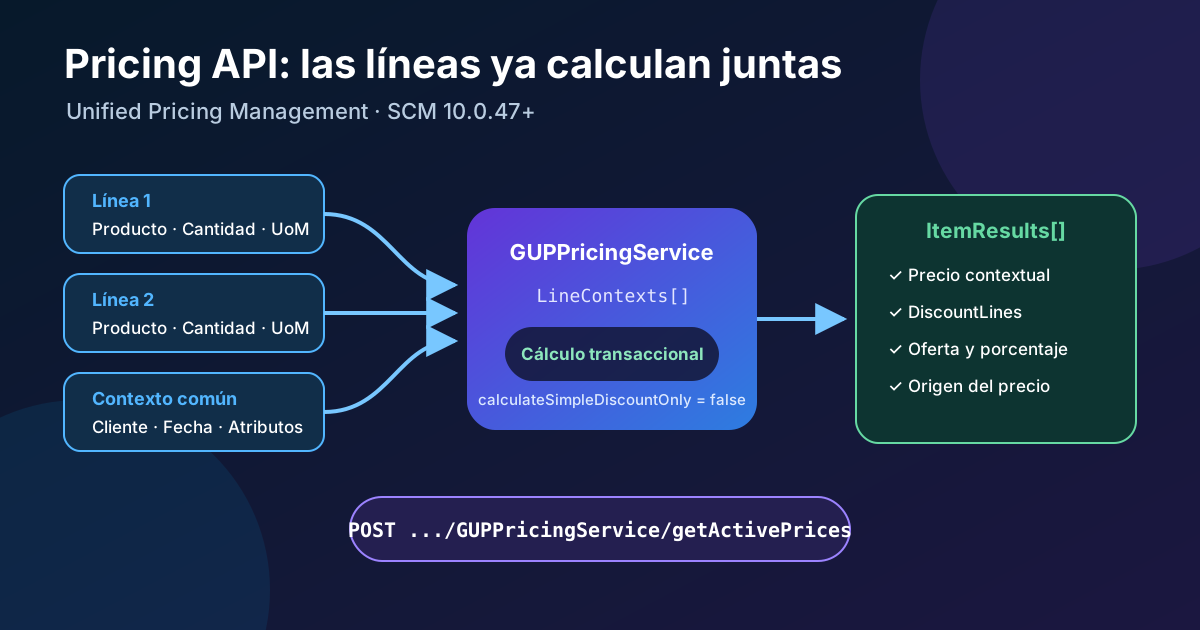
Original diagram. Lines travel together inside priceLookupContext; SCM returns a per-product breakdown without persisting an order.
What changed exactly
The official scope table now makes this distinction:
| Supported | Still unsupported |
|---|---|
| Single-line price calculation per product | Commerce basket pricing and promotion concurrency |
| Simple discounts | High-frequency or high-volume calls |
| Multiline or cart-level discounts | E-commerce or storefront scenarios |
| Unified Pricing Management rules and attributes | Replacing Commerce Scale Unit APIs |
| Quantity-based pricing and variant ranges | — |
The distinction between a “cart-level discount” and “basket pricing” matters. The former describes rules that need a transaction’s full set of lines. The latter belongs to Commerce scenarios with specific concurrency, performance, and basket semantics. The SCM API can evaluate lines together without acquiring the operating contract of a POS or web store.
Microsoft does not label the API as preview. Published prerequisites are:
- Dynamics 365 Supply Chain Management 10.0.47 or later;
- Unified Pricing Management enabled;
- an application registered in Microsoft Entra ID;
- the same application registered in SCM and mapped to a suitably privileged user.
The documentation announces no feature-specific SKU or meter. Existing Supply Chain Management licensing and the security context of the integration user continue to apply.
Architecture and contract
The external application does not create SalesTable or SalesLine. It invokes a synchronous JSON service:
POST https://<environment>/api/services/GUPPricingServiceGroup/GUPPricingService/getActivePrices
Authorization: Bearer <token>
Content-Type: application/json
The flow is:
- The application obtains an OAuth 2.0 token from Microsoft Entra ID for the
https://<environment>/.defaultscope. - SCM resolves the client ID through System administration > Setup > Microsoft Entra ID applications and runs under the mapped user.
GUPPricingServiceturnsHeaderContextandLineContextsinto a transaction context for Unified Pricing Management.- The engine evaluates prices, adjustments, and discounts effective at the requested time.
- The response contains a
Transactionand anItemResultsarray with each product’s price and breakdown.
The service calculates; it does not document sales-order persistence or inventory reservation. If a consuming system must commit the quote, use a separate document flow and decide how validity is controlled between calculation and confirmation.
Two request modes
The contract offers two mutually exclusive paths:
| Input | Use |
|---|---|
productIds | Simple product lookup, with default quantity 1 |
priceLookupContext + LineContexts | Multiple lines, quantities, units, warehouses, delivery modes, and attributes |
Do not send productIds and LineContexts in the same request. Multiline discounts require LineContexts, because each line participates in the transaction context.
The main calculation controls are:
dataAreaId: company, required whenChannelIdisn’t supplied;activeDate: effective timestamp; defaults to system date and time;calculateSimpleDiscountOnly:truelimits calculation to simple discounts;falsetreats input as a transaction for full calculation;includeVariantPriceRange: returns variant minimum and maximum whentrue.
Complete multiline request
This example submits two products with different quantities and requests full calculation:
{
  "request": {
    "dataAreaId": "usrt",
    "activeDate": "2026-10-03T08:00:00+02:00",
    "priceLookupContext": {
      "HeaderContext": {
        "CustomerAccount": "004009",
        "InventorySiteId": "CENTRAL",
        "InventoryLocationId": "DC-CENTRAL",
        "SalesOrderProperties": [
          {
            "Name": "order type",
            "Value": "3"
          }
        ]
      },
      "LineContexts": [
        {
          "ProductRecordId": 22565421974,
          "UnitOfMeasureSymbol": "ea",
          "Quantity": 3,
          "SalesLineProperties": [
            {
              "Name": "material",
              "Value": "brass"
            }
          ]
        },
        {
          "ProductRecordId": 22565421975,
          "UnitOfMeasureSymbol": "ea",
          "Quantity": 2
        }
      ]
    },
    "calculateSimpleDiscountOnly": false,
    "includeVariantPriceRange": false
  }
}
Names are case-sensitive. ProductRecordId is the product record identifier, not ItemId. Quantity defaults to 1. Site and warehouse first inherit from the channel and, without a channel, from the customer; send "" to override inheritance with a blank value.
Header context
HeaderContext can supply:
CustomerAccount;ChannelIdinstead ofdataAreaIdfor channel-based calculation;- common site and warehouse;
- affiliations and loyalty tiers;
SalesOrderPropertiesfor header attributes.
Affiliations already linked to the customer are applied automatically. Send them explicitly only to introduce different or additional context.
Line context
Each LineContexts element can provide:
- product, unit, and quantity;
- line-specific site and warehouse;
- delivery mode;
SalesLinePropertiesconsumed by pricing rules.
SalesOrderProperties and SalesLineProperties do not support two values for the same attribute in one request. Use separate requests to compare alternatives.
Reading the response
ItemResults returns an entry for each calculated product. Documented fields include:
| Field | Meaning |
|---|---|
BasePrice | Product base price |
TradeAgreementPrice | Price from applicable trade agreements |
AdjustedPrice | Price after adjustments |
CustomerContextualPrice | Final contextual customer price |
DiscountAmount | Total applied discount |
CurrencyCode, UnitOfMeasure, Quantity | Result context |
AttainablePriceLines | Price method and origin trace |
DiscountLines | Offers, percentages, and effective amounts |
For multiline integration, do not read only CustomerContextualPrice. Retain DiscountLines, OfferId, SaleLineNumber, and effective amounts to diagnose why a promotion did or did not apply. Do not assume array order is a stable key; correlate using product and line identifiers exposed by the contract.
Step-by-step implementation
1. Prepare Unified Pricing Management
Enable Unified Pricing Management in a sandbox and configure rules, groups, priorities, concurrency, and attributes. Validate the outcome inside SCM first. The API consumes the configured engine; it cannot compensate for incomplete rules or incorrect priority.
2. Register the identity
- Create or reuse an application in Microsoft Entra ID.
- Generate the secret described by the official guide and protect it in a secret manager.
- Request a token for
https://<environment>/.default. - Register the client ID in SCM and map it to a dedicated user.
- Grant only the privileges required by the service and pricing data.
Do not map the application to a human or global administrator account. Rotate the secret before expiry, and keep tokens, secrets, customer identifiers, and commercial terms out of logs.
3. Build the request as one transaction
Group every line that must participate in the multiline rule into one call. Set calculateSimpleDiscountOnly to false, provide an explicit effective time, and keep company, customer or channel, quantities, units, and pricing attributes together.
Splitting lines into independent calls removes the transaction-wide context. Combining lines from different baskets can apply a discount that should not exist.
4. Handle the result and validity
Define which output the consumer uses and what trace it stores. At minimum, retain effective time, company, customer or channel, products, quantities, currency, final prices, and applied offers. Before confirming a document long after calculation, decide whether to recalculate or honor an earlier contractual quote.
5. Design errors and retries
Use your own correlation identifier and bounded retries for transient failures. Do not repeatedly retry functional errors in product, unit, rule, or permissions. Calculation is read-oriented, but a retry storm can exceed Microsoft’s low- to moderate-frequency profile.
Extensibility
Microsoft documents GUPPricingServiceClass extension points for custom input or output:
initHeaderPricingObjectHashfor header context;initLinePricingObjectHashfor line context;setProductPricefor output fields.
A class extension must use [ExtensionOf(classStr(GUPPricingServiceClass))] and call next. Send custom attributes through SalesOrderProperties or SalesLineProperties, validating name, type, and value before use. Do not alter the standard contract or assign different semantics to the same attribute across channels.
Remaining limits
- SCM 10.0.47 or later and Unified Pricing Management are required.
- The API targets low- to moderate-frequency system-to-system integrations.
- It does not replace Commerce Scale Unit for PDP, POS, e-commerce, burst concurrency, or catalog browsing.
- Commerce basket pricing and promotion concurrency remain excluded.
- It does not create an order, reserve inventory, or promise that a result remains valid until confirmation.
activeDateand defaulted values can change the result; avoid relying silently on the server clock.- The contract uses product record IDs and several case-sensitive names.
- Test performance with realistic line and rule counts instead of extrapolating from one-line requests.
Test matrix
| Case | Validation |
|---|---|
One line, calculateSimpleDiscountOnly: true | Existing simple behavior remains unchanged |
Multiple lines, false | Expected multiline rule applies with a per-line breakdown |
| Just below and above a threshold | Discount appears only when eligible |
| Two units of measure | Quantity conversion does not distort the threshold |
| Customer and channel | Correct context and affiliations apply |
| Omitted, blank, and explicit site/warehouse | Documented inheritance is observed |
| Current and future date | Rule and trade-agreement validity is correct |
| Header and line attributes | Priority and conditions match SCM |
| Two concurrent promotions | Commerce limitation is tested, not assumed equivalent |
| Low, medium, and burst load | Latency, errors, and retries fit the design |
Compare output with an equivalent transaction inside SCM. Verify not only final price but also DiscountLines, origin, currency, unit, quantity, and effective rule.
Practical recommendation
This expansion removes an important barrier for internal B2B quoting and portals: they no longer need to price each line independently when a rule depends on the set. Treat the request as an immutable transaction, use calculateSimpleDiscountOnly: false, and retain the returned breakdown.
Keep the boundary clear. For a public storefront, POS, or a high-volume basket with complex promotion concurrency, Commerce Scale Unit remains the correct API. The new support adds multiline calculation to SCM; it does not make SCM the pricing plane for a high-scale store.