🌍 D365 SCM centralizes multicurrency pricing in one base currency
🌍 D365 SCM centralizes multicurrency pricing in one base currency
Microsoft has published the complete technical guidance for managing pricing rules through a generic base currency in Unified pricing management. An organization can maintain a rule once in EUR, USD, or another reference currency and let the engine convert it into the transaction currency during price calculation.
This isn’t only a data-maintenance convenience. Currency becomes part of rule selection, conversion uses the configured rate type and pricing date, and a global rule can compete or compound with a rule created specifically for the local currency. That makes the feature a pricing architecture decision.
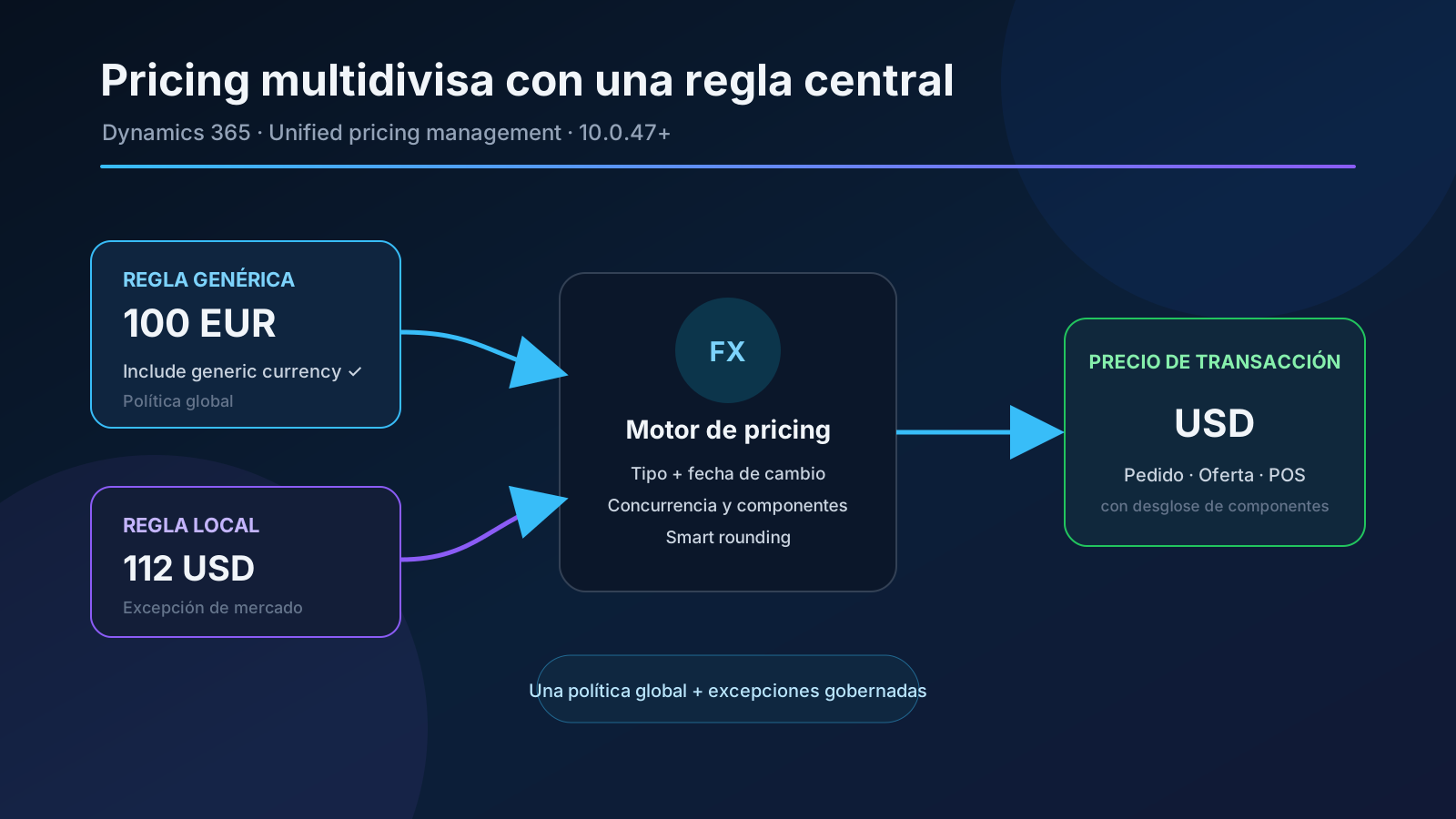
Original diagram. The engine selects transaction-currency rules and marked generic-currency rules, converts the latter, and then resolves concurrency, composition, and rounding.
What changed
Without this capability, an organization selling the same catalog in five currencies often duplicates trade agreements, margin adjustments, and discounts five times. Every commercial change becomes five master-data changes, with a risk of divergence.
With generic currency enabled, a rule can behave as follows:
| Rule type | Currency | Include generic currency | Candidate for a USD order |
|---|---|---|---|
| Local | USD | No | Yes |
| Generic | EUR, when EUR is generic | Yes | Yes, after conversion to USD |
| Other currency | GBP | No | No |
| Non-generic EUR | EUR | No | No |
The key distinction is that a generic rule isn’t a fallback. The engine evaluates it together with rules in the transaction currency. It then applies the normal price structure and concurrency rules to decide which one wins or how components compound.
Enabling the option therefore doesn’t mean “use EUR only if USD is missing.” When both rules exist, both can participate in the calculation.
Availability and requirements
The capability requires:
- Dynamics 365 Supply Chain Management or Dynamics 365 Commerce 10.0.47 or later;
- the Unified pricing management module enabled in Feature management;
- exchange rates between the generic currency and every required transaction currency.
The official release plan places public preview on January 26, 2026, and general availability on March 13, 2026. SCM 10.0.47 lists it as enabled by default, but that doesn’t remove two functional steps: Unified pricing management must be active, and Enable generic currency must be configured before rules can be marked as generic.
Microsoft documents no additional SKU or feature-specific consumption meter. Normal Supply Chain Management or Commerce licensing and Unified pricing management requirements apply.
Calculation internals
For a transaction in USD, the engine builds its candidate set from:
- rules whose currency is USD;
- rules whose currency is the generic currency and have Include generic currency selected.
Rules in any other currency are ignored. For each generic candidate, the engine:
- reads the exchange-rate type from Pricing management parameters;
- finds the rate applicable on the pricing date;
- converts the amount into the transaction currency;
- optionally applies smart rounding for that currency;
- lets the price structure resolve concurrency and composition.
The Date type field in Pricing management parameters decides which date the engine uses. A quotation recalculated for a past date uses the exchange rate for that date, not necessarily today’s rate. Treat that dependency as part of the price contract, especially when quotations remain open for weeks.
Confirmed scope
Microsoft documents generic currency for:
- sales trade agreement prices;
- margin component price adjustments;
- every discount type, including shipping threshold discounts;
- sales orders;
- sales quotations;
- point-of-sale transactions.
Not every rule has to become global. A centralized base price can coexist with local discounts in a market’s currency. That is exactly why concurrency requires design: a local rule can complement or compete with the generic rule.
Calculation example
Consider this setup:
- generic currency: EUR;
- pricing exchange rate:
1 EUR = 1.10 USD; - generic product price:
EUR 100; - USD smart rounding: the configured commercial increment;
- alternative local price:
USD 112.
The generic price produces a USD 110 candidate before rounding. The local price produces a USD 112 candidate. Don’t assume that the engine always selects USD 110: the result depends on the concurrency model, attribute-combination rank, and component structure.
This exposes the main adoption risk. A setup that looks correct when each rule is reviewed independently can produce an unexpected result when local and generic rules enter the same calculation.
Configuration step by step
1. Enable Unified pricing management
In Feature management, find:
- module: Sales and marketing;
- feature: Unified pricing management.
Enable it in a sandbox first and validate existing pricing customizations. The optional Unified pricing management pricing rule performance enhancement feature improves performance and import/export entities, but it isn’t the switch for generic currency.
2. Define currency and conversion
Open Pricing management > Setup > Pricing management parameters, select General, and expand Generic currency and smart rounding.
Configure:
- Enable generic currency: makes currency a matching criterion and exposes the rule flag;
- Generic currency: currency used to maintain centralized rules;
- Exchange rate type: set of exchange rates used by this calculation;
- Apply smart rounding after currency conversion: rounds the converted amount by transaction-currency rules.
Generic currency and Exchange rate type must either both be populated or both left empty. They are also shared with Accounts receivable parameters: a value entered on one page appears on the other.
3. Maintain exchange rates
In General ledger > Currencies > Currency exchange rates:
- select the exchange-rate type configured for pricing;
- create a pair from the generic currency to every sales currency;
- define periods without gaps or unintended overlaps;
- verify the rate unit, especially for currencies quoted per 100 units;
- assign an owner and update cadence.
The engine can convert only when a rate exists for the relevant pair, type, and date. Microsoft doesn’t promise fallback to another rate type, so treat a gap as a master-data error and test it explicitly.
4. Create trade agreement prices
For a trade agreement price:
- open Pricing management > During-sales pricing > Sales trade agreement price > Trade agreement journals;
- create or select a journal and open Lines;
- set the line currency to the generic currency;
- select Include generic currency;
- complete dimensions, attributes, dates, and amount;
- post the journal.
The checkbox is available only when the line currency matches the configured generic currency. After it is selected, currency becomes read-only on that line. The flag carries into the active agreement for review.
5. Create adjustments and discounts
For margin adjustments and discounts:
- open the relevant rule-type page;
- create a rule or disable an existing one before editing;
- assign the generic currency;
- select Include generic currency;
- complete attributes, components, dates, and conditions;
- enable the rule.
The setting doesn’t automatically convert every existing rule denominated in the generic currency. Apply it deliberately to each rule that should operate across markets.
Recommended governance model
Before migrating thousands of records, define ownership:
| Element | Recommended owner | Control |
|---|---|---|
| Pricing currency and rate type | Functional architecture/Finance | Approved, tested change |
| Exchange rates | Treasury or Finance | Calendar, source, dual review |
| Generic rules | Central pricing | Global scope and validity |
| Local rules | Market owner | Documented exception |
| Concurrency and structure | Solution architect | Automated regression cases |
| Smart rounding | Local pricing | Commercial validation by currency |
Separating rate maintenance, agreement creation, journal posting, and discount activation reduces the risk that one person controls both the reference and the resulting price.
Migration plan
A safe adoption can use five phases:
- Inventory: export rules by currency, validity, product, customer, and component.
- Normalize: identify true duplicates without consolidating legitimate local exceptions.
- Simulate: compare current and target prices on representative orders before replacing production rules.
- Pilot: activate one stable product family and two low-volume currencies.
- Roll out: migrate in waves, disable duplicates under change control, and retain calculation evidence.
Avoid mass-converting amounts with today’s rate when rules have historical or future validity. The centralized rule should express commercial policy, not merely an arithmetic snapshot of each local catalog.
Minimum test matrix
At minimum, test:
- transaction in the generic currency itself;
- transaction in every supported local currency;
- generic rule without a local equivalent;
- concurrent generic and local rules;
- current, past, and future pricing dates;
- missing exchange rate;
- a rate change during a quotation’s lifetime;
- smart rounding on and off;
- prices, margin adjustments, simple, quantity, mix-and-match, and threshold discounts;
- order, quotation, and POS;
- return or correction of an original transaction;
- recalculation after changing currency, date, or quantity;
- bulk import and rule activation;
- performance under the real candidate volume.
Store the component breakdown, not only the final total. Two calculations can coincidentally reach the same amount while selecting different rules.
Integrations and extensibility
Microsoft doesn’t announce a new API. Integrations invoking the Unified pricing management engine still receive a transaction-currency price, but its source can now be a converted rule.
Review in particular:
- external engines comparing the returned amount with a local list;
- price caches whose keys omit date, currency, or rate type;
- exports that must distinguish a central rule from a local exception;
- customizations filtering rules only by exact currency match;
- batches calculating prices before exchange rates are refreshed.
Don’t depend on undocumented internal tables or fields. If calculation provenance must be audited, use supported Unified pricing management breakdowns and contracts and validate them on the deployed build.
Security and operations
The risk surface isn’t a new endpoint but the reach of each master-data change. One generic rule modification can affect orders, quotations, and POS transactions in several currencies at once.
Apply:
- least privilege for parameters, rates, and rules;
- segregation between creation, approval, and activation;
- alerts for exchange-rate gaps and expiring rules;
- traceability for parameter changes and posted journals;
- testing with real roles, not only System administrator;
- a deployment window that allows caches to be invalidated and examples recalculated.
Limitations and nuances
- One configured generic currency is evaluated; this isn’t a hierarchy of base currencies.
- A generic rule neither replaces local rules nor acts as fallback.
- Conversion introduces volatility: a local price can change without editing the commercial rule.
- Rounding happens after conversion and may differ from catalogs calculated outside D365.
- The capability requires Unified pricing management and doesn’t alter the legacy pricing engine.
- Commerce without Unified pricing management still doesn’t support generic currency in its traditional pricing engine.
- Microsoft documents no new OData contract or feature-specific data entity.
- Changing the generic currency requires a review of flagged rules and rates; it isn’t a routine setting change.
Practical recommendation
Start with a stable catalog and retain a small layer of local exceptions. Before activation, explicitly model what happens when a local and a generic rule match together. Then monitor the price breakdown as well as the total.
The real value isn’t merely reducing records. It is establishing central pricing policy without losing the ability to respond to each market. Without governed exchange rates, concurrency, and rounding, administrative simplification can turn into commercial variability that is hard to explain.