💳 D365 Finance 10.0.49 decouples payment journal settlement
💳 D365 Finance 10.0.49 decouples payment journal settlement
In Dynamics 365 Finance, posting a payment journal and settling its marked transactions have traditionally been one operation. This is convenient when everything succeeds, but it creates dangerous coupling: a lock, inconsistency, or validation error during settlement can prevent a valid payment from being posted.
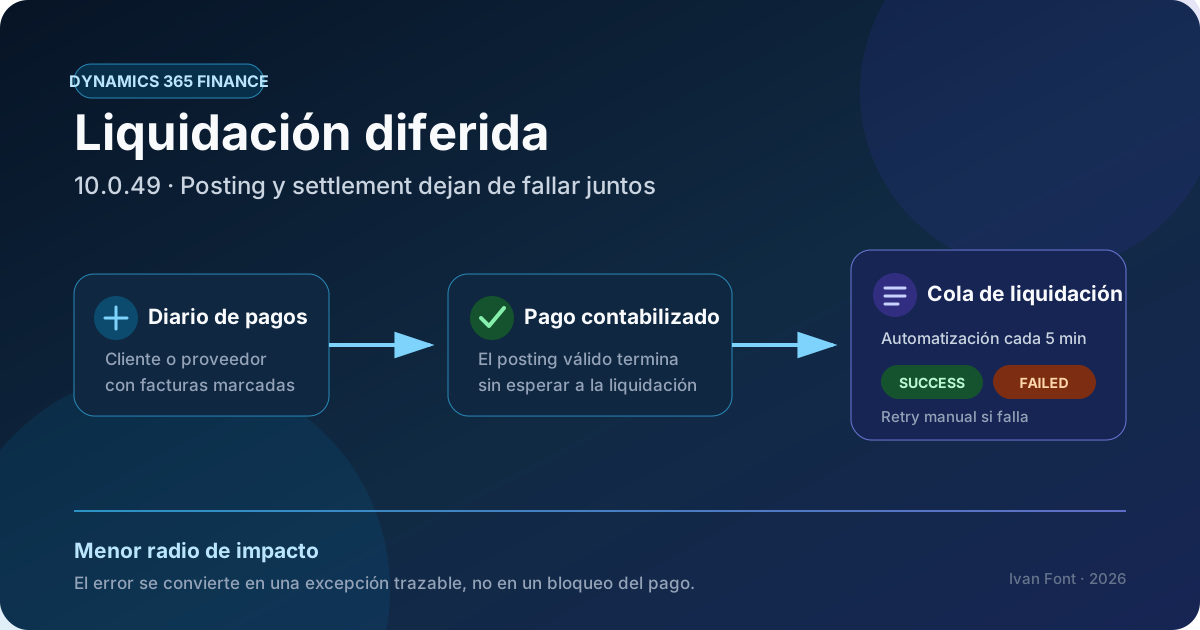
Version 10.0.49 introduces the Decouple settlement from journal posting feature in preview. Once enabled, Finance posts the payment, preserves the settlement relationship in a queue, and processes settlement separately. The matching rules don’t change; the execution timing and failure isolation do.
Status on August 27, 2026: this feature requires Dynamics 365 Finance 10.0.49 and explicit activation in Feature management. Version 10.0.49 is available as a development/test preview; general availability for self-update is scheduled for September 11, 2026. Microsoft states that preview releases can’t be used in production.
The problem it solves
In the standard flow, journal posting and settlement execute together:
Payment journal
      │
      ▼
Post payment + settle invoices
      │
      ├── all successful ──► Journal posted
      │
      └── settlement error ──► Entire operation blocked
This combines two distinct responsibilities:
- recording a valid payment in the ledger;
- applying that payment to one or more open transactions.
At scale, record locks or a problem with one transaction can turn settlement into a bottleneck for the entire journal. The new feature separates the two steps:
Payment journal
      │
      ▼
Post payment
      │
      ├──► Payment posted immediately
      │
      └──► Settlement relationship stored in queue
                         │
                         ▼
                 Automation every 5 minutes
                         │
             ┌───────────┴───────────┐
             ▼                       ▼
          Success              Partial success / Failed
                                      │
                                      ▼
                                Manual review and retry
The architectural benefit is failure isolation: a settlement issue no longer invalidates an otherwise valid payment posting.
Availability and prerequisites
Microsoft documents these prerequisites:
| Requirement | Detail |
|---|---|
| Version | Dynamics 365 Finance 10.0.49 |
| Status | Preview in August 2026 |
| Preview environments | Development or test; not production |
| Global activation | Feature management |
| Functional activation | Per journal name |
| Supported types | Customer and vendor payment journals |
The current 10.0.49 schedule is:
| Milestone | Microsoft-published date |
|---|---|
| Initial preview | July 27, 2026 |
| Latest possible preview update | August 17, 2026 |
| General availability for self-update | September 11, 2026 |
| First production autoupdate window | October 2, 2026 |
| Second production autoupdate window | November 1, 2026 |
These dates are subject to change. Version availability also doesn’t enable the feature automatically: Microsoft documents it as a capability that administrators must enable and configure.
Documented execution model
When a compatible journal is posted with delayed settlement:
- Finance posts the payment.
- Instead of settling in the same operation, it stores the relationship between the payment and marked transactions.
- It adds an entry to the settlement queue.
- Background process automation picks up prepared entries every five minutes.
- A fully completed settlement moves to
Success. - A partial result or error remains available for manual intervention.
Microsoft explicitly states that settlement logic itself is unchanged. Existing rules for marking, matching, and applying transactions still apply. This isn’t a new reconciliation engine; it is a new execution and recovery pattern.
Queue statuses
| Status | Operational meaning |
|---|---|
Prepared | The relationship is stored and waiting for processing. |
Processing | Settlement is currently running. |
Partial success | Some marked transactions settled; others remain. |
Success | All marked transactions settled successfully. |
Failed | The attempt failed and requires manual review and retry. |
One detail is critical: background automation doesn’t automatically reprocess Failed entries. Without human intervention, they remain open indefinitely.
Step-by-step configuration
1. Deploy the version to a test environment
Obtain the 10.0.49 preview package from the Lifecycle Services Shared Asset Library and apply it only to a development or test environment. Accept the preview terms and validate customizations and critical processes before wider adoption.
2. Enable the feature
- Go to Workspaces > Feature management.
- Find Decouple settlement from journal posting.
- Select the feature, and then select Enable now.
If the feature is later turned off, settlements already queued continue to be processed; the system simply stops adding new entries.
3. Enable selected journal names
- Go to General ledger > Journal setup > Journal names.
- Open a customer or vendor payment journal name.
- Enable delayed settlement for that journal.
Microsoft documents two functional controls:
- Decouple settlement on posting controls whether posting queues settlement for separate processing.
- Access to Settlement in queue controls access to the page used to review and process delayed settlements.
Start with one or two controlled journals instead of enabling every journal at once. This provides real measurements for queue volume, failure rate, and operational effort.
4. Operate the queue
The page is available under Cash and bank management > Periodic tasks > Settlement in queue. It supports:
- immediate processing with Settle now;
- batch execution with Settle in batch now;
- viewing marked transactions;
- canceling a queued settlement;
- inspecting errors and retrying failed entries.
Canceling an entry removes the settlement mark but doesn’t reverse the posted payment. This is intentional and must be reflected in support procedures, especially for vendor payments.
Locks and consistency while settlement is pending
Asynchronous processing reduces coupling but introduces an intermediate state that must be governed. While settlement is queued:
- involved open invoices are locked against manual edits and automatic settlement;
- the settlement form displays a delayed-settlement indicator;
- the payment exists in the ledger although the invoice can remain open;
- failed entries aren’t retried automatically;
- canceling the queue entry doesn’t undo posting.
Cash ledger balances can therefore update before the operational state of open transactions. Reports, integrations, and alerts that assume posting and settlement happen simultaneously need explicit regression testing.
Security and segregation of duties
Microsoft doesn’t document new standard security roles for this feature. It does introduce a new sensitive operation: reviewing, canceling, and retrying settlement after the payment has already posted.
Before production activation, review at least:
- who can change journal names and enable delayed settlement;
- who can open Settlement in queue;
- who can cancel, retry, or execute settlement in batch;
- how each intervention is represented in available audit evidence;
- which team owns and resolves
Failedentries.
Don’t grant general queue access merely because users can post journals. Posting a payment and managing settlement exceptions may require different responsibilities.
Recommended test plan
A happy-path test isn’t enough. Use a matrix such as:
| Scenario | Expected result |
|---|---|
| Customer payment against one invoice | Immediate posting and successful later settlement. |
| Vendor payment against multiple invoices | One traceable entry and complete application. |
| Lock on an invoice | Payment posted; queued relationship preserved. |
| Error in one of several transactions | Partial success with the remainder identifiable. |
| Manual retry | Only pending work is processed. |
| Cancellation | Mark removed; payment isn’t reversed. |
| Feature disabled | Existing queue continues; no new entries are added. |
| Open-transaction integration or report | Tolerates the interval between posting and settlement. |
Microsoft also states that automatic and batch payment journal posting behavior is unchanged. Validate this limitation against the exact posting mechanisms used by your implementation; don’t assume every posting channel adopts delayed settlement identically.
Operational monitoring
For safe operation, build a dashboard or at minimum a recurring review that tracks:
- entries by status and age;
- average duration from
PreparedtoSuccess; - unowned
Failedentries; Partial successsettlements;- journal names producing the most exceptions;
- posted payments whose settlement remains pending beyond the agreed SLA.
Microsoft doesn’t document a feature-specific API or supported table names for querying this queue. Avoid direct integrations against internal tables until an official extensibility contract exists. Use only supported entities, events, or extension points that are confirmed in the target environment.
Licensing
The feature documentation doesn’t identify a separate license. The published technical prerequisite is Dynamics 365 Finance 10.0.49. Preview terms, regional availability, and tenant usage rights should still be validated before planning deployment.
Practical recommendations
- Keep the preview out of production. Use the 10.0.49 preview to validate processes and customizations before self-update GA.
- Roll out in phases. Start with low-risk journals and expand once queue operations are stable.
- Assign exception ownership. A
Failedentry doesn’t retry itself. - Separate permissions. Review who can post, inspect, cancel, and retry.
- Test downstream consumers. Payments and open transactions can be temporarily out of alignment.
- Alert on queue age. An unmonitored queue turns a visible blocking error into silent operational debt.
- Document cancellation. Canceling settlement doesn’t reverse payment posting.
Conclusion
Delayed settlement in Dynamics 365 Finance 10.0.49 looks small on the surface but represents an important operational architecture change. It separates a valid posting from a potentially problematic settlement, reduces the blast radius of locks and validation errors, and creates an explicit recovery path.
The cost of decoupling is a new responsibility: queue governance. Without monitoring, ownership, and retry procedures, posted payments can accumulate without being applied. Implemented well, the feature turns a synchronous business-blocking failure into an isolated, traceable, and recoverable exception.