💳 D365 Finance 10.0.49 brings prepayments to each sales line
💳 D365 Finance 10.0.49 brings prepayments to each sales line
Dynamics 365 Finance 10.0.49 adds a capability that looks small but matters for projects, make-to-order manufacturing, and milestone sales: customer prepayments can now be calculated and tracked for each sales order line. The previously documented flow treated a prepayment as one amount or percentage at header level.
The new Enable line level prepayment flow parameter lets the proposal use Header or Line. In line mode, each position can hold its own percentage or amount, and Finance maintains that allocation through proposal, prepayment invoice, receipt, and application to the final invoice. Standard customer payment and settlement behavior remains in place.
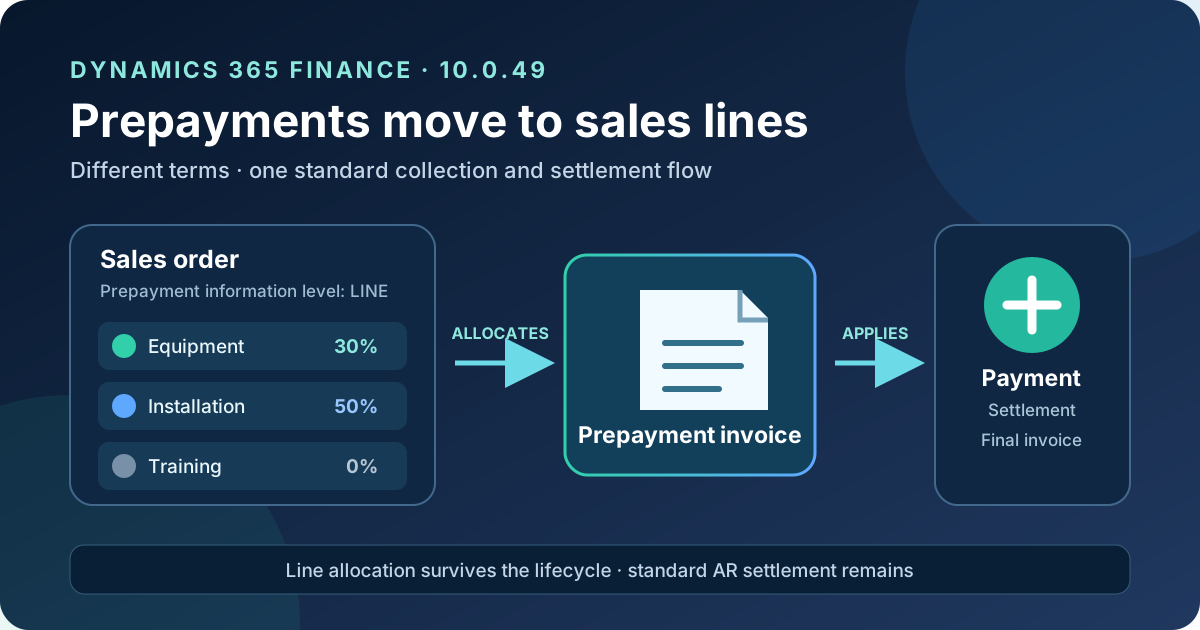
Original diagram. Allocation starts at sales lines and survives the prepayment lifecycle; collection and settlement continue through the standard Accounts receivable process.
What changed
The previous model remains available. The difference is calculation and tracking granularity:
| Level | Calculation | Tracking | Use it when |
|---|---|---|---|
| Header | One percentage or amount over the order total | One prepayment for the order | Commercial terms are uniform |
| Line | Independent percentage or amount per line | Relationship between prepayment and source lines | Milestones, product families, or terms differ |
Microsoft confirms four effects of line mode:
- the proposal can review and edit prepayment information per position;
- the system calculates each sales line independently;
- the prepayment invoice reflects the line-level calculation model;
- reporting and analysis can trace calculations to source order lines.
Microsoft also states that the underlying allocation is maintained throughout the lifecycle, but this update doesn’t publish the tables, data entities, or OData contracts implementing it. Don’t design an integration around field or entity names that aren’t documented.
Availability
The capability is documented for Dynamics 365 Finance 10.0.49. That release reached self-update general availability on September 11, 2026; the first production autoupdate window starts October 2 and the second starts November 1, 2026.
Microsoft doesn’t label line-level flow as preview. The functional page presents it as available from 10.0.49 and requires explicit enablement. The confirmed status is therefore:
- documented minimum version: 10.0.49;
- 10.0.49 release: generally available for self-update;
- activation: base prepayment feature plus functional parameter;
- licensing: no new SKU, consumption meter, or additional cost is documented for this change.
Don’t confuse release GA with automatic process activation. Line behavior remains off until the parameter is configured.
Functional architecture
The flow separates three concepts:
- Prepayment proposal: defines Header/Line level and required percentages or amounts.
- Prepayment invoice: creates the receivable and records the liability or deposit according to posting configuration.
- Payment and application: settles the prepayment invoice and applies the collected amount to the order’s final invoice.
The enhancement concentrates on the first concept and preserves allocation through the next two. It doesn’t replace customer settlement or create a payment method. The final invoice retains the full sale value, and the applied prepayment reduces its open balance.
The general accounting entries remain those of the standard flow:
| Event | Debit | Credit |
|---|---|---|
| Prepayment invoice | Accounts receivable | Prepayments/deposits |
| Collection | Bank | Accounts receivable |
| Application to final invoice | Prepayments/deposits | Accounts receivable |
| Final invoice | Accounts receivable | Revenue |
The documentation doesn’t guarantee that the ledger voucher itself is physically split by line. What is confirmed is line-level functional calculation and traceability—not new general-ledger granularity. Inspect actual vouchers before promising position-level accounting reports.
Example: different terms within one order
Consider this order:
| Line | Amount | Prepayment | Prepaid amount |
|---|---|---|---|
| Equipment | €10,000 | 30% | €3,000 |
| Installation | €2,000 | 50% | €1,000 |
| Training | €1,000 | 0% | €0 |
| Total | €13,000 | €4,000 |
Header mode could reproduce the total with an approximate 30.77% rate, but it would lose the commercial contract: training has no prepayment and installation requires half. Line mode retains that meaning and explains the €4,000 total.
This is a design example based on the documented behavior. Microsoft doesn’t describe what happens when one of these lines is canceled, split, or partially delivered; include those cases in acceptance testing.
Configure the base prepayment process
Line mode builds on Prepayment customer invoice. Complete the base process first:
- Enable Prepayment customer invoice in Feature management.
- Configure a Customer prepayment ledger account under Inventory management > Setup > Posting > Posting > Sales order > Prepayment.
- Under Accounts receivable parameters > Updates > Invoice > Prepayment, review:
- mandatory sales order confirmation;
- synchronous prepayment settlement;
- the sales category that determines the revenue account.
- Set the application policy to Notification or Automatic.
- Configure number sequences for invoice, voucher, and reversal.
- Initialize Process automations and schedule Automated prepayment settlement posting if synchronous settlement isn’t used.
- If Electronic Reporting generates the document, import the prepayment model, mapping, and template and configure its destination.
Don’t enable line calculation in production before completing one header-level generation and settlement in sandbox. That separates base-process issues from new-granularity issues.
Enable line-level prepayments
With 10.0.49 deployed:
- Open Accounts receivable > Setup > Accounts receivable parameters.
- On Updates, select Invoice.
- Set Enable line level prepayment flow to Yes.
- Save and open a test sales order containing multiple lines.
- Under Invoice > Prepayment, select Payment proposal.
- Set Prepayment information level to Line.
- Enter the required percentage or amount for each position.
- Review the calculated total before confirming the proposal.
Selecting Header retains aggregate behavior. Teams can adopt the capability incrementally and preserve orders with one common commercial term.
End-to-end process
An end-to-end test should follow the real sequence:
- Create and, if required, confirm the order.
- Generate a Line proposal.
- Enter different values and leave at least one line without a prepayment.
- Change a percentage and confirm that totals and allocation recalculate.
- Generate and post the prepayment invoice.
- Inspect the document, customer transactions, and voucher.
- Record the receipt in a payment journal and settle the prepayment invoice.
- Select Apply prepayment on the order.
- Post the final invoice.
- Run or wait for settlement automation when synchronous mode is off.
- Verify open balance, application, and traceability to original lines.
Application can be manual with Notification, or automatic after full payment with an Automatic policy. Synchronous prepayment settlement determines whether application completes during invoicing or through later automation; it is independent from Header/Line level.
Test cases not to skip
The documentation covers the main path, but an implementation must validate combinations affecting amount or source line:
- different percentage per line;
- percentage, fixed amount, and a no-prepayment line together;
- line and total discounts;
- automatic and manual charges;
- different sales taxes per position;
- foreign currency and exchange-rate variation;
- partial quantity, delivery, and invoicing;
- price or quantity changes after proposal creation;
- line cancellation;
- prepayment-invoice reversal;
- multiple prepayments on one order;
- small-amount rounding;
- manual, automatic, synchronous, and batch application;
- ER output and downstream reporting.
Microsoft doesn’t document every result. The matrix exists to establish actual build behavior and agree on treatment before deployment.
Security and segregation of duties
New granularity doesn’t justify broad role expansion. Where the control model requires it, separate:
- Accounts receivable parameter maintenance;
- proposal creation and editing;
- prepayment-invoice posting;
- payment recording and settlement;
- transaction reversal;
- inquiry and reporting.
Record the parameter change as a financial configuration change. Test with real user roles; System administrator masks authorization gaps and doesn’t validate segregation of duties.
Integrations, reporting, and extensions
Line traceability can help customer portals, cash planning, or milestone recognition, but the published documentation defines no new API. Before extending:
- inspect supported metadata in a 10.0.49 environment to identify tables and relationships;
- verify whether existing entities expose line level and allocation;
- avoid direct database reads and extensions against internal fields;
- confirm proposal customizations don’t replace the new standard behavior;
- validate how granularity reaches BYOD, Fabric Link, or the chosen export mechanism.
A line-based UI doesn’t mean an old entity automatically publishes line allocations. If its contract doesn’t expose them, design a supported entity or API and document compatibility with header-level orders.
Documentation limits
- The capability is documented from 10.0.49, but no more precise build or PQU minimum is published.
- Allocation tables, entities, business events, and APIs aren’t detailed.
- Exact behavior for partial delivery, cancellation, or post-proposal changes isn’t described.
- Line-level general-ledger voucher breakdown isn’t confirmed.
- The page doesn’t list exact roles or privileges for the new parameter.
- Microsoft’s example uses the same rate on all lines; test mixed rates and rounding.
These gaps don’t invalidate the capability, but they prevent presenting undocumented behavior as fact.
Practical recommendation
Enable the parameter first in a 10.0.49 sandbox and build a matrix from real orders: different line terms, partial deliveries, taxes, changes, and reversal. Compare proposal, document, customer transaction, voucher, and exported data.
The value isn’t visually splitting a total. It’s preserving the commercial relationship between each line and the cash required before delivery while staying inside Finance’s standard collection and settlement process.