📈 D365 Finance: BPA requires SQL rowversion to install
📈 D365 Finance: BPA requires SQL rowversion to install
Microsoft has documented an architectural prerequisite that can block Business performance analytics (BPA) installation: SQL row version change tracking (preview) must be enabled, and no customization, ISV integration, or environment flight can disable it.
The warning was published on September 24, 2026 in the official BPA prerequisites. This isn’t merely another installer checkbox. BPA depends on the Finance and Operations virtual entities solution, which relies on rowversion-based incremental tracking. If that chain is broken, installation might fail.
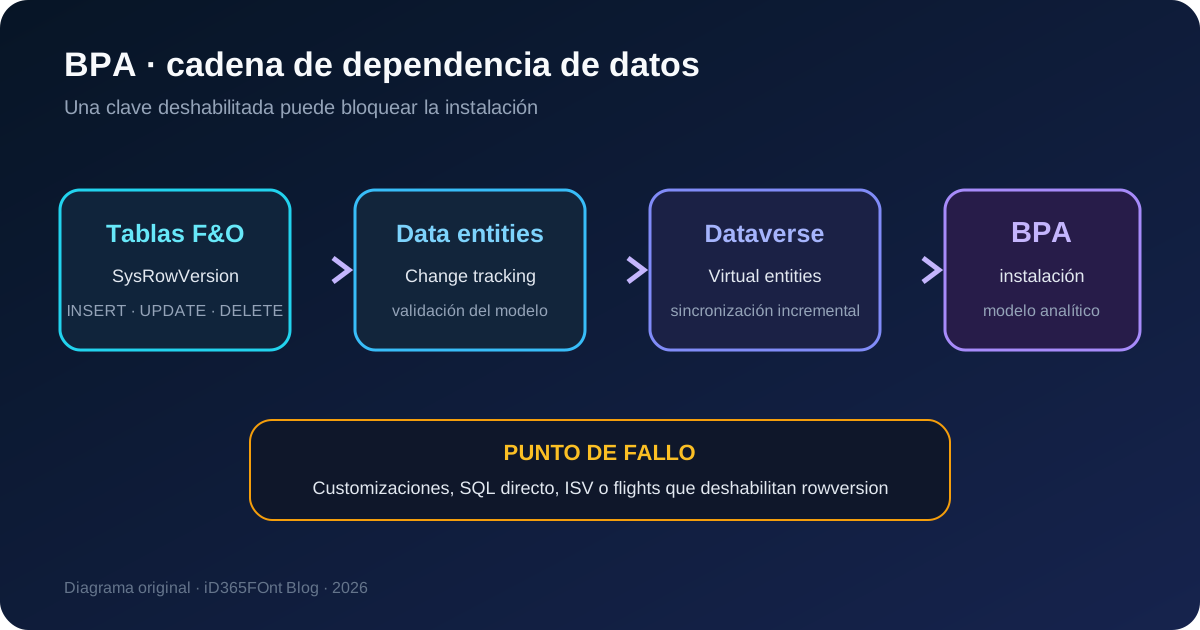
Original diagram. BPA installation relies on Power Platform, virtual entities, and incremental tracking in F&O.
What changed
BPA already required the SQL row version change tracking (preview) key under System administration > Setup > Licensing > License configuration. Microsoft now explicitly documents three consequences:
- BPA requires the feature because it depends on Finance and Operations virtual entities.
- Installation might fail when a customization, ISV, or flight disables it.
- If an ISV requires it to remain disabled, contact Microsoft before installing BPA.
That turns a configuration check into a solution compatibility gate. A selected key isn’t enough: the application model, entities, and ISV components must tolerate the change.
Availability status
Keep the component statuses separate:
| Component | Documented status |
|---|---|
| Business performance analytics | Generally available in supported public-cloud regions. |
| SQL row version change tracking | Still labeled preview in BPA configuration and guidance. |
| BPA in France | Currently unavailable because of regulatory limitations. |
| Initial BPA language | English en-US only; more languages are planned for future waves. |
BPA requires Dynamics 365 Finance 10.0.45, application build 10.0.2345.96, or later. Microsoft also requires a Tier 2/multibox environment for evaluation and preparation.
No new SKU is announced with this update. The installing user needs a Dynamics 365 Finance or equivalent license plus the administrative roles listed later. The change concerns compatibility and installation, not a newly documented consumption model.
How rowversion works
After the key is enabled in maintenance mode and the database synchronizes, F&O adds a system field named SysRowVersion, using SQL Server’s rowversion type, to tables where Allow Row Version Change Tracking = Yes.
SQL Server maintains a database-level counter and stamps a new value whenever a row is inserted or updated. A consumer retains a token and asks only for later changes, allowing Dataverse to synchronize increments instead of rereading the complete dataset.
F&O table
  └─ SysRowVersion changes on INSERT/UPDATE
       └─ Data entity supports change tracking
            └─ Virtual table exposes changes in Dataverse
                 └─ BPA installs and feeds its analytical model
The AifChangeTrackingDeletedObject table records deletions. A Delete tracking history clean-up batch removes history older than ten days by default. Therefore, the F&O change token has a default ten-day window rather than the 90 days commonly used by native Dataverse tables.
The hidden risk: direct SQL in X++
A rowversion column is read-only. X++ code that executes direct SQL and relies on implicit column order can break after enabling the key. Microsoft identifies this pattern as unsafe:
INSERT INTO table2
SELECT * FROM table1
Once SysRowVersion appears, SELECT * can try to insert or update a column managed internally by SQL Server. The safe pattern lists source and destination columns explicitly:
INSERT INTO table2 (Column1, Column2)
SELECT ColumnA, ColumnB FROM table1
Before enabling the key, search custom and ISV models for X++ Statement, executeUpdate, INSERT ... SELECT *, and other direct SQL. If a vendor depends on rowversion being disabled, don’t force installation; Microsoft instructs customers to open a support request.
Table and entity restrictions
The global key doesn’t make every entity compatible. Participating tables and the data entity need Allow Row Version Change Tracking = Yes, and the model must pass build-time validation.
Important restrictions include:
- custom change-tracking queries aren’t supported;
ExistsJoinandNoExistsJoinaren’t supported;Group Byon a data source isn’t supported;- one-to-many relationships aren’t supported because they create duplicate virtual-table identifiers;
- views and nested data entities aren’t supported as data sources;
- ranges on mutable fields can prevent deletion detection;
- joins must meet immutability and
OnDeleterules; - date-effective tables have restrictions because records can disappear from the view;
- Microsoft recommends fewer than ten data sources per entity for performance.
Microsoft recommends creating new entities when enabling this mechanism. Some incompatibilities in existing extensions appear as warnings to preserve backward compatibility, so a successful build doesn’t replace warning review.
BPA installation preflight
1. Confirm version, region, and environment
Record the application and platform versions, region, environment type, and linked Power Platform environment URL. Confirm Finance 10.0.45 or later and use a representative Tier 2 sandbox.
2. Inventory customizations and ISVs
Obtain confirmation from each ISV that it supports SysRowVersion and the global key. Review environment-specific flights and locate direct SQL. Absence of a known issue isn’t equivalent to certified compatibility.
3. Verify Power Platform and virtual entities
In LCS, confirm Power Platform environment setup is complete. In PPAC, open Resources > Dynamics 365 apps, verify Finance and Operations Virtual Entity is installed, and apply available updates before BPA.
When the solution is missing, BPA can return an error such as:
Unable to establish connection using data source:
'Finance and Operations Virtual Data Source Configuration'
The entity 'mserp_financeandoperationsentity' was not found in MetadataCache.
4. Validate the key in maintenance mode
Enable maintenance mode from LCS. In Finance, open System administration > Setup > Licensing > License configuration and confirm SQL row version change tracking (preview). Also review the functional configuration keys BPA lists for Bank, Electronic banking, Fixed assets, General ledger, Procurement, Project, Service management, and Trade.
When maintenance mode ends, database synchronization adds the required columns. Reserve a maintenance window; this isn’t an instant UI-only switch.
5. Review Dataverse and TDS
The installer needs System Administrator and System Customizer in Power Platform and System administrator in Finance. Current guidance also requires:
- the
PowerplatformAppuser enabled in Finance; - unmanaged customizations allowed;
- the Tabular Data Stream (TDS) endpoint enabled;
- the virtual entities solution updated;
- a healthy environment with sufficient capacity.
Blocking unmanaged customizations can prevent BPA from creating reports, completing organization setup, and transporting custom reports.
Test plan
Don’t test only installer completion. Run regression across four layers:
- Database and code: successful synchronization, no SQL failures, and execution of batches and processes using
Statement. - Entities: error-free build, reviewed warnings, visible virtual tables, and change tracking enabled.
- Integrations: Synapse Link, archival, mobile offline, relevance search, and ISVs sharing rowversion.
- BPA: installed application, completed ingestion, reconciled financial data, and verified incremental update.
Include at least one update and one deletion. Wait for both to reach the consumer and record token, timestamp, and latency. Verify Delete tracking history clean-up runs and that an extended outage won’t exceed the ten-day retention window.
Security and operations
Installation combines elevated access across Finance, LCS, and Power Platform. Use a named or controlled deployment identity, MFA, and temporary elevation. Separate approval, execution, and validation, then remove extra roles after the change.
Manage these as configuration items:
- SQL rowversion key state;
- Finance and Operations Virtual Entity version;
- ISV inventory and compatibility evidence;
- TDS endpoint state;
- unmanaged-customization policy;
- clean-up batch frequency and last result;
- BPA reconciliation tests.
Repeat the preflight after a restore, upgrade, or model change. This architecture depends on a chain of states; yesterday’s working BPA doesn’t prove every component remains aligned.
Practical recommendation
Treat SQL rowversion as a shared platform dependency, not a private BPA option. Before installation, create an explicit compatibility decision signed by application, integration, and ISV owners. If direct SQL exists or a vendor asks to disable the key, stop the deployment and resolve the conflict before production.
The important asymmetry is that a GA product depends on a capability still marked preview. That doesn’t invalidate BPA, but it raises the required test level and makes rowversion part of environment architecture governance.