🚀 Custom Agents in VS Code: build faster with less rework
🚀 Custom Agents in VS Code: build faster with less rework
What if you could describe the web application you want to build and the assistant returned both the agents you need and the complete implementation plan — with phases, dependencies, and validation criteria — in the same response? That is exactly what this tutorial shows.
In this article, I share a practical approach to:
- understand how the assistant generates your agents automatically from a Plan,
- invoke them from VS Code for each development phase,
- use
Planto design both the application and the agent system itself, - and chain agents in a flow that actually works.
The example: a team task manager (simplified Trello). Stack: React 18 + Vite + Tailwind CSS v4, FastAPI with Python 3.12, PostgreSQL 16 + SQLAlchemy 2.0 + Alembic, JWT authentication, Zustand for client state, TanStack Query v5 for server state.
🎯 Why create custom agents instead of using a generic assistant?
When you work with a single generic assistant on a web project, this is common:
- it mixes database schema, API routes, and React components in the same conversation,
- it does not keep the stack context between sessions,
- and it does not know when to review security versus when to implement.
With custom agents, you separate responsibilities into defined roles.
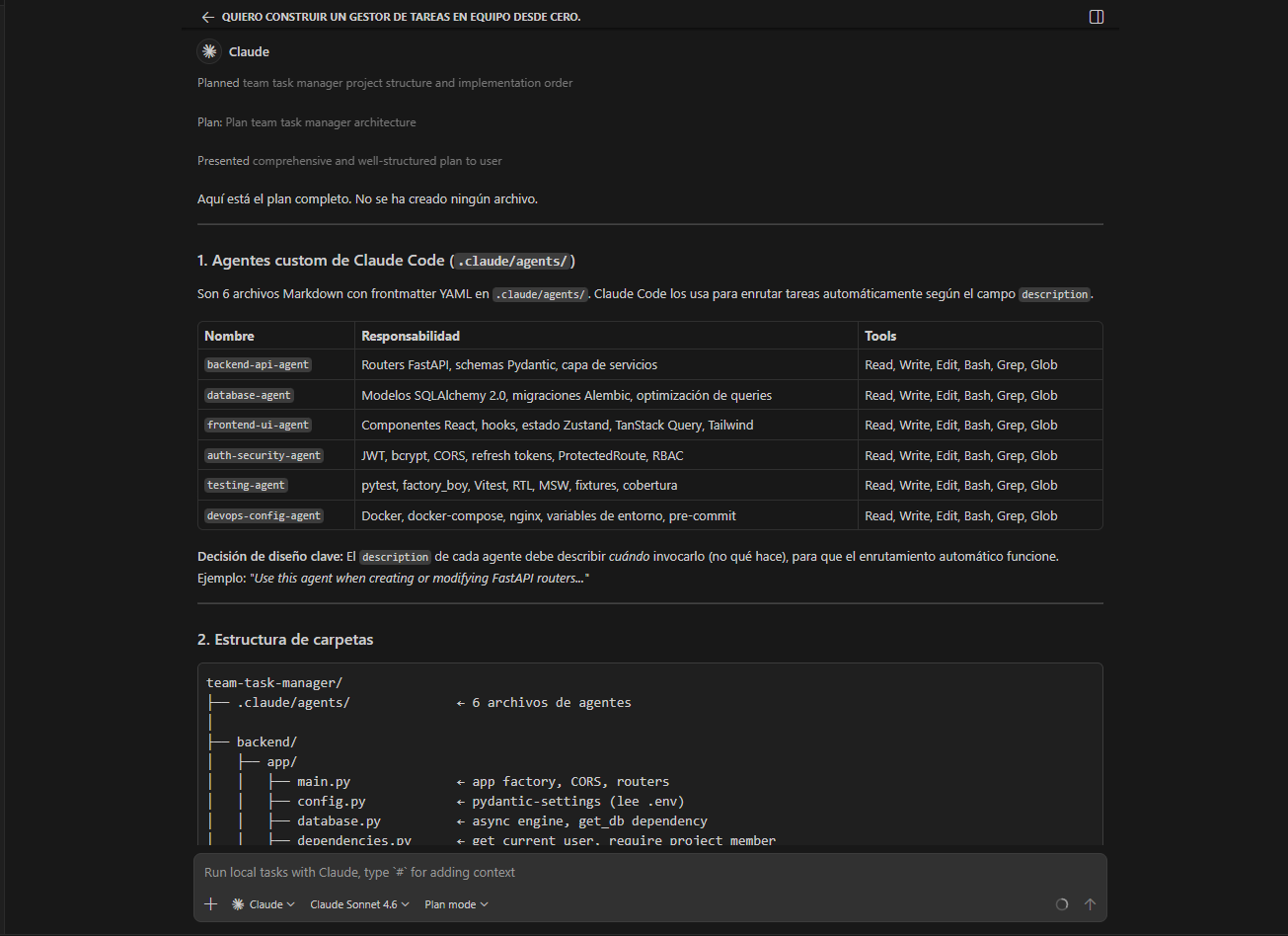
The 6 agents this Plan generated:
Database Agent: SQLAlchemy models, Alembic migrations, indexes, queries.Backend API Agent: FastAPI routers, Pydantic schemas, services layer, REST endpoints.Frontend UI Agent: React components, TanStack Query hooks, Zustand, Tailwind, DnD.Auth & Security Agent: JWT strategy, bcrypt, CORS, RBAC, ProtectedRoute.Testing Agent: pytest with factory_boy for backend, Vitest + MSW for frontend.DevOps & Config Agent: Docker multi-stage, nginx, docker-compose, linters, pre-commit.
Result: less noise, less rework, and more traceable decisions.
🧭 Orchestration: 5 phases, each with its agent
The key is not having many agents, but knowing when each one should be involved.
Plan structured the project into 5 strictly sequential phases:
| Phase | Main agent | Responsibility |
|---|---|---|
| 1 — Infrastructure | DevOps & Config Agent | Docker, env vars, health endpoint |
| 2 — Authentication | Auth & Security Agent | JWT, refresh token, ProtectedRoute |
| 3 — Models + API | Database Agent + Backend API Agent | Schema, migrations, CRUD with role-based auth |
| 4 — Frontend | Frontend UI Agent | Kanban DnD, TanStack Query, optimistic updates |
| 5 — Tests + Prod | Testing Agent + DevOps & Config Agent | ≥80% coverage, multi-stage Dockerfiles |
Each phase is strictly sequential: do not start the next one until all validation criteria of the current one pass.
Not every task needs all five phases. Adapt based on complexity:
| Complexity | Recommended steps |
|---|---|
| New single endpoint | Backend API Agent directly |
| New feature with schema change | Database Agent → Backend API Agent → Frontend UI Agent |
| Release with validation | Full 5-phase cycle |
🧪 How the agent system was born: Plan as the starting point
Before approving a single agent file, I used Plan mode with this prompt:
I want to build a team task manager from scratch.

Stack:
- Frontend: React with Vite and Tailwind CSS
- Backend: FastAPI with Python
- Database: PostgreSQL with SQLAlchemy and Alembic
- Authentication: JWT

Before creating any file, give me a complete plan that includes:
1. The custom agents I need to create to manage this project:
   name, description for the "description" field, tools, and argument-hint for each.
2. The project folder structure.
3. The implementation order with dependencies between phases.
4. Validation criteria before moving from one phase to the next.
Plan returned:
- 6 agents with complete frontmatter fields stored in
.claude/agents/. - Full folder tree for both backend and frontend.
- 5 implementation phases with strict dependencies between them.
- Validation criteria per phase — for example, to move from Phase 1 to Phase 2:
curl http://localhost:8000/healthmust return{"status":"ok"}andalembic currentmust show no errors.
When you approve the plan, the assistant executes each step: creates the .claude/agents/ folder, generates the 6 agent files, and scaffolds the project structure. All in the same session, without manual intervention.
Once approved, the assistant turns the plan into a TODO list and executes each item one by one. Here is the process mid-execution:
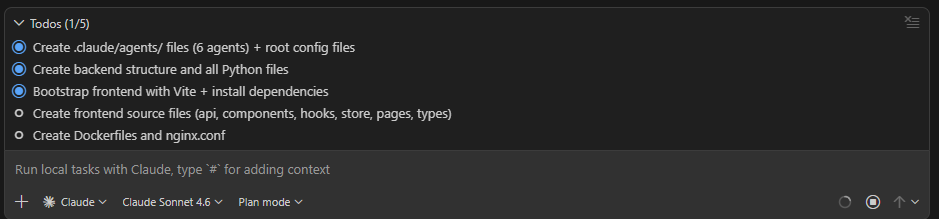
The key insight: Plan does not only organize code tasks — it builds the entire agent system for you.
Plan in action: full video
The complete flow recorded in real time — from the initial prompt to 6 agents created and the project structure scaffolded:
⏱️ Realistic comparison: complete web app without AI vs with Plan + agents
If we are talking about a complete web app like the one in this tutorial (React + FastAPI + PostgreSQL + JWT + tests + Docker), 120 min without AI is not a realistic estimate.
For one person, these ranges are more credible:
| Scenario | Total time | Outcome |
|---|---|---|
| Without AI (manual flow) | 160-320 h | More back-and-forth, more rework, late validation |
With orchestrated Plan + agents | 50-140 h | Better sequence, less rework, more time for quality |
Phase-by-phase estimate
| Phase | Without AI | With Plan + agents |
|---|---|---|
| Infrastructure and setup | 12-30 h | 4-10 h |
| Authentication and security | 20-50 h | 8-20 h |
| DB modeling + migrations + API | 50-100 h | 18-45 h |
| Full frontend + integration | 45-90 h | 15-40 h |
| Tests + stabilization + deployment | 30-60 h | 10-25 h |
| Total | 160-320 h | 50-140 h |
It is not magic: the reduction comes from lowering friction in decisions and handoffs between phases.
Where the real savings come from
- Less rework from badly ordered dependencies (schema/API/UI).
- Fewer broken changes by validating each phase instead of validating only at the end.
- Less context loss across sessions thanks to specialized agents.
- More net time for quality: tests, error handling, security hardening, and final review.
Practical translation: you are not only delivering faster, you are also delivering better.
📋 Why Plan is the most valuable practice
If I had to keep only one practice, it would be this: use Plan before touching files.
Plan gives four concrete benefits:
- Logical sequence. Turns a broad request into actionable steps with a defined order.
- Explicit dependencies. Prevents starting a step that depends on unresolved previous work.
- Verification criteria. Defines how quality will be validated before finishing — not after.
- Clear communication. When you collaborate with more people, the plan becomes an alignment document.
Practical rule: if a task has more than three dependencies or affects multiple files, using Plan is no longer optional.
✅ Practical recommendations to start today
- Initialize a git repository in your project if you do not have one yet.
- Open the chat, activate Plan mode, and use the prompt from the section above adapted to your stack.
- Approve the plan — the assistant creates the agents and scaffolds the project structure.
- Invoke
auth-security-agentin your first session: it only reads files and delivers immediate value. - Measure time across 5 consecutive tasks and compare with your baseline.
🧩 Conclusion
Custom agents in VS Code are not a productivity trend. They are a practical way to turn complex work into a repeatable process.
When you combine specialized agents, orchestration, and a good Plan, the benefit is clear: faster delivery, less rework, and stronger control over quality.
The 6 agents in this project were not designed one by one. They were born from a single prompt to Plan — with phases, dependencies, and validation criteria included. The system works because it has a design logic, not because it is a collection of accumulated prompts.
If your bottleneck today is the chaos between schema changes, API contracts, frontend integration, and quality review, start there: use Plan to design and generate the system, and let each agent do its part.