🧠 Copilot Studio connects business applications to Work IQ
🧠 Copilot Studio connects business applications to Work IQ
Microsoft has extended Work IQ so agents can reason not only over Microsoft 365 context, but also over data and processes in Dataverse business applications. A Copilot Studio agent built with the GitHub Copilot harness can add Work IQ as an MCP server, discover the available surface, and reuse business skills to query or act on model-driven applications.
The capability is in preview. Microsoft published it on September 25, 2026 and also announced that the standalone experience called Dataverse intelligence will soon no longer be available; new pilots should start with Business Applications in Work IQ. Microsoft has not published a retirement date, so this is a confirmed product direction rather than a closed migration schedule.
What actually changes
This is more than another connector. Work IQ MCP exposes a stable contract of ten generic tools. New applications add paths and schemas that those tools discover at runtime instead of creating a separate tool for every table or action.
| Layer | Confirmed contract | Technical consequence |
|---|---|---|
| Entity tools | fetch, create_entity, update_entity, delete_entity, do_action, call_function | Read and CRUD or business operations through discovered paths |
| Copilot | ask, list_agents | Delegation to published experiences and agents |
| Schema | get_schema, search_paths | Dynamic introspection of operations, types, and parameters |
| Application | Dataverse views, forms, metadata, rules, and permissions | The existing app still governs the functional surface |
| Semantics | Semantic models and business skills stored in Dataverse | Reusable, consistent instructions across agents |
This design reduces MCP tool explosion: a new workload adds paths that search_paths can locate and get_schema can describe, rather than indefinitely increasing the initial tool list.
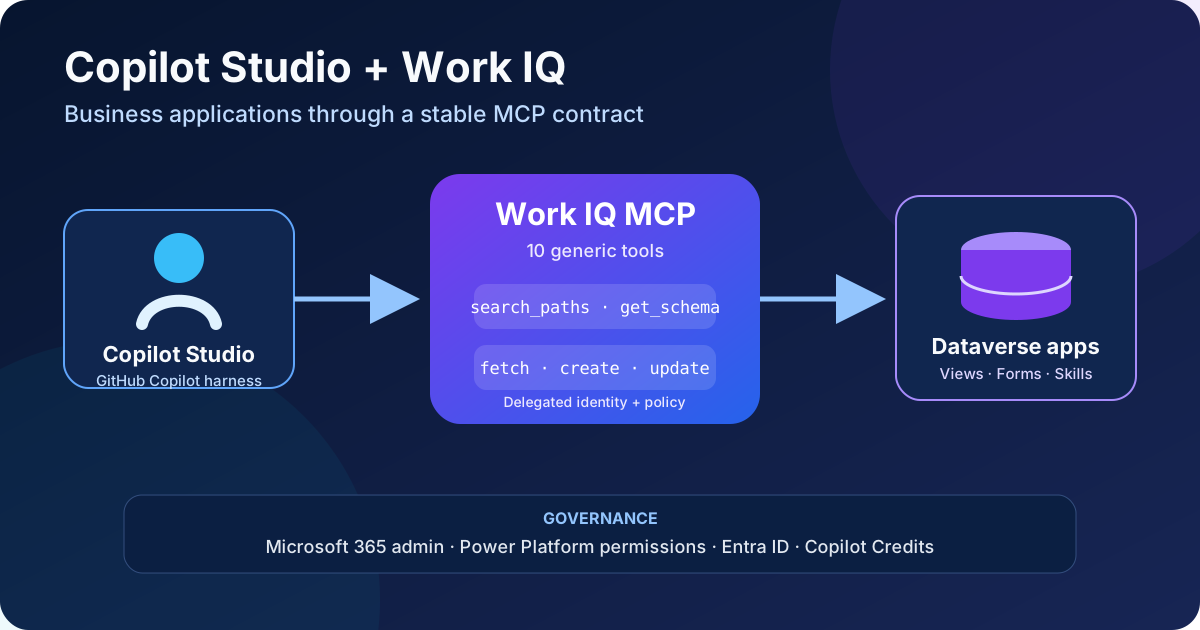
Original diagram. Work IQ applies delegated identity, Power Platform permissions, and administrative policy before reaching the application.
Availability and requirements
As of September 26, 2026, Business Applications in Work IQ is in preview and must not be assumed to be available in every tenant or region. Using it from Copilot Studio requires:
- an agent built with the GitHub Copilot harness;
- a Dataverse environment containing the pilot application and data;
- Work IQ and Business Applications enabled for a user group in the Microsoft 365 admin center;
- Work IQ/Dataverse intelligence features enabled in the Power Platform admin center;
- a usage-based billing plan, spending policy, and available Copilot Credits;
- licensed users with permissions to the required app, tables, rows, columns, and operations;
- consent for the agent’s Work IQ connection.
Microsoft documents an initial tenant setup that creates the Work IQ service principal with appId fdcc1f02-fc51-4226-8753-f668596af7f7. That registration does not replace user identity: the Work IQ API supports delegated permissions and on-behalf-of only; app-only authentication is unsupported.
Architecture and trust boundaries
Work IQ organizes context into three layers:
- Data connects authorized Microsoft 365 and business-application information.
- Memory retains relevant signals and context for the user.
- Inference reasons over that context to select paths and operations.
From Copilot Studio, a request enters through the Work IQ MCP connection. The server discovers a path, retrieves its schema, and executes the operation with delegated identity. For Dataverse applications, Microsoft confirms that existing Power Platform permissions, field metadata, business rules, and table permissions are respected.
Do not confuse this route with the native Dataverse MCP server. Business Applications in Work IQ does not require the agent to connect directly to Dataverse MCP. They are separate surfaces with different administration and contracts; enabling one does not automatically authorize the other.
Reads and writes
Read operations are the safest starting point. For Work IQ to perform writes over Microsoft 365 or connected applications, an administrator must explicitly allow them. The Business Applications experience also requires user confirmation before creating, updating, or deleting a record.
Confirmation improves operational safety, but it does not replace:
- least-privilege Dataverse roles;
- separation of duties;
- server-side business rules and validation;
- auditing for sensitive tables;
- DLP policies and connector review;
- denial tests with lower-privileged users.
Never use the agent prompt as an access-control mechanism.
Step-by-step configuration
1. Select a pilot application
Start with a non-critical model-driven application and a verifiable process. Choose a system view with few columns and a simple main form. Initially avoid sensitive data, irreversible automation, and complex client logic.
Define before enabling the feature:
- pilot group and functional owner;
- permitted tables and operations;
- read and, if applicable, write scenarios;
- Copilot Credits budget and threshold;
- test evidence and rollback criteria.
2. Enable Business Applications for the pilot group
In the Microsoft 365 admin center:
- Go to Copilot → Settings.
- Open Business Applications in Work IQ.
- Allow the feature only for the pilot group.
- Save the change and record its approver.
Propagation might not be immediate. Do not expand the group until permission and consumption tests are complete.
3. Prepare the Power Platform environment
In the Power Platform admin center, review the environment options under Dataverse intelligence features:
- Enable Allow data availability in Microsoft 365 Copilot if the scenario needs data to be available from Microsoft 365.
- Enable Turn on Dataverse intelligence (Work IQ) for agents and AI experiences.
- Review DLP policy, audit settings, and regional availability.
- Verify that every pilot user can open the application and perform only the intended operations.
Both options are off by default in the current documentation. Microsoft 365 admin-center control over tools and MCP servers is also not available in every region yet.
4. Configure billing and limits
Work IQ uses consumption billing through Copilot Credits. The documented onboarding path links a usage-based billing plan to an Azure subscription and resource group, assigns users, and establishes a separate spending policy.
An Azure budget provides alerts but does not guarantee that consumption stops. Define limits in the layers that can enforce a hard stop, and measure development, test, and runtime use of the GitHub Copilot harness separately.
5. Add Work IQ to the agent
In Copilot Studio:
- Open the GitHub Copilot harness agent.
- Go to Tools → Add Tool.
- Select Model Context Protocol.
- Choose Work IQ (preview).
- Select Create New Connection and sign in with the test identity.
- Select Add and Configure.
- Review instructions, permissions, and consent before saving.
- Start with a read-only query for a known record.
After validating reads and attribution, enable one low-risk write operation and verify that explicit confirmation appears before execution.
What it can do over a Dataverse application
Microsoft currently documents that Business Applications can:
- list records from system views;
- read records using the information available on the main form;
- create, update, and delete records with explicit confirmation;
- enforce whether fields are required, writable, or read-only;
- respect business rules and table permissions;
- use reusable business skills stored in Dataverse.
The selected view determines the rows and columns exposed in the experience, while operations use fields on the first tab of the main form. Views and forms designed for people now also influence the surface understood by the agent.
Limitations that affect design
The preview does not yet support every model-driven app customization:
- records cannot be created or updated when the form contains JavaScript in
OnLoad,OnChange, orOnSave; - custom controls are unsupported;
- subgrids are unsupported;
- the first tab of the main form is used;
- system views are used to list records;
- availability and administrative controls vary by region;
- app-only authentication is unsupported by the Work IQ API.
Client-side JavaScript is particularly important. Checking table write privileges is not enough: inventory the exact form and move any invariant that must also apply outside the web UI to server-side validation.
Recommended test plan
| Test | Expected result |
|---|---|
| User without table access | Cannot retrieve or modify records |
| Read-only field | Cannot update it |
| Business rule violation | Operation is rejected with an understandable error |
| Admin-disabled writes | Agent does not offer or execute the operation |
| Enabled write | Explicit confirmation appears before persistence |
| Form with client JavaScript | Create/update is blocked or unavailable |
| Known record in a system view | Response matches authorized rows and columns |
| Executed operation | Audit identifies user, table, time, and change |
| Controlled test session | Consumption appears in Copilot Credits reports |
Include prompt-injection tests in text fields. Record content is untrusted data; it must not become an instruction capable of changing tools, expanding permissions, or bypassing confirmation.
Adoption strategy
For new scenarios, Microsoft recommends starting with Business Applications in Work IQ instead of the standalone Dataverse intelligence experience. For existing pilots, retain the previous configuration until functional parity, regional availability, permissions, audit, and cost are verified.
A sensible rollout has three stages:
- Controlled reads through simple views and forms.
- Low-risk writes with confirmation, audit, and server-side rules.
- Shared business skills after versioning their instructions, owner, tests, and change process.
Business skills can prevent every agent from duplicating logic in prompts, but they also become governed assets. Treat them like code: stable name, purpose, inputs, owner, version, test suite, and retirement plan.
Official sources
- Business Applications in Work IQ (preview)
- Use business applications in Work IQ
- Add Work IQ to a Copilot Studio agent
- Work IQ MCP overview
- Work IQ API overview
- Enable Work IQ
- Set up Business Applications in Work IQ for a pilot
- Power Platform feature settings
- Primary documentation change published September 25, 2026