🛠️ Copilot Studio opens its full lifecycle to VS Code through MCP
🛠️ Copilot Studio opens its full lifecycle to VS Code through MCP
Microsoft has published Copilot Studio MCP, an official server that brings Copilot Studio operations into Model Context Protocol clients such as Visual Studio Code and GitHub Copilot CLI. From the same client, teams can discover agents and workflows, create or update drafts, run tests, review consumption, publish, and diagnose executions.
The direction of the integration matters: Copilot Studio is the MCP server in this pattern. This isn’t the familiar pattern where a Copilot Studio agent consumes tools from an external server, nor the MCP channel that exposes one published agent to clients. The new package provides an authoring and administrative surface for the service and the environment selected by the user.
Status on October 30, 2026: Microsoft created the repository on October 12 and updated the technical documentation on October 19. The
@microsoft/copilot-studio-mcppackage is available, but the pages don’t label the capability as either preview or general availability. Microsoft states that tools and operations can vary by rollout, environment, permission, and client policy. Package availability must therefore not be treated as a uniform GA contract for every tenant.
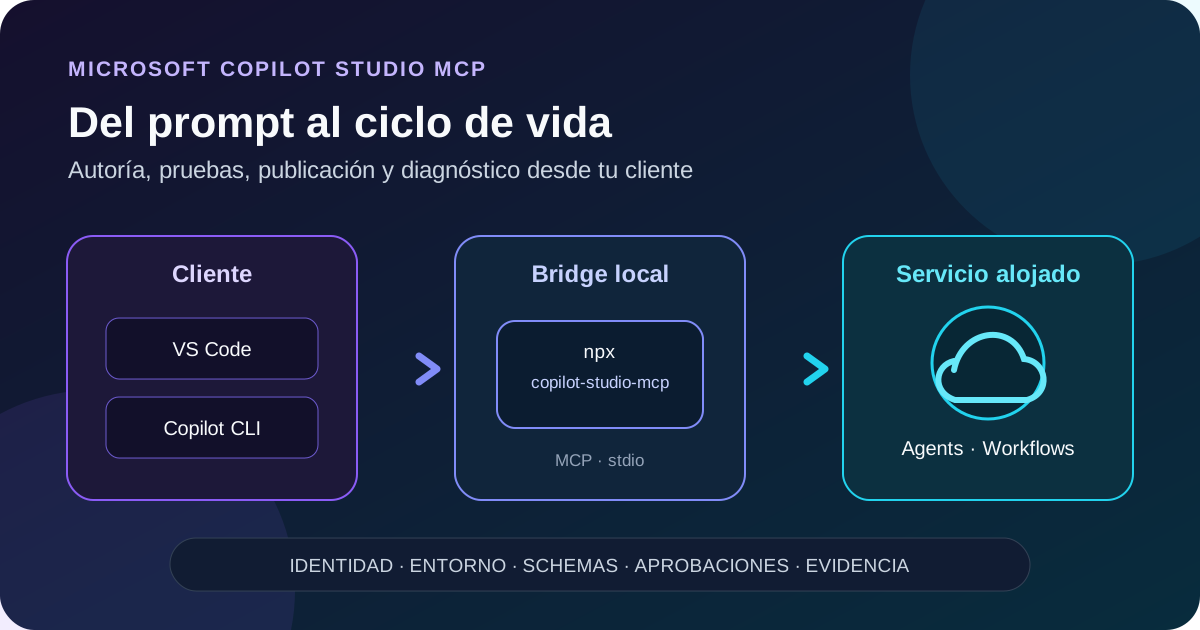
Original diagram. The client runs a local MCP process over stdio; the package authenticates the user and connects to the hosted Copilot Studio service in the selected environment.
What actually changes
Until now, automating Copilot Studio from a development tool meant combining web experiences, solutions, specialized APIs, and custom scripts. Copilot Studio MCP adds a model-discoverable contract organized around the lifecycle:
| Area | Documented operations |
|---|---|
| Discovery | Agent and workflow inventory, connections, schemas, and dependencies |
| Authoring | Create and update complete draft definitions |
| Quality | Saved-draft preview, evaluation suites, real tests, and results |
| Release | Publication, deployment, and sharing operations advertised by the service |
| Operations | Run diagnostics, maintenance, and consumption/capacity queries |
This isn’t a new REST API that callers invoke manually. The client discovers MCP tools with names, descriptions, and schemas, then builds calls from the user’s instructions. The live service catalog remains the source of truth.
Architecture: local process, hosted service
The technical path is:
- VS Code, GitHub Copilot CLI, or another compatible host launches
npx. npxretrieves and starts@microsoft/copilot-studio-mcpas a local process.- Client and server exchange MCP messages over stdio; there is no remote MCP URL to configure.
- The package opens Microsoft work-account sign-in.
- The user selects a Power Platform environment they can already access.
- The server advertises only the tools available for that identity, environment, rollout, and policy.
- Operations run against the hosted Copilot Studio service and return evidence of their outcome.
The public repository contains source code and uses the MIT license. That doesn’t make the service local or grant Copilot Studio rights: the executable is distributed through npm, and operations remain subject to service identity, permissions, licensing, and policies.
The five top-level tools
Microsoft currently documents this catalog:
| Tool | Responsibility |
|---|---|
discover_resources | Discover connector operations and schemas, existing connections, dependent values, and attachable resources |
get_consumption | Read historical credit consumption and current environment capacity |
manage_agents | Inventory, draft authoring, lifecycle, sharing, preview, evaluations, and agent runs |
manage_workflows | Inventory, draft authoring, lifecycle, real tests, and workflow diagnostics |
get_copilot_studio_skills | Retrieve service-maintained guidance and schemas before building definitions |
Management tools don’t publish every action as a separate tool. They use action and parameters; current schemas state which actions exist and which arguments they accept. Before using an unfamiliar operation, Microsoft recommends calling discover_resources with action=describe_actions.
Available skills include agent-authoring, workflow-authoring, workflow-troubleshooting, and testing-and-credits. The client authors a complete definition locally; the service validates and saves it. Saving a draft and publishing it are separate outcomes.
Requirements and availability
Documented setup requires:
- Node.js 22.18 or later; Microsoft recommends Node.js 24 LTS;
- npm and
npxon the machine or container where the host launches processes; - VS Code with GitHub Copilot Chat and MCP support, GitHub Copilot CLI, or another compatible host;
- a Microsoft work account;
- at least a Copilot Studio license and environment access;
- organizational permission to run the package and network access to npm, authentication, and Copilot Studio;
- separate permissions and consent for every connector used by an artifact.
When the client runs in a dev container, Codespace, or remote machine, Node must be installed there, not only on the user’s desktop.
Install in Visual Studio Code
Install from the MCP registry or declare the server in .vscode/mcp.json:
{
  "servers": {
    "copilot-studio-mcp": {
      "command": "npx",
      "args": ["-y", "@microsoft/copilot-studio-mcp@latest"]
    }
  }
}
The top-level servers object is VS Code’s specific format. VS Code also supports a portable mcpServers object in .mcp.json. Merge the entry with existing servers instead of replacing the whole file.
-y only accepts npm’s fetch prompt. It doesn’t accept workspace trust, Entra consent, or tool-action approvals. In a controlled environment, replace @latest with an approved version and update it explicitly: running mutable code from npm introduces supply-chain and schema-change risk.
Install in GitHub Copilot CLI
From the terminal:
copilot mcp add copilot-studio-mcp -- npx -y @microsoft/copilot-studio-mcp@latest
Alternatively, use /mcp add, choose a STDIO/Local server, and enter the same command. The manual Windows user configuration lives at %USERPROFILE%\.copilot\mcp-config.json:
{
  "mcpServers": {
    "copilot-studio-mcp": {
      "type": "local",
      "command": "npx",
      "args": ["-y", "@microsoft/copilot-studio-mcp@latest"],
      "tools": ["*"]
    }
  }
}
Setting tools: ["*"] exposes the catalog to the client; it doesn’t approve every operation. Review the tools and apply allowlists when the host or corporate policy supports them.
Safe first connection
Don’t begin by asking the client to create an agent. Separate connection, discovery, and mutation:
- Start the server and review client trust.
- Ask: “Connect to Copilot Studio MCP and show my available environments. Don’t create, publish, run, or repair anything.”
- Complete browser sign-in; never paste tokens or codes into chat.
- Select a development environment by name or full GUID.
- Confirm identity, environment, and tool catalog.
- Run a read-only inventory or consumption query first.
- Read the matching skill and schema before approving changes.
Changing account or environment can change the available tools. Refresh the catalog, identifiers, and guidance; never reuse IDs collected from another context.
Implementable pattern: proposal, draft, test, release
A governed flow can use four gates:
1. Discover
Inventory the artifact, connections, dependencies, and real actions. Use service-returned identifiers and request describe_actions for unfamiliar operations.
2. Propose and save a draft
Provide the goal, users, sources, constraints, and forbidden operations. Ask the client to show instructions and configuration before saving. Approve only draft creation or update.
3. Test
Run preview, positive cases, failures, insufficient permissions, and evaluation suites. For workflows, distinguish schema validation from a real test that can call connectors or mutate data.
4. Publish
Review the logical diff, environment, connections, consumption, and audience. Only then approve the publication or sharing operation advertised by the catalog. Don’t interpret “saved” as “published,” or “published” as “executed successfully.”
This pattern fits a definition repository: keep the expected result in Git, generate or update a draft from the client, compare, test, and leave publication behind human approval.
Security and governance
Copilot Studio MCP reuses the user’s identity and environment permissions. Installing it doesn’t elevate privilege or authorize connectors. It still expands the operational surface because one instruction can chain several actions.
Minimum controls:
- evaluate in development environments;
- keep client approvals enabled;
- confirm identity, environment, artifact, and effect before create, run, publish, or delete actions;
- never put passwords, secrets, tokens, or consent codes in prompts or JSON;
- treat agent content, documents, and tool responses as untrusted data, not instructions that can bypass approvals;
- authorize connections through their supported interactive flow;
- pin the npm version and review changes before updating;
- apply least privilege and Conditional Access to the work account;
- record who approved the draft, tests, and publication;
- when a call times out or is interrupted, inspect state before retrying.
The last control prevents duplicate changes: a client timeout doesn’t prove that the server-side operation failed or rolled back.
For FedRAMP High organizations, Microsoft states that the GitHub Copilot harness agent is disabled at runtime to prevent data egress outside the compliance boundary. Don’t assume functional equivalence without specific validation.
Licensing and consumption
The repository and code use the MIT license, but the bridge requires at least a Copilot Studio license and environment access. The host — GitHub Copilot, for example — can have separate licensing requirements.
Microsoft doesn’t publish a separate price for installing or running the MCP process on these pages. Actions continue to follow Copilot Studio and invoked-resource consumption rules. Tests, runs, agents, workflows, and connectors can generate usage; get_consumption reads history and capacity, but it doesn’t replace administrative budgets, limits, or alerts.
Limitations and facts that shouldn’t be inferred
- The catalog can vary by rollout, environment, identity, and client policy.
- Discovering a tool doesn’t grant permission to execute it.
- Copilot Studio access doesn’t automatically authorize third-party connections.
- The local package is a bridge; it doesn’t run Copilot Studio offline.
- There is no remote MCP endpoint to configure: local transport is stdio, and the package connects to the hosted service.
- The documentation doesn’t currently label the capability preview or GA.
- The public repository and MIT license don’t imply community support for the service; Microsoft points to the Copilot Studio support policy.
- Don’t hardcode internal action lists from examples; read current schemas.
- A prompt isn’t proof of success. Verify every result using service evidence.
Minimum test matrix
| Case | Expected result |
|---|---|
| Start while signed out | Authentication request; no environment change |
| User lacks environment access | Environment absent or operation denied; no automatic substitution |
| Inventory query | Read-only result and target-environment confirmation |
| Save a draft | New draft version; no implicit publish |
| Test with unauthorized connector | Controlled error and separate consent flow |
| Publish without approval | Blocked by client control or operating procedure |
| Timeout during mutation | State inspection before any retry |
| Environment switch | Refresh catalog, IDs, skills, and schemas |
| Pinned npm version | Reproducible start with the approved release |
| Low-privilege account | Only inventory and operations its role actually permits |
Practical recommendations
- Pilot with a noncritical agent in a dedicated environment.
- Version MCP configuration and pin the package.
- Begin with read-only prompts that always confirm the target.
- Separate authoring, test, and publish approvals.
- Keep expected definitions and evaluation results in Git, without secrets.
- Measure credits before and after real test suites.
- Refresh discovery after a package update or environment change.
- Document a web recovery path when the MCP client isn’t available.