💳 Copilot Studio: GitHub Copilot harness billing starts during development
💳 Copilot Studio: GitHub Copilot harness billing starts during development
With a standard Copilot Studio agent, we usually associate billable consumption with a published agent. That assumption is no longer valid for agents, workflows, and apps built on the GitHub Copilot harness.
Microsoft now documents a consumption model in which creating solutions with natural language, using Preview, testing, generating evaluations, and running the agent can consume Copilot Credits. A maker’s or user’s Microsoft 365 Copilot licence does not cover this consumption. Developer and trial environments also move to usage-based billing on September 1, 2026. See the official documentation updated August 29, 2026.
This is more than a price change. It changes how we design environments, access, budgets, automated testing, and service continuity.
What changes compared with the standard harness
| Activity | Standard harness | GitHub Copilot harness |
|---|---|---|
| Authoring and design | Billing doesn’t start until publication | Can consume credits as soon as building starts |
| Preview and testing | Depends on the standard scenario | Consumes when using models, tools, knowledge, or the harness |
| Evaluation generation | Standard model applies | Can consume Copilot Credits |
| Runtime | Billed according to channel and licence | All usage is billed |
| Microsoft 365 Copilot | Can cover eligible usage in Microsoft 365 channels | Doesn’t cover the new harness |
Credits cover the whole experience: LLM tokens, tools —including knowledge and MCP— and the harness itself. Microsoft does not publish a fixed per-conversation rate on these pages; consumption depends on design, complexity, and the components used. See the billing model overview.
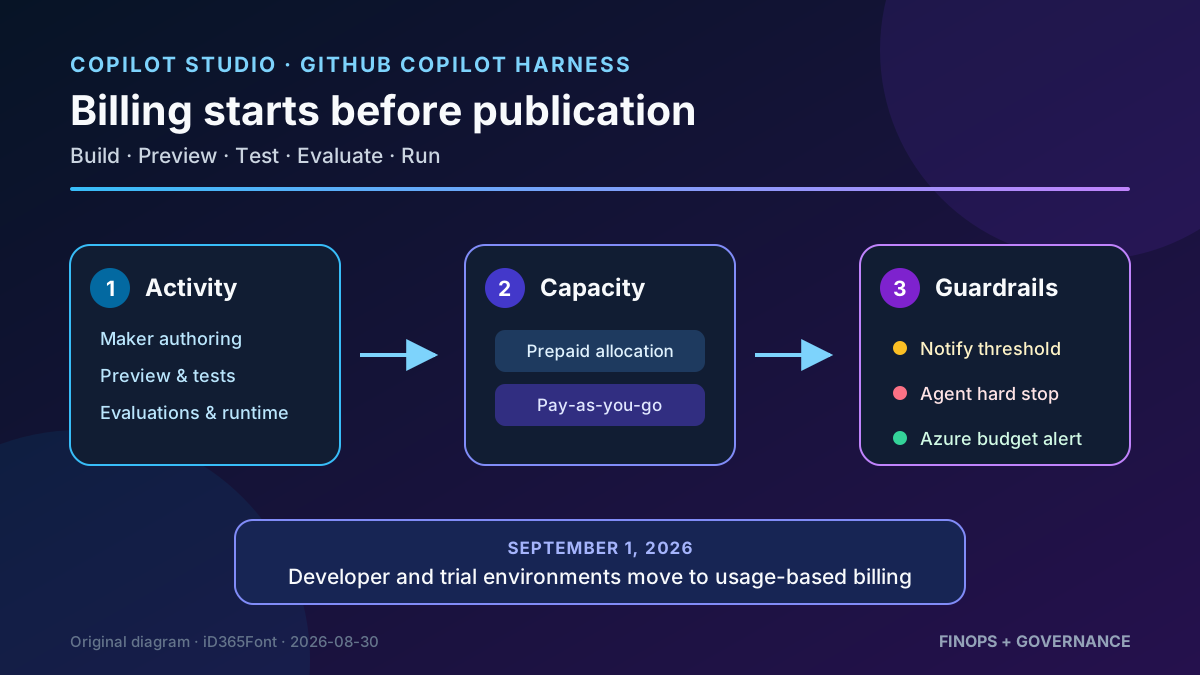
Original diagram. An Azure budget alerts but does not stop the agent; the hard stop must be configured at agent level.
Who is affected and when
The confirmed scope is:
- agents, workflows, and apps built with the GitHub Copilot harness;
- creation, preview, testing, evaluation, and runtime activities;
- every user, including Microsoft 365 Copilot licensees;
- developer and trial environments from September 1, 2026.
The Standard harness remains supported and keeps its own model. These rules should not be applied automatically to Copilot Chat either: Copilot Studio is now a multi-harness platform, and each agent must be classified correctly.
In Power Platform admin center → Manage → Copilot Studio, the Harness column identifies GitHub Copilot, Standard, or Copilot Chat. This is the minimum inventory needed before sizing capacity.
Consumption and control architecture
The operating flow has four layers:
- A maker or user starts an activity that requires the model, a tool, knowledge, or the harness.
- Copilot Studio records Copilot Credits against the agent and environment.
- The environment consumes allocated prepaid capacity, available tenant capacity, or a linked pay-as-you-go plan.
- Agent limits, notifications, and enforcement determine whether usage continues.
An environment allocation is not always a limit. When drawing from the tenant pool is allowed, the environment continues to use unallocated capacity. If pay-as-you-go is linked, it can also continue billing Azure after prepaid capacity is exhausted.
Maker or runtime activity
        ↓
Copilot Credits by agent and environment
        ↓
Prepaid allocation exhausted
        ├─ Tenant pool allowed → continue
        ├─ Pay-as-you-go linked → continue and bill Azure
        └─ No capacity available → authoring and runtime stop
What happens when Credits run out
When the environment has no available Credits, experiences that require them stop:
- agents stop responding to users;
- makers can’t author with natural language;
- Preview and testing stop working;
- evaluations can’t be generated or created.
Microsoft allows some overage consumption, similar to a grace period, to avoid immediately blocking business processes. However, the policy specifies neither a guaranteed amount nor duration. It must not be treated as reserve capacity. See the enforcement policy.
Step-by-step configuration
1. Inventory agents and owners
- Open Power Platform admin center.
- Go to Manage → Copilot Studio.
- Filter Harness = GitHub Copilot.
- Record agent, environment, business owner, technical owner, and criticality.
- Separate prototypes, development, and production workloads.
The Harness column is currently an inventory UI property. Do not build an integration assuming that exact field exists in an API without checking the supported schema.
2. Choose a capacity source
| Model | Recommended use | Main risk |
|---|---|---|
| Prepaid packs | Stable demand and predictable monthly capacity | Unused capacity doesn’t carry over |
| Pay-as-you-go | Pilots or variable demand | Open-ended cost without agent limits |
| Pre-purchase plan | High, predictable annual consumption | Final annual purchase; no cancellation, split, or exchange |
The pre-purchase plan is bought as Copilot Credit Commit Units through Azure Reservations. It has a one-year term, renews automatically by default, and can provide up to 20% savings depending on volume. Always confirm pricing and terms under your agreement before purchasing. See official pre-purchase plan management.
3. Contain prepaid usage per environment
The Power Platform Administrator or Global Administrator role, or equivalent permissions, is required.
- Go to Licensing → Copilot Studio → Manage Copilot Credits.
- Select the environment.
- Allocate the approved number of Credits.
- Under Capacity overages, clear Draw from the available capacity in my tenant to prevent the environment using the unallocated pool.
- Save.
This contains prepaid usage but doesn’t stop pay-as-you-go. If a billing plan is linked, consumption can continue against Azure.
4. Create an agent-level limit
- Go to Licensing → Copilot Studio → Manage Agents.
- Select the agent and choose Set limit.
- Define the monthly limit.
- Configure the notification threshold.
- Turn on Stop usage if the agent should be disabled at the limit.
This control contains an individual workload. Microsoft explicitly confirms that an Azure budget sends alerts but does not stop Copilot Studio consumption.
5. Configure pay-as-you-go with two safeguards
- Create a billing plan associated with an Azure subscription.
- Link only approved environments.
- Configure Azure Cost Management budgets and alerts for the Power Platform account resource.
- Also add agent limits with hard stops.
- Assign an owner to review consumption and exceptions.
The combination is intentional: Azure provides financial visibility; Copilot Studio controls agent shutdown.
Monitoring and testing
Under Licensing → Copilot Studio, Microsoft provides four views:
- tenant: purchased, allocated, and consumed capacity;
- environment: prepaid, pay-as-you-go, and overage status;
- agent: month-to-date consumption, limit, and state;
- downloadable report: detail for further analysis.
Attribution doesn’t reach the individual maker or user: billing is recorded by environment and agent. Internal chargeback must combine usage with ownership, cost centre, and approval data.
Establish a baseline for each scenario:
| Scenario | Minimum measurement |
|---|---|
| Create an agent with natural language | Credits before and after |
| Five Preview conversations | Total difference and indicative average |
| Generate a test set | Difference per generation |
| Run a complete evaluation | Credits by number of cases |
| Invoke knowledge, connector, or MCP | Compare with a response without the tool |
These tests produce an estimate, not a stable contractual rate. Models, instructions, tool paths, and complexity change consumption.
Security and governance
- Least privilege: restrict who can create GitHub Copilot harness agents in each environment.
- Environment separation: don’t mix unlimited prototypes with production agents.
- Evaluation data: test generation can use connected credentials and produce sensitive data visible to other authorised makers.
- MCP and tools: each invocation can affect consumption and retains its own authentication and DLP controls.
- Continuity: decide which agents tolerate a hard stop and which require pay-as-you-go fallback.
- Financial segregation: makers shouldn’t approve their own capacity increases without oversight.
Checklist before September 1
- Inventory agents with Harness = GitHub Copilot.
- Review currently reported nonbilled consumption.
- Classify DEV, trial, and production.
- Allocate Credits to authorised environments.
- Decide whether environments can draw from the tenant pool.
- Link pay-as-you-go only where necessary.
- Define agent limit, notification, and hard stop.
- Configure Azure budgets and alerts.
- Name a consumption owner and capacity-increase process.
- Measure creation, Preview, evaluations, and tools separately.
Limitations
- Microsoft doesn’t publish a fixed Credit count per conversation for the new harness.
- Consumption isn’t directly attributed to each maker or end user.
- Grace overage has no guaranteed amount or duration.
- Azure budgets aren’t a kill switch.
- An environment allocation isn’t a cap while tenant-pool draw or pay-as-you-go remains enabled.
- Preview consumption doesn’t guarantee future production cost.
Conclusion
The GitHub Copilot harness makes authoring part of the economic runtime. Creation, testing, and evaluation are now activities that must be budgeted and governed.
The answer isn’t to avoid testing. Give it an environment, capacity, and owner: inventory by harness, explicit allocations, agent-level limits, and pay-as-you-go only where continuity justifies it.
Official references
- Manage costs for agents powered by the GitHub Copilot harness
- Overview of billing for agents powered by the GitHub Copilot harness
- Enforcement policy for agents consuming Copilot Credits
- Manage Copilot Credits and capacity for Copilot Studio
- Standard harness licensing
- Copilot Studio pricing
- Optimize Copilot Credit costs with a pre-purchase plan