🔐 Copilot Studio now requires an Entra identity for every new agent
🔐 Copilot Studio now requires an Entra identity for every new agent
Since July 2026, every new agent created in Microsoft Copilot Studio automatically receives a Microsoft Entra Agent ID. Environment administrators can no longer opt out.
This is more than an administrative change. Each agent now has a workload identity that is visible in Entra and connected to its lifecycle, ownership, connector capabilities, audit activity, and governance policies. Administrators can correlate an agent in Dataverse with a concrete identity in Entra instead of treating agent governance as a Power Platform-only concern.
This article explains what Copilot Studio creates, how the identity relates to the Dataverse agent, when connector permissions appear, what Conditional Access currently protects, and how to build an operational review around the new model.
Status on August 21, 2026: automatic identity creation is mandatory for new Copilot Studio agents. Agents created before the July 2026 rollout continue to use app registrations until Microsoft performs a future migration.
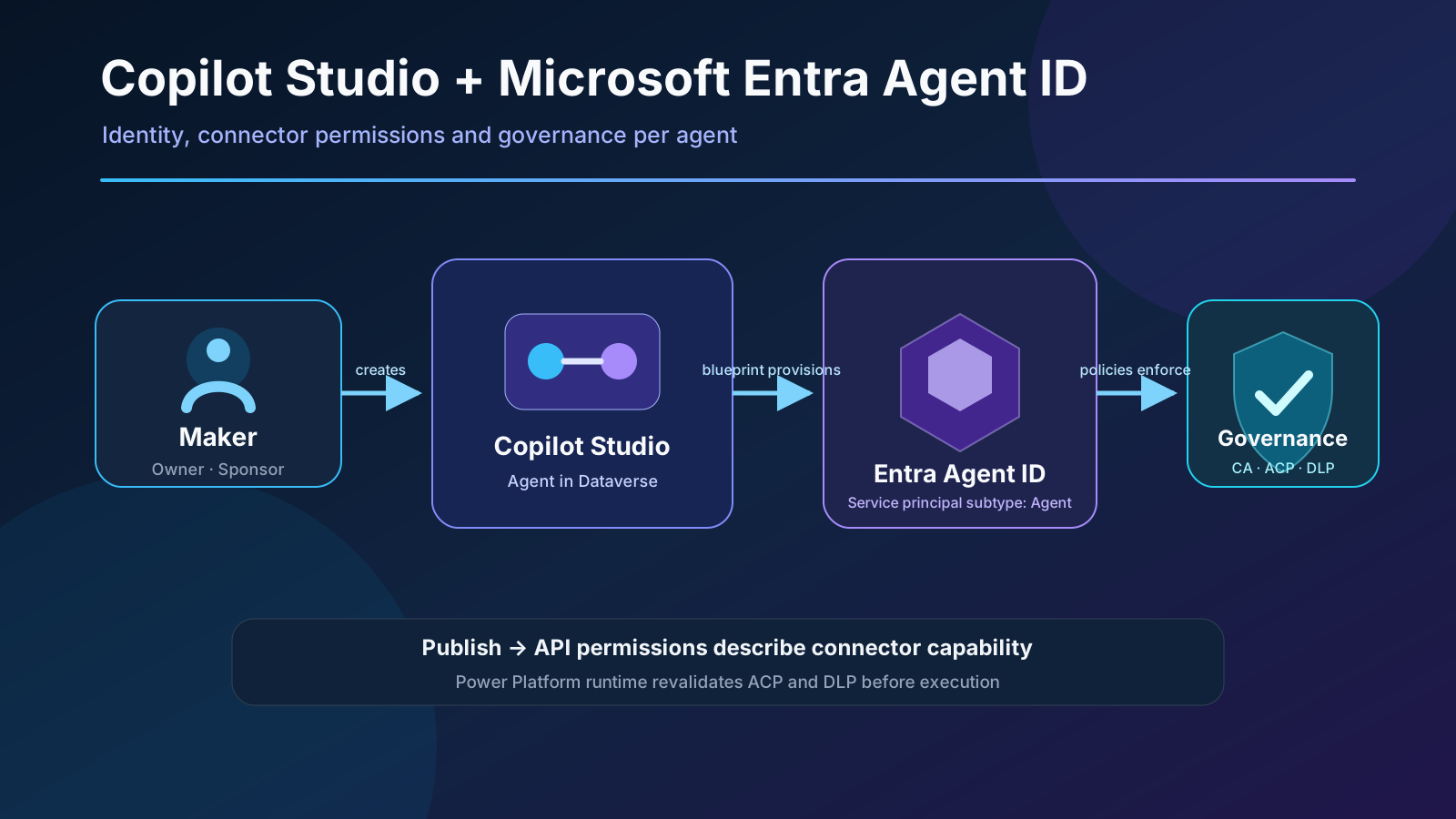
What changed
An Entra Agent ID is a service principal with the Agent subtype. The underlying authentication flow remains OAuth-based. The difference is that the agent is represented as a first-class identity that can be discovered, audited, governed, and retired.
| Before July 2026 | New agents from July 2026 |
|---|---|
| Traditional app registration | Entra Agent ID |
| Maker listed as owner | Maker listed as sponsor with limited permissions |
| Connector capabilities not projected onto the identity | Supported connectors appear as API permissions after publishing |
| Governance split between the app and Power Platform | Per-agent inventory, audit, and policy targeting |
| Legacy model until migration | Automatic creation with no opt-out |
Two distinctions matter:
- This is not end-user authentication. The Agent ID identifies the agent when it communicates with channels and services. The agent’s authentication setting still determines how the user is identified.
- Microsoft 365 Copilot Agent Builder agents are different. The current inventory documentation states that Agent Builder agents don’t use these identity properties.
Architecture: blueprint, identity, and agent
When the first identity-enabled agent is created, Copilot Studio adds a Microsoft Copilot Studio agent identity blueprint and its corresponding blueprint principal to the tenant. Every Copilot Studio Agent ID is created as a child of this global blueprint.
The documented production blueprint ID is:
25664c89-cea5-4ab6-b924-a54fd8a19ae0
The logical flow is:
Maker
  │ creates
  ▼
Copilot Studio agent (Dataverse)
  │ requests managed identity
  ▼
Microsoft-owned blueprint principal
  │ creates via federated credentials
  ▼
Tenant-owned Entra Agent ID
  │ publishes descriptive permissions
  ▼
Connectors + ACP/DLP + Conditional Access
Microsoft controls the blueprint and authentication mechanism through Federated Identity Credentials. According to the documentation, nobody in the tenant — including tenant administrators — can mint tokens using the identity. Bring-your-own Agent IDs or app registrations aren’t supported because Copilot Studio manages the relationship with channels, services, and lifecycle.
The maker is added as a sponsor, not as an unrestricted identity owner. This preserves accountability and lifecycle traceability while reducing the ability to modify credentials or permissions.
How connector permissions appear in Entra
The key transition happens when the agent is published. Copilot Studio evaluates the configured Power Platform connectors and attaches API permissions to the Agent ID to describe what the agent can invoke.
The permission depends on how the connector was added:
Operations.Execute.All: the complete connector was added as a tool.- Individual operation scopes: selected connector actions were added.
Azure API Connections Runtime.All: fallback for connectors without granular scopes.
Adding or removing tools and republishing recalculates these permissions. An audit should therefore examine the identity associated with the published version, not only the maker’s current draft.
What these scopes mean — and what they don’t
These permissions describe capabilities within the Power Platform connector runtime. They aren’t raw resource permissions such as Mail.Read or Files.Read.All, and they don’t provide a direct path to Microsoft Graph.
At runtime, Power Platform still validates:
- Advanced Connector Policies (ACP),
- Data Loss Prevention (DLP) policies,
- the real connection and user or execution context,
- channel-specific restrictions.
A useful mental model is:
Agent ID scopes = what the agent is configured to attempt
ACP + DLP + runtime = what the agent is actually allowed to execute
Scope visibility applies across channels. However, as of this article, end-to-end Conditional Access enforcement on the Agent ID applies only when the agent runs in Microsoft Teams. Other channels still use the existing Power Platform connector authentication flow. Don’t assume that a policy tested in Teams provides identical enforcement on a website or another channel.
There is another important boundary: first-party and certified connectors currently project scopes. Custom connectors, MCP servers, and REST API tools don’t add API permissions to the Agent ID. Those integrations still need separate controls for authentication, authorization, secrets, and network access.
How to verify an agent identity
1. Retrieve the GUID in Copilot Studio
- Open the agent.
- Go to Settings.
- Select Advanced.
- Expand Metadata.
- Copy the Entra Agent ID.
A legacy agent displays its app registration Application ID instead. This is a quick way to classify agents during the transition.
2. Locate the identity in Entra
Use the GUID to find the service principal in Microsoft Entra admin center. Review at least:
- the
Agentidentity subtype, - associated blueprint principal,
- agent sponsor,
- connector API permissions,
- sign-in logs,
- applicable Conditional Access policies.
3. Verify after every publication
Connector configuration is projected when the agent is published. After a change:
- publish the new version;
- review permissions that were added or removed;
- confirm that ACP and DLP allow only the expected combination;
- test every relevant channel;
- retain the result and published version as evidence.
Automated inventory
The Copilot Studio agent inventory schema exposes fields that correlate Dataverse and Entra:
{
  "properties": {
    "name": "<CDS bot ID>",
    "environmentId": "<Power Platform environment ID>",
    "ownerId": "<owner Entra object ID>",
    "entraAppId": null,
    "entraAgentId": "<Entra Agent ID>",
    "entraAgentBlueprintId": "<Blueprint ID>",
    "lastPublishedAt": "2026-08-21T08:00:00Z"
  }
}
Legacy agents populate entraAppId; newer agents use entraAgentId and entraAgentBlueprintId. Inventory represents the published configuration. Unpublished draft changes don’t appear until the next publication.
This supports controls for:
- published agents without a valid owner or sponsor,
- identities with stale publication dates,
- mismatches between declared and approved connectors,
- agents shared tenant-wide,
- legacy identities awaiting migration,
- orphaned objects after failed retirement processes.
Existing-agent migration
Agents created before the July 2026 rollout continue using app registrations. Microsoft describes the future migration as:
- automatic,
- zero-downtime,
- preserving the agent GUID,
- compatible with Teams, Omnichannel, and skills.
Microsoft hasn’t published one universal backfill date. Inventory queries, alerts, and dashboards should support both models. Don’t automatically classify entraAppId != null as an error while the transition is in progress.
Directory quotas: the hidden operational risk
Every Agent ID is a directory object and consumes the tenant’s Entra resource quota. If the tenant has reached its limit, agent creation fails because identity provisioning is part of the Copilot Studio creation process.
Microsoft highlights these limits:
- 50,000 directory objects by default;
- 300,000 with a verified domain, except self-service signup tenants;
- Agent IDs and all other resources can’t exceed 95% of the quota;
- a temporary 600-object limit applies during the first two days of a new tenant.
The normal cap of 250 identities per blueprint doesn’t apply to the Microsoft-owned Copilot Studio blueprint. Organizations that generate agents programmatically should still monitor the overall tenant quota and retire test agents and environments that are no longer needed.
Lifecycle and deletion
Deleting an agent from Copilot Studio also removes its Agent ID — or its legacy app registration — from Entra. This lifecycle coupling reduces orphaned identities, but it doesn’t replace operational verification.
A minimum policy should define:
- functional owner and technical sponsor;
- periodic permission and channel reviews;
- expiry for test agents;
- retirement through Copilot Studio, not direct deletion in Entra;
- post-deletion verification;
- log retention aligned with audit policy.
Adoption checklist
| Control | Recommended action |
|---|---|
| Inventory | Record CDS bot ID, Environment ID, Agent ID/App ID, and blueprint |
| Ownership | Validate owner and sponsor; avoid personal accounts without succession |
| Permissions | Review scopes after publishing and prefer selected connector actions |
| DLP/ACP | Confirm visible scopes don’t conflict with runtime policy |
| Conditional Access | Test in Teams and document the current limitation for other channels |
| MCP/REST | Govern separately; these tools don’t currently project API permissions |
| Quotas | Alert before 95% and control large-scale agent creation |
| Legacy | Support entraAppId until Microsoft completes backfill |
| Retirement | Delete through Copilot Studio and verify removal in Entra |
Conclusion
Mandatory Microsoft Entra Agent IDs make identity a native part of agent architecture rather than an afterthought. The main benefit is correlation: one agent, one identity, one sponsor, visible connector capabilities, and a traceable lifecycle.
Visibility alone isn’t authorization. DLP and ACP still govern runtime execution; Conditional Access currently has a channel boundary; and MCP, REST, and custom connectors need complementary controls. The right operating model combines inventory, controlled publishing, least privilege, and channel-specific testing.