🧩 Copilot Studio: a context contract to avoid answering twice
🧩 Copilot Studio: a context contract to avoid answering twice
The agent displays a card, you choose an option, and seconds later it asks the same question again. Before adding another “don’t repeat yourself” instruction, check what the topic actually returned.
On August 28, 2026, Microsoft added a new series about context and duplicate messages to its guidance hub. This is newly documented architecture and an implementable pattern, not a new API, preview or general-availability announcement. It doesn’t establish that the runtime changed that day, either.
It deserves attention because it turns an apparently conversational problem into something we can design and test: a contract between components.
Chat and context aren’t the same thing
In the standard harness, the orchestrator hands control to certain components. While they run, it cannot see their user-facing messages, and it doesn’t automatically reconcile all context. In particular, Adaptive Card button interactions don’t reach the orchestrator’s context as such. Displaying something isn’t the same as returning a result. Official context model.
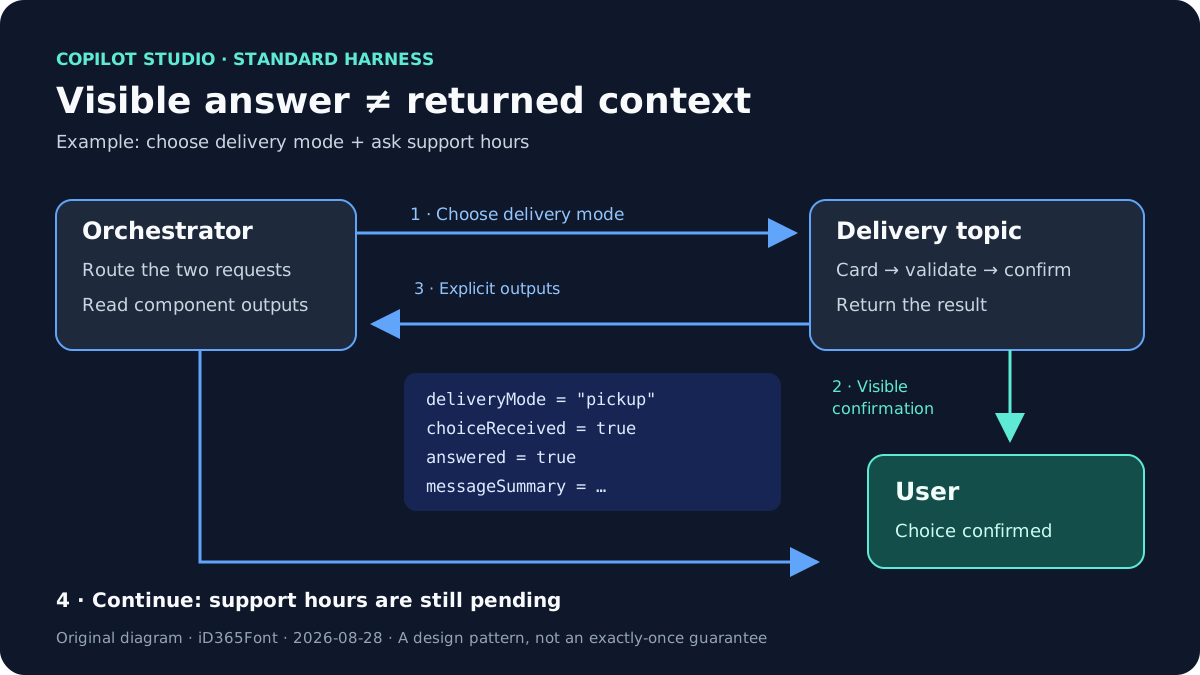
Original diagram for this example. Arrows distinguish visible communication from outputs returned to the plan.
My recommendation: review topic boundaries as you would a function contract. What goes in? What comes back? Who communicates the result?
Scope and prerequisites
This lab uses a standard-harness agent with generative orchestration. If you’re in the new experience, Microsoft documents Other ways to build and the New experience toggle for accessing standard agents. Don’t confuse this pattern with GitHub Copilot harness behavior. Accessing the standard harness.
Under Settings → Generative AI → Orchestration, verify that generative orchestration is enabled. Record the model: Microsoft warns that switching models can affect repetitions. Configuration and behavior.
You’ll need editing permissions and a test environment. This example neither reads nor updates D365FO; its data is fictional. It is a configuration recipe, not an exported solution or a test executed in your tenant.
Lab: choose delivery without repeating the question
We’ll separate two intents:
“I want to choose how to receive my order and find out the support hours.”
The Choose delivery mode topic collects and confirms the choice. Another topic, Demo support hours, returns a text output called supportHours containing the fictional value “Monday–Friday, 09:00–17:00” and the boolean answered=false. That second topic sends no messages; the orchestrator communicates its result.
Create both through Topics → Add a topic → From blank, with distinct descriptions for delivery selection and support-hours lookup. With generative orchestration, the description informs topic selection. Creating and selecting topics.
1. Declare the first topic’s outputs
Open Details → Outputs → Create a new variable. Each output requires a name, type and description. These parameters are distinct from variables that merely exist inside the topic. Managing inputs and outputs.
For our exercise:
| Output | Type | Meaning in this contract |
|---|---|---|
deliveryMode | Text | Valid selected mode: pickup or delivery. |
choiceReceived | Boolean | The choice was received and validated. |
answered | Boolean | The topic already confirmed that choice to the user. It says nothing about support hours. |
messageSummary | Text | Summary of the confirmation displayed. |
answered and choiceReceived are recommended names for maker-defined outputs, not magic properties that enable a runtime filter. Microsoft recommends returning useful values alongside them and adding instructions to interpret them. Topic design.
2. Initialize before asking
Add Variable management → Set a variable value nodes: answered=false, choiceReceived=false, deliveryMode="" and messageSummary="". Use actual booleans, not the string "false". The node accepts literals, variables and formulas. Setting variables.
This initialization is our design choice: every execution should start without an earlier confirmation. Don’t use a global variable as a universal “user answered” flag.
3. Add a minimal card
Insert Ask with Adaptive Card, open its properties and select Edit adaptive card. Paste this original JSON:
{
  "$schema": "https://adaptivecards.io/schemas/adaptive-card.json",
  "type": "AdaptiveCard",
  "version": "1.5",
  "body": [
    {
      "type": "Input.ChoiceSet",
      "id": "deliveryMode",
      "label": "How would you like to receive the test order?",
      "style": "expanded",
      "isRequired": true,
      "errorMessage": "Select a delivery mode.",
      "choices": [
        { "title": "Pickup", "value": "pickup" },
        { "title": "Delivery", "value": "delivery" }
      ]
    }
  ],
  "actions": [
    { "type": "Action.Submit", "title": "Choose" }
  ]
}
Save and check that the node’s deliveryMode output is text; Edit Schema lets you correct generated outputs. If the designer creates another variable, use it as input and copy its validated value to the topic output. A node output doesn’t replace the declaration in Details → Outputs. Card configuration.
4. Validate and confirm
Use Condition nodes to accept only pickup or delivery. In any other branch, don’t report success: request a valid choice or end that operation without confirming it.
In each valid branch, configure this sequence:
- Save the accepted value in
deliveryMode. - Set
choiceReceived=true. - Send “You chose pickup for this example” or “You chose delivery for this example.”
- After the message, set
answered=trueand the corresponding summary. - Finish the topic with its four outputs available.
No order is reserved or updated. Confirming a preference in chat is not proof of an ERP transaction.
5. Connect the contract to the instructions
Suggested description for Choose delivery mode:
Handles delivery selection for the test order.
Returns deliveryMode and its confirmation state.
Does not provide opening hours or change orders.
Suggested agent instruction:
After a component runs, interpret its outputs.
If answered is true, do not repeat what messageSummary describes.
If choiceReceived is true, reuse deliveryMode.
Answer other pending requests using their sources or tools.
If a result is missing, do not invent it or declare it complete.
These are example instructions, not a guarantee. The guidance combines outputs, component descriptions and agent instructions; adding an unexplained flag isn’t enough. Official design pattern.
For Demo support hours, describe that it returns fictional hours for the orchestrator to communicate. This lets us detect whether choosing delivery causes the second intent to disappear.
What if other agents are involved?
Connected agents let you disable Pass conversation history to this agent; child agents have no equivalent switch. The guidance recommends scoping work with scopedRequest. If a subagent must work without talking to the user, instruct that subagent: After running doesn’t prevent messages during execution. Subagent design.
I wouldn’t add a subagent to this lab. First test the contract with two topics; expand the architecture only when a distinct responsibility justifies it.
Tests that actually expose the problem
Microsoft recommends comparing transcripts, the activity map and outputs rather than diagnosing from chat alone. Troubleshooting procedure.
Here is my proposed acceptance matrix:
| Case | What to check |
|---|---|
| Choose pickup | One confirmation; pickup returned; no equivalent second question. |
| Choose delivery + ask support hours | The choice is retained and fictional support hours are answered too. |
| Empty or disallowed value | No success output or claim that an order was updated. |
| Ask something else while the card is pending | Record interruption and resumption; distinguish these from an already completed answer. |
| Explicitly repeat the request | The agent can answer again when the user asks it to. |
| Run the topic again with another choice | No state carried over from the first execution. |
Save the model, instructions, transcript and outputs for each case. Repeat with different phrasings; one successful conversation doesn’t establish freedom from regressions.
Limitations, security and cost
Don’t use End all topics as a universal patch: it cancels the remaining plan steps and can leave support hours unanswered. Nor should this contract be interpreted as exactly-once delivery, durable memory or API idempotency. Plan control.
Conversation state doesn’t authorize operations. For real orders, validate identity, permissions and data in the business operation. Keep secrets and unnecessary data out of summaries. Data policies and authentication remain separate controls from the prompt. Security and governance.
No new license is announced for this pattern. Copilot Studio terms apply: trial testing doesn’t permit publication, and consumption depends on the capabilities used. Don’t budget “one fewer message = a fixed credit saving.” Standard-harness licensing.
What I’d take to production
First, an inventory of who responds in each operation. Next, explicit outputs and multi-intent tests. Finally, replace fictional data with an authorized integration while keeping the business result separate from the visible answer.
The point isn’t to silence the agent. It is to ensure the next component knows what remains to be done.