🔐 Copilot Studio blocks publishing agents that reuse maker credentials
🔐 Copilot Studio blocks publishing agents that reuse maker credentials
Microsoft has added a Power Platform admin center security control that can prevent a Copilot Studio agent from being shared or published when it contains a maker-credential connection that other users aren’t permitted to reuse.
This matters because it turns a warning into a deployment barrier. Copilot Studio’s security scan already flagged maker-provided credentials, but the new Sharing agents with embedded maker credentials setting can stop the operation before end users gain access to the agent.
The capability is in preview. Microsoft added the setting to the Power Platform documentation on November 4, 2026 and updated the Copilot Studio guidance on November 5. It isn’t a replacement for DLP, authentication, target-system permissions, or agent review, and it shouldn’t be the only access control.
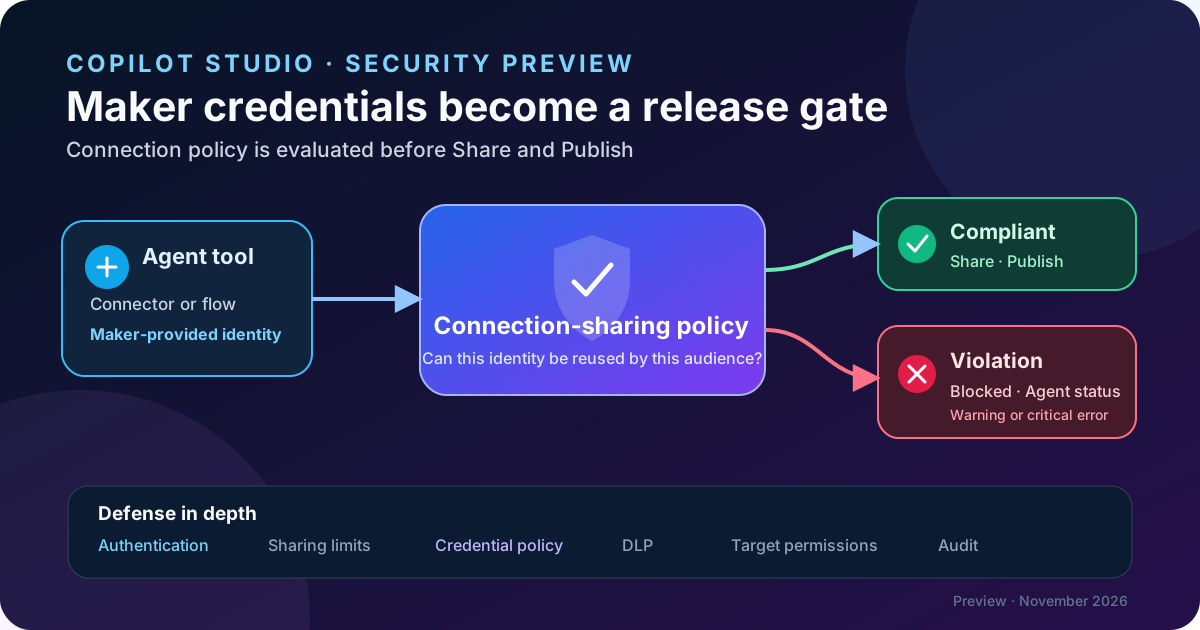
Original diagram. The policy doesn’t remove maker credentials. It evaluates whether the underlying connection can be reused and blocks sharing or publishing when the connection violates policy.
The risk it addresses
A tool can authenticate with:
- end-user credentials: each user signs in and the operation runs with that user’s permissions;
- maker-provided credentials: every user invokes the tool through the connection configured by the agent’s maker.
The second route is needed for some unattended processes, but it moves the authorization boundary. A user could run a query or action that their account doesn’t allow when the maker’s connection has broader permissions.
The new control inspects the connections used by the agent. If a maker-credential connection can’t be shared or reused under the organization’s connection-sharing policy, Copilot Studio can prevent the agent from being shared with end users and block publishing.
It doesn’t validate business correctness or implement row-level security in the remote system. Effective authorization remains that of the identity used by the connection.
What changes
The setting is managed under Power Platform admin center > Security > Threat detection > Sharing agent with embedded maker credentials and can target an environment or environment group.
Microsoft documents two options:
| Option | Documented default | Result |
|---|---|---|
| Don’t let makers share agents with their own credentials embedded | On by default and recommended | Evaluates connections and blocks sharing or publishing when a maker connection violates policy |
| Let makers share agents with their own credentials embedded | Off by default | Allows sharing without this specific enforcement |
The control doesn’t declare every maker connection unsafe. The underlying connection’s sharing and reuse policy determines the result.
It isn’t the control that prohibits maker credentials
Power Platform already provides Control maker credential options, which decides whether makers can choose end-user credentials, their own credentials, or both. That setting changes the authentication options for every tool in the environment or group.
| Control | Stage | Effect |
|---|---|---|
| Control maker credential options | Authoring and runtime | Can remove maker credentials entirely and require end-user sign-in |
| Sharing agents with embedded maker credentials | Sharing and publishing | Keeps maker credentials available but blocks distribution when a connection can’t be reused safely |
| Automatic security scan | Before publishing | Warns about risky settings; a warning isn’t the same as an administrative enforcement policy |
The distinction matters for autonomous agents. Disabling maker credentials requires a live interactive user and can break scheduled or background execution. The new control retains the pattern where needed but prevents distribution when the connection violates policy.
Lifecycle behavior
Sharing
When validation finds a violation:
- viewer or end-user access can’t be granted to the affected recipient;
- the agent can’t be shared with everyone in the organization;
- the sharing experience shows an error and identifies the affected target.
The documentation doesn’t say the control automatically revokes existing access. Inventory existing assignments and explicitly remove anything that is no longer appropriate.
Publishing
Publishing can also be blocked. Microsoft documents a nuance for authenticated agents:
- an agent that hasn’t been shared can publish while showing a warning;
- if the agent is already shared with another user and the policy finds an incompatible connection, publishing is blocked;
- when Copilot Studio detects the blocking condition, Publish is unavailable and the maker is directed to Agent status.
Don’t treat the nuance as a bypass. Publishing an unshared agent doesn’t authorize later distribution or prove that its connections are safe.
Agent status and tools
Copilot Studio exposes the violation at two levels:
- a warning for an authenticated agent that hasn’t been shared;
- a critical error once the agent is shared.
Affected tools appear as Blocked with a Sharing policy violation message. If the tool also violates a data policy, Copilot Studio shows the DLP violation instead.
Step-by-step configuration
1. Inventory agents and connections
Before confirming the policy, identify:
- shared and published agents;
- connector tools, built-in actions, and embedded Power Automate flows;
- connections configured with maker credentials;
- owner, permissions, and target system for each connection;
- autonomous agents that can’t request interactive sign-in.
Include inherited and older connections. The absence of a previous warning doesn’t prove compliance with the new policy.
2. Classify the identity pattern
For every tool, select the appropriate route:
| Pattern | Use it when | Primary control |
|---|---|---|
| End user | The operation must respect individual permissions | End-user credentials, agent authentication, and target access |
| Governed workload identity | An autonomous or shared process requires deliberately scoped permissions | Dedicated identity, least privilege, rotation, and monitoring |
| Maker’s personal credential | Temporary prototype | Avoid in production and replace before sharing |
Embedding a personal connection in an agent doesn’t turn it into a service identity.
3. Configure the environment or group
- Sign in to Power Platform admin center with administrative permissions.
- Open Security > Threat detection.
- Select Sharing agent with embedded maker credentials.
- Choose Environment groups or Environments.
- Select the target and choose Set up.
- Enable Don’t let makers share agents with their own credentials embedded.
- Save the setting.
Microsoft doesn’t publish a propagation time for this new control. Include a wait and a new authoring session in the test plan instead of assuming immediate enforcement.
4. Resolve violations
When supported, the preferred fix is to switch the tool to end-user credentials. Each user creates or authorizes a connection and the action runs with that user’s permissions.
If the scenario requires autonomous execution:
- verify whether the connector supports a shareable workload identity;
- reduce permissions to the minimum data and operations;
- separate test and production agents;
- avoid personal accounts and single owners;
- document renewal, offboarding, monitoring, and recovery;
- revalidate Agent status before sharing and publishing.
Not every tool supports both credential modes, and Microsoft doesn’t document an automatic conversion.
Defense-in-depth architecture
Treat this control as one layer in the security model:
- agent authentication identifies the caller;
- sharing limits determine who can use or edit the agent;
- credential policy prevents unauthorized delegation of the maker’s identity;
- DLP controls connector combinations and data movement;
- target-system permissions limit actual data and actions;
- audit and monitoring detect anomalous use.
Credential enforcement doesn’t compensate for an overprivileged connector. It also doesn’t make writes idempotent, add human approval, or prevent sensitive output.
Security and operational governance
- Use environment groups for consistent policy across development, test, and production, but validate impact before broad rollout.
- Assign alternate owners and remove connections owned by departing makers.
- Recheck connections after solution imports or tool changes.
- Include a negative test: a maker must be unable to share or publish a deliberately noncompliant agent.
- Retain evidence of the policy state and Agent status in the release process.
- Don’t enable the permissive option as a quick fix; correct identity and permissions first.
Licensing and availability
The feature is documented as preview, and its interface can change. Microsoft doesn’t announce a new SKU or charge for enabling the control. Existing Copilot Studio, connector, Power Automate, and target-system licensing still applies.
Microsoft confirms environment and environment-group scope, but doesn’t publish a complete matrix for regions, sovereign clouds, or harness types. Validate the control in the specific tenant and harness before making it a mandatory production gate.
Known limitations
- The capability is in preview and can’t be the only security control.
- It only targets maker-credential connections; end-user connections retain their own authentication path.
- The underlying connection determines whether it can be shared or reused.
- An authenticated, unshared agent can publish with a warning; the publishing block appears when distribution and connection policy conflict.
- A DLP violation can take precedence over the sharing-policy message.
- Microsoft doesn’t document an API, cmdlet, or solution property for automating this setting.
- There is no published guarantee that existing access is revoked retroactively.
- Not every tool supports end-user credentials.
Minimum test matrix
| Case | Configuration | Expected result |
|---|---|---|
| End-user connection | Tool uses end-user credentials | This policy doesn’t block sharing or publishing |
| Allowed maker connection | Reusable connection complies with policy | Distribution is allowed |
| Nonshareable maker connection | Agent isn’t shared | Warning in Agent status; validate publishing nuance |
| Nonshareable maker connection | Agent is shared | Critical error and publishing blocked |
| Share with one user | Violating connection | Error for the recipient |
| Share with the organization | Violating connection | Operation blocked |
| Simultaneous DLP violation | Connector blocked by DLP and sharing | Data policy violation is displayed |
| Autonomous agent | Switch to end-user credentials | Unattended run fails in a controlled manner |
Practical recommendation
Keep the recommended option enabled in new environments and make it a release validation. Before broad enforcement, classify autonomous agents and replace personal credentials with governed workload identities or end-user connections.
The value isn’t merely blocking a Publish click. The feature introduces a control point between the identity executing a tool and the audience receiving the agent. Design that point deliberately instead of discovering it at the end of deployment.