🗄️ Copilot Studio connects Azure SQL as native knowledge
🗄️ Copilot Studio connects Azure SQL as native knowledge
Copilot Studio now documents how to add Azure SQL Database or Azure SQL Managed Instance tables directly as a knowledge source. The agent can answer questions about structured data in the selected tables through a Power Platform SQL connection, without turning every query into an action or wrapping the database in a custom API first.
The change is technically significant, but its availability needs precise wording. Roadmap 568930 remains In development, with preview scheduled for August 2026 and general availability estimated for September 2026. The implementation guide, updated August 13, 2026, already describes the setup. Therefore, on September 8, 2026, this should be treated as a rolling preview, not as confirmed GA in every tenant.
What actually changes
The usual pattern for querying SQL from an agent has been to expose explicit actions: a flow, connector, API, or MCP tool accepts parameters and returns a result. Azure SQL knowledge adds a different pattern:
| Pattern | How it is selected | Contract | Recommended use |
|---|---|---|---|
| Azure SQL knowledge | The orchestrator decides whether the source can answer | Selected tables, schema, and semantic description | Read-only questions and exploration over structured data |
| Action or tool | The orchestrator chooses an explicit operation | Defined inputs and outputs | Writes, processes, and deterministic queries |
| Custom API or MCP | The logic needs specialised control | Team-designed contract | Complex rules, audit, controlled aggregations, or multi-system integration |
Knowledge does not replace a transactional tool. Microsoft documents this capability for reading tables and grounding answers. If a conversation must approve, post, or modify a record, keep that operation behind a governed action.
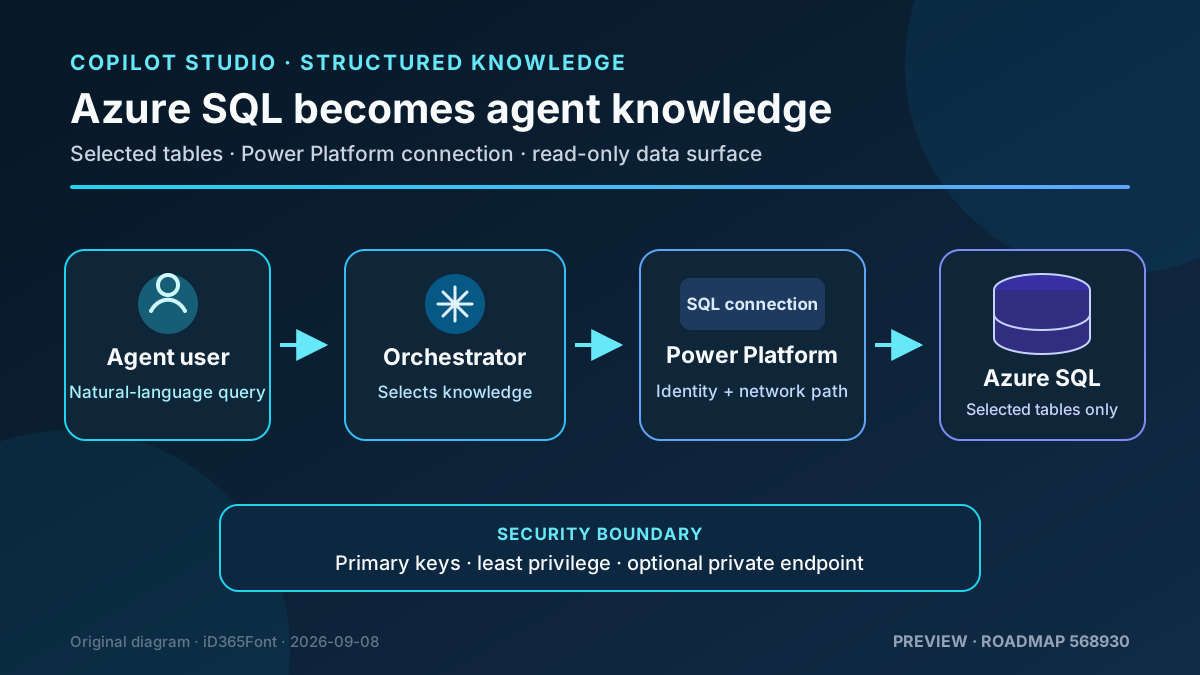
Original diagram. The private route is optional and requires Power Platform VNet support; the configured connection and its SQL permissions define the maximum data boundary.
Runtime architecture
The confirmed flow has five parts:
- A user asks the published agent a question.
- The orchestrator uses the source name and description to decide whether Azure SQL is relevant.
- Copilot Studio reaches the selected tables through a Power Platform SQL connection.
- Azure SQL authorises reads according to the permissions associated with that connection path.
- The agent composes an answer grounded in the available results.
Microsoft states both that runtime relies on the agent user’s Microsoft authentication and that users only receive answers based on data the maker can access through the configured connection. That wording does not by itself prove that the end user’s identity is passed through to Azure SQL or that Row-Level Security is evaluated as that user.
The safe rule is to design the connection as the maximum data boundary and validate actual tenant behaviour before relying on per-user security. Never treat prompts or agent instructions as an access-control mechanism.
Requirements and availability
You need:
- an Azure SQL Database or Azure SQL Managed Instance reachable from Power Platform;
- credentials that can connect, enumerate, and read the selected tables;
- Copilot Studio access and permission to edit the agent;
- connectivity through firewall rules or a supported private route;
- tables with primary keys and understandable table and column names.
The UI might show Azure SQL or SQL Server, depending on the environment. The guide also mentions SQL Server when preparing tables, but its prerequisites name Azure SQL Database and Managed Instance. Do not assume that on-premises SQL Server follows the same path without explicitly verifying it in the tenant.
The SQL Server connector is classified as Premium in Copilot Studio. The feature page publishes no separate price per table or query. For agents built on the GitHub Copilot harness, knowledge usage contributes to Copilot Credit consumption; size and measure the real scenario rather than assuming a fixed cost per conversation.
Prepare a secure data surface
Do not automatically connect complete operational tables. Create a dedicated read surface containing only the rows and columns the agent needs. Because the feature requires a primary key and SQL views do not expose a declared primary key, a materialised serving table is usually a better fit than a conventional view.
A simple pattern is an agent_knowledge schema populated through ETL, Fabric, Data Factory, or a controlled job:
CREATE SCHEMA agent_knowledge AUTHORIZATION dbo;
GO

CREATE TABLE agent_knowledge.OrderStatus (
    OrderId           nvarchar(30)  NOT NULL,
    CustomerName      nvarchar(160) NOT NULL,
    OrderDate         date          NOT NULL,
    StatusDescription nvarchar(80)  NOT NULL,
    TotalAmount       decimal(18,2) NOT NULL,
    CurrencyCode      char(3)       NOT NULL,
    LastUpdatedUtc    datetime2(0)  NOT NULL,
    CONSTRAINT PK_agent_knowledge_OrderStatus PRIMARY KEY (OrderId)
);
GO

CREATE ROLE copilot_knowledge_reader;
GRANT SELECT ON SCHEMA::agent_knowledge TO copilot_knowledge_reader;
GO

-- Replace the name with the database principal used by the connection.
ALTER ROLE copilot_knowledge_reader ADD MEMBER [copilot-sql-reader];
GO
This design provides four controls:
- a stable key for identifying each row;
- names the orchestrator can interpret;
- no unnecessary sensitive fields;
- a principal with
SELECTlimited to the knowledge schema.
Avoid granting db_datareader across the whole database when a schema grant is enough. Document the refresh latency too: the agent cannot know about data newer than its SQL serving surface.
Step-by-step configuration
1. Verify the connection outside the agent
Using the same identity or credential intended for the connection:
- Confirm that the server and database are reachable.
- Enumerate tables in the permitted schema.
- Run a
SELECTagainst a diagnostic table containing a small known dataset. - Confirm that other schemas cannot be read and that writes fail.
If tables don’t appear in Copilot Studio, Microsoft recommends first validating the connection outside the product and checking permission to list and read those tables.
2. Add Azure SQL as knowledge
- Open the agent in Copilot Studio.
- Go to Build.
- Select Knowledge in the components panel.
- Choose Add knowledge, then Azure SQL or SQL Server.
- Create or select the connection.
- Enter the server, database, and approved authentication method.
- Search for and select only the required tables.
- Review the name and write a detailed description.
- Select Add to agent.
- Publish the agent and test the published channel.
A useful description sets both positive and negative boundaries:
Contoso order status in Azure SQL. Use this source for order number, date,
customer, amount, currency, and operational status. Data refreshes every
15 minutes. Do not use it for inventory on hand, payments, banking data,
or carrier tracking.
The description participates in orchestration. “SQL database” provides too little semantic information.
3. Choose the network path
With a public endpoint, restrict firewall access to the minimum compatible with Power Platform and avoid broad rules for convenience. For a database exposed only through a private endpoint, Microsoft documents a route through Power Platform Virtual Network support.
That option requires:
- a Managed Environment;
- VNet support enabled for the Power Platform environment;
- Power Platform tenant admin or Environment Admin role to configure it;
- a connector with native VNet support, such as SQL Server.
The SQL connector has VNet-specific limitations. For example, an on-premises gateway isn’t supported on that route and, with Microsoft Entra ID Integrated authentication, the database must be entered manually as a custom value.
Security and governance
Identity
- Prefer a dedicated identity over a maker’s personal account.
- Grant read-only access to approved schemas or tables.
- Rotate secrets and test connection health after every change.
- Entra guest users aren’t supported for the SQL connector’s Entra connections; validate alternatives before designing B2B access.
Data
- Materialise only attributes required to answer the intended questions.
- Exclude secrets, personal identifiers, and highly sensitive columns unless explicitly justified.
- Enforce in SQL every boundary that must hold even if the agent ignores an instruction.
- Record the owner, purpose, refresh frequency, and retention period for every exposed table.
Power Platform
Connections are saved credentials in the environment. Review Power Platform data policies: blocking a connector can affect both design time and runtime and can disable the connection. Put SQL in the appropriate business-data group and separate connectors that must not be combined with it.
Minimum test plan
| Test | Expected result |
|---|---|
| Known question against the diagnostic table | Returns the exact values |
| Out-of-domain question | Doesn’t choose Azure SQL or states the source doesn’t apply |
| Question about a column that isn’t exposed | Doesn’t disclose or infer the value |
| User with a different profile | Matches the authorisation behaviour validated in the tenant |
| Expired or revoked credential | Fails visibly and can be monitored |
| Large table or aggregate question | Meets the accepted latency and accuracy threshold |
| Schema change | Is detected in DEV before production promotion |
Compare every response with SQL executed against the same snapshot. For financial or regulated figures, a plausible answer isn’t enough: validate totals, currency, dates, and filters.
Limitations that should remain visible
- The roadmap remains “In development”; the GA date is an estimate, not confirmation.
- The documentation doesn’t promise simultaneous rollout to every tenant.
- Every table needs a primary key; legacy models might need a serving layer.
- Adding irrelevant tables degrades source selection and answer quality.
- The published general limit is 500 knowledge sources per agent, but that isn’t a design target.
- SQL connector navigation is limited to 10,000 tables.
- Microsoft doesn’t document an Azure SQL knowledge latency SLA, specific row limits, or complete per-user authorisation semantics in this guide.
- SQL action limits, such as action timeouts and throttling, shouldn’t automatically be applied to knowledge without testing; Microsoft doesn’t describe the internal implementation at that level.
Practical recommendation
Start with one domain, one small materialised table, and one read-only identity. Define valid and invalid questions, measure accuracy and consumption, and test two user profiles before widening scope.
The value of Azure SQL knowledge isn’t giving an LLM access to the corporate database. It is creating a deliberate, readable, governed SQL surface that the orchestrator can safely select. If the team cannot state exactly what a table exposes, it isn’t ready for an agent.
References
- Add Azure SQL tables as a knowledge source
- Microsoft 365 Roadmap ID 568930
- SQL Server connector reference
- Configure Virtual Network support for outbound connections from agents
- Power Platform data policies
- Copilot Studio quotas and limits
- Billing overview for agents powered by the GitHub Copilot harness