🧩 Copilot Studio now generates apps on Managed Runtime
🧩 Copilot Studio now generates apps on Managed Runtime
Copilot Studio is no longer limited to agents and workflows. The new Apps in Copilot Studio experience lets makers describe a requirement in natural language and generate a functional web application with a user interface, data model, and logic. Makers can test it in an interactive preview, iterate through conversation, publish it, and share it.
The important change sits below the authoring surface: this is not a conventional canvas app. It runs on Microsoft Copilot Managed Runtime, the same managed runtime used by apps created from Copilot Cowork or through the new SDK and CLI. It inherits Microsoft Entra authentication, corporate policy, centralized inventory, approved connectors, and distribution controls.
As of September 27, 2026, this entire surface is in preview, is rolling out gradually, and isn’t intended for production. Microsoft updated the main documentation on September 26. Documentation availability must not be confused with availability in every tenant.
What actually changes
Until now, the new Copilot Studio experience had two main artifacts: agents and workflows. It now adds a third class:
| Artifact | Result | Primary runtime | Interaction |
|---|---|---|---|
| Agent | Conversational experience and tools | GitHub Copilot harness | Conversation and actions |
| Workflow | Executable automation | GitHub Copilot harness | Event or invocation |
| App | Web app with UI, data, and logic | Copilot Managed Runtime | Forms, views, actions, and navigation |
A generated app can contain screens, forms, fields, tables, views, filters, actions, and sample data. The platform keeps interface, logic, and data model synchronized when the maker requests changes. Generated files can also be inspected, although the current code view is read-only.
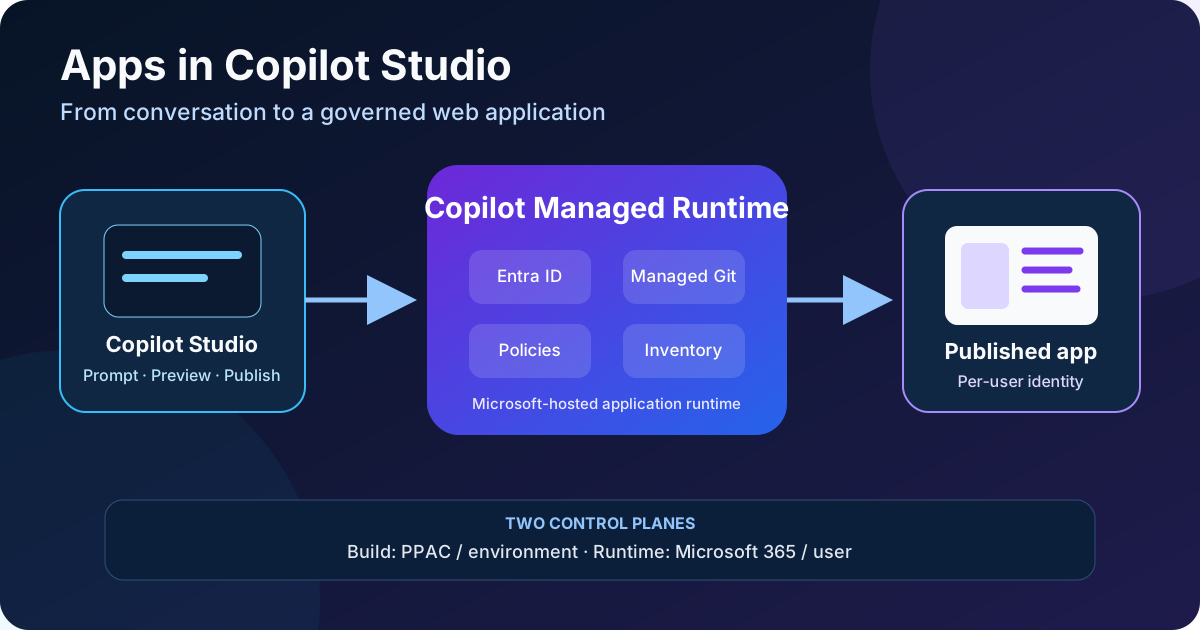
Original diagram. Build is governed and billed through Power Platform; runtime and distribution converge in Copilot Managed Runtime and Microsoft 365.
Architecture: three paths, one artifact
Microsoft documents three entry points into Managed Runtime:
- Copilot Studio, for makers who want conversational authoring, preview, publish, and share in one surface.
- Copilot Cowork, for business users and currently tied to the Frontier program.
- SDK and CLI, for developers working with
@microsoft/managed-apps, themscommand, and coding agents.
All three create the same type of managed app. At runtime:
- the user opens the app from
https://managedapps.cloud.microsoftor its published URL; - Microsoft Entra authenticates the user;
- Copilot Managed Runtime loads the published artifact on Microsoft-hosted infrastructure;
- tenant and environment policies filter connections, distribution, and access;
- each connector uses the user’s identity, not shared maker credentials;
- the admin sees inventory, usage, health, and lifecycle in the Microsoft 365 admin center.
The runtime also provides a managed Git repository for source control and collaboration. From Copilot Studio, however, the maker doesn’t directly edit those files: changes are requested from the agent and the generated result is reviewed.
Availability and requirements
The preview is rolling out gradually. To verify that a tenant is enabled:
- turn on New experience on the Copilot Studio home page;
- confirm that the App (Preview) tile or Apps (Preview) navigation item appears;
- verify that the administrator hasn’t disabled app creation;
- allocate Copilot Credits and a spending policy to the build environment;
- review routing of the maker to a personal developer environment.
Creation from Copilot Studio is on by default for eligible users. Global Administrator and Power Platform Administrator roles can manage it; Global Reader, AI Administrator, and AI Reader roles are read-only.
The documented tenant setting is powerPlatform.powerApps.enableManagedAppsMcsPreview. It isn’t Boolean; it accepts string values. For example, to apply the public-preview default:
$tenantSettings = Get-TenantSettings
$tenantSettings.powerPlatform.powerApps.enableManagedAppsMcsPreview = "DefaultOn"
Set-TenantSettings -RequestBody $tenantSettings
Don’t automate this change without validating the value and module version in a test tenant. Microsoft also supports scoping app creation to a security group through PowerShell or API.
The less visible effect: automatic environment routing
All tenants have Copilot Managed Runtime routing enabled, and it can’t be disabled. Its behavior depends on existing configuration:
| Tenant state | Confirmed result |
|---|---|
| No routing rules exist | An Everyone rule and default environment group are created |
| Rules already exist | Only makers included in their security groups can create these apps |
| Personal environment created for Managed Runtime | It is a Managed Environment and initially has no Dataverse database |
| Maker is also routed from Power Apps, Power Automate, or Copilot Studio | Dataverse can be added automatically and Premium requirements might apply |
The personal environment is an isolated maker sandbox. It isn’t production or an automatic ALM strategy. Before enabling the preview broadly, inventory the environments it can generate, the environment group they inherit, ownership when a maker leaves, and how approved applications will be promoted.
How to build an app
1. Define the functional contract
A request such as “build an issue app” delegates too many decisions to the model. Specify:
- users and roles;
- entities, fields, and relationships;
- actions and business rules;
- data source and persistence;
- states and transitions;
- validation and error messages;
- accessibility requirements;
- prohibited operations.
Break complex applications into verifiable increments. Microsoft warns that multiple roles, conditional paths, integrations, and specialized rules need more iteration.
2. Generate the first draft
- Open Copilot Studio and enable New experience.
- Select App or Apps (Preview) → New app.
- Describe the problem and attach documents, spreadsheets, images, or screenshots when they provide context.
- Answer the clarification questions.
- Wait for the interactive preview.
- Walk through the main cases before requesting further changes.
Attachments used as authoring context don’t automatically become live connections. An attached Excel workbook can help infer fields, but it doesn’t guarantee continuous synchronization with the file.
3. Refine without directly editing code
The maker can:
- request changes through chat;
- attach a file or screenshot;
- annotate a specific area of the canvas;
- review the result in preview;
- switch between preview and code view.
Code view is read-only. This limits manual corrections and requires the maker to express changes to the agent. If customization requires professional code control, evaluate the Managed Runtime SDK/CLI instead of forcing the maker path.
Choose persistence deliberately
Copilot Studio offers options that can look equivalent in the UI but aren’t:
| Option | Persistence | Appropriate use | Main risk |
|---|---|---|---|
| Sample data | Can reset or regenerate | Visual design and testing | Mistaking demo data for business records |
| Browser-local | Browser profile and device | Self-contained personal utilities | No governance or multiuser access |
| SharePoint | Shared organizational list | Simple team trackers and records | Limited relational model and permissions |
| Dataverse | Existing environment tables | Structured data, relationships, and granular security | Licensing, capacity, and ALM |
| Excel, SQL, or another table | Allowed environment connector | Reuse an existing source | Consent, delegation, and connector limits |
In preview, Copilot Studio can connect to existing Dataverse tables, but creating new tables isn’t supported in every rollout version. Creating a new SharePoint site isn’t available in every tenant either.
Before publishing, open Data and Connections and verify the actual source. Refreshing preview doesn’t prove persistence: sample data can be embedded in the artifact, while browser-local data can survive refresh without being shared.
Identity, connections, and security
Every user authenticates with Microsoft Entra and opens their own connections. Maker credentials aren’t shared. Therefore:
- two users can see different results;
- sharing the app doesn’t grant access to the underlying table, list, or file;
- first use can require consent;
- an operation fails when the user lacks permission;
- Conditional Access, DLP, advanced connector policies, sharing limits, and data restrictions apply automatically.
The app can use a subset of the connector catalog. A connection might be absent because policy blocks it, it isn’t available in the environment, the user lacks permission, or a required license is missing.
Minimum recommendations:
- test with an account equivalent to the end user, not only the maker;
- apply least privilege at every data source;
- review DLP and connector classification;
- clearly separate sample and real data;
- validate inputs, calculations, and destructive operations;
- test accessibility, keyboard navigation, and error messages;
- register owner, purpose, authorized users, and review date.
Publishing isn’t sharing
Copilot Studio separates the two operations:
- Publish creates a stable version for its recipients. Later changes aren’t visible until another publish.
- Share grants people or groups permission to open it, subject to environment policy. It doesn’t grant design editing or access to underlying data.
The safe flow is:
- validate build, connections, policy, and required settings;
- test the published URL;
- share with a pilot security group;
- verify consent and data access with representative users;
- expand only after reviewing telemetry, errors, and cost.
Billing: build by environment, runtime by user
Apps use the GitHub Copilot harness, so authoring, chat, generation, preview, and testing can consume Copilot Credits before publication.
The administrative split matters:
| Phase | Billing model | Control plane |
|---|---|---|
| Build in Copilot Studio | Copilot Credits by environment | Power Platform admin center |
| App runtime | Copilot Credits and policy by user | Microsoft 365 admin center |
The environment-based model used for Copilot Studio agent runtime doesn’t apply to app runtime.
Microsoft documents one exception: with Power Apps Premium, running an app doesn’t consume Copilot Credits unless it uses separately billed services such as Work IQ APIs or exceeds applicable Power Apps Premium API request limits. This exception doesn’t cover build usage.
During preview, an uncovered user first receives a warning. Access is blocked after 20 app operations or five minutes of use, whichever occurs first. Configure runtime policy before the pilot; this warning isn’t a sustainable licensing model.
Limitations and open questions
Confirmed preview facts include:
- rollout is gradual;
- generated code is read-only in Copilot Studio;
- layouts, calculations, fields, actions, or sample data can be incomplete or incorrect;
- connectors and operations vary by tenant, environment, policy, and license;
- creating Dataverse tables or SharePoint sites isn’t available in every rollout;
- results can vary across languages and cultural contexts;
- preview capabilities, limits, connections, and deployment options can change before GA.
These pages don’t yet document an end-to-end promotion, versioning, backup, or recovery process from the Copilot Studio surface. Managed Runtime provides Git and lifecycle administration, but this must not be assumed equivalent to Power Platform solutions ALM. Keep regulated or critical scenarios out of production until a supported and tested path exists.
Pilot checklist
- Create a small security group for makers.
- Review environment routing rules and the resulting environment group.
- Allocate a build budget and Copilot Credits to the environment.
- Define per-user runtime policy and limits.
- Start with sample data and no sensitive information.
- Replace it with an explicit governed source.
- Test with high- and low-privilege users.
- Verify DLP, Conditional Access, consent, and source permissions.
- Validate calculations, errors, accessibility, and destructive actions.
- Publish and share only with the pilot group.
- Check inventory, owner, health, and consumption in Microsoft 365 admin center.
- Document a manual exit plan if the preview changes or is withdrawn.
Official sources
- Apps overview in Microsoft Copilot Studio
- Create an app in Copilot Studio
- Manage data in your app
- Publish and share an app
- FAQ for apps in Copilot Studio
- What is Copilot Managed Runtime
- Copilot Managed Runtime overview for admins
- Environment routing for Copilot Managed Runtime
- Usage-based billing for the GitHub Copilot harness